

JavaScript Benchmarking IV: JSON Revisited 
September 29th, 2005
My last post [1] about JSON had a helpful comment from Michael Mahemoff, the driving force behind the great AJaX Patterns site (I recommend taking a quick gander at the comments/responses from/to Michael and Dean who are both very knowledgeable in the AJaX realm).
Experimental: Comparing Processing Time of JSON and XML
Michael had commented that there was a JavaScript based JSON parser that is an alternative to using the native JavaScript
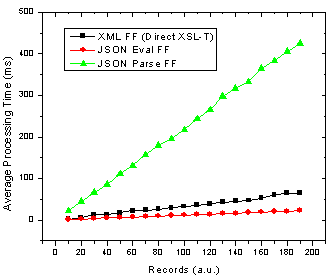
Figure 1. JSON parse and eval() as well as XML transformation processing time with number of records in Firefox.
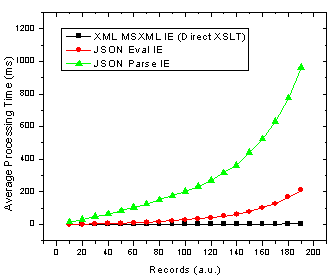
Figure 2. JSON parse and eval() as well as XML transformation processing time with number of records in Internet Explorer.
Ok so it’s pretty clear that the JSON parser is by far the slowest option in both browsers! The result that muddies the water is that in Firefox using JSON with the
Analysis: Implications of Varying DataSet Size
Now, to make it crystal clear that I am not simply saying that one method is better than another I will look at what this means for choosing the proper technology. If you look at browser usage stats from say W3Schools, then we can determine the best solution depending on the expected number of records you are going to be sending to the browser and inserting into HTML. To do this I divide each set of data by the browser usage share and then add the JSON Firefox + JSON Internet Explorer processing times and do the same for the XML data. This then gives the expected average processing time given the expected number of people using each browser. The results are below.
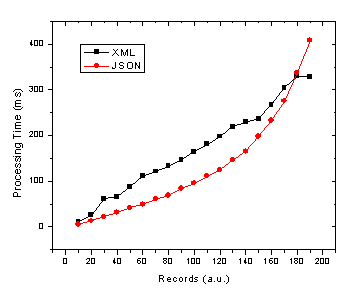
Figure 3. JSON and XML average processing time against record number given 72% and 20% market share of Internet Explorer and Firefox/Mozilla respectively.
Due to the apparent x^2 / exponential dependence of JavaScript / JSON processing time on the number of records in IE (see Fig. 2) it is no wonder that as we move to more records the JSON total average processing time increases in the same manner. Therefore, the JSON processing time crosses the more linear processing time for XML at somewhere in the neighbourhood of 180 records. Of course this exact cross-over point will change depending on several factors such as:
- end user browser usage for your application
- end user browser intensity (maybe either IE or FF users will actually use the application more often due to different roles etc)
- end user computer performance
- object/data complexity (nested objects)
- object/data operations (sorting, merging, selecting etc)
- output HTML complexity
Keep in mind that this will all could all change with the upcoming versions of Internet Explorer and Firefox in terms of the speed of their respective JavaScript and XSL-T processors. Still there are also other slightly less quantitative reasons for using XML [1,3] or JSON.
References
[1] JSON and the Golden Fleece - Dave Johnson, Sept 22, 2005
[2] JavaScript Benchmarking - Part I - Dave Johnson, July 10, 2005
[3] JSON vs XML - Jep Castelein, Sept 22 2005
 Del.icio.us
This entry was posted on Thursday, September 29th, 2005 at 11:54 am and is filed under Web2.0, AJAX, JavaScript, XML, XSLT. You can follow any responses to this entry through the RSS 2.0 feed. You can leave a response, or trackback from your own site.
 Entries (RSS)
and
Entries (RSS)
and
February 20th, 2005 at 8:55 am
Another alternate to using the parse method would be to insert an i-frame element and use document.write to push the JSON object into that DOM.
Then just grab it by it�s name and set the parent window object equal to it. I�ve been dynamically rendering IFRAMES and posting them to the server to perform �AJAX transactions� rather than using XML at all. The resulting JSON object is already serialized into the browser on reply and ready for use.
In fact I�ve created a JavaScript DataBinding Object, then use JSON objects for data sent between the server & client. I�ll use a hidden div field to hold my html templates then i just map the control id�s etc for dynamic output. I guess the benefit in doing this is (I use .Net) I can continue to build my markup using server controls and then F-Wit-Em when I need to on the client side. This also allows my interface to serialize back into my server object if need be.
Further I�ve read in several places that any XML processing not done using XML/XSLT will be very slow in every browser. It�s the built in XSLT processor which results in the performance advantage. Thought that may interest you.
(Also C++ supplort �Object Notation� so it�s really handy to process quick on the server!).
Very Very Sweet Article!
Matt
September 29th, 2005 at 5:19 am
Dave, thanks for taking the comments on and benchmarking the parser. As for the performance, ouch! Somewhat surprising, but I guess it shows the JS parser is more optimised. As we both pointed out, the parser was primarily created for security, so I expect one could optimise it. Worth noting that the reverse JSON operation, stringify(), has apparently been optimised, though no hard numbers there.
The numbers ought to make anyone think twice, especially if they do actually need the secure version for large transfers.
October 14th, 2005 at 5:14 am
Hi Vinod, I am trying to organize posting the scripts - just a little busy
In my earlier posts I was specifically looking at the string concatenation time to build a table versus the XSL-T method. In those cases the concatenations are done using the string array push then join method - which was deemed the fastest method on Quirksmode: http://www.quirksmode.org/dom/innerhtml.html
In the experiments posted here I dynamically concatenate a large string of JSON depending on the number of records that I am using and then time only the code that says eval(JSONString) so I am careful to test as close to the source as possible.
By doing DOM calls instead of XSL-T you are thinking that the XML is HTML ready I suppose? This could certainly be faster in some situations.
October 14th, 2005 at 6:17 am
Dave, the performance findings are very interesting. Have you posted the details of the pages you used to gather these timings? I�m curious what type of strings concatenations are being done in the non XSLT-approach and whether this is the real source of the large discrepancy. Also, if you opt not to use XSLT, but rather various DOM calls to extract data from XML�curious how the performance compares.
November 4th, 2005 at 12:45 pm
Hi
I did like your blog postings and comments but i have soem problem if some1 could help me out.
Does anyone know how to pass html table data from parent to a child form html table ? Or may be you could let me know any URL related to this topic.
Any kind of help is highly appericiated.
Thanks
Imran Hashmi
http://www.visionstudio.co.uk
December 19th, 2005 at 4:13 am
Please post the scripts, are you sure you�re comparing apples and oranges, it appears you�re only comparing parsing time, not parsing time+access of resulting content time, the overhead of XML is in the COM calls to MSXML once the data is parsed, not within the parse itself.
Using XSLT to overcome this is frankly irrelevant, there simply aren�t enough xslt engines available to make it relevant.
December 19th, 2005 at 10:19 am
yes Jim I am comparing apples and apples � it wouldn�t be that useful otherwise
what I am comparing is the time it takes to go from a string of XML or JSON retrieved using an XMLHTTPRequest object to an HTML snippit that is ready to be inserted into a web page using innerHTML.
I am pretty sure that XSLT is not �irrelevant� - if it is good enough for Google Maps then its good enough for me.
I will have the code up tomorrow.
February 20th, 2006 at 12:05 pm
Hey Matt, I have also looked at injecting the JSON as a script tag which is IMHO one of the best ways of instantiating the JSON object.
You are absolutely right that accessing XML nodes through the DOM is damn slow - I try to never do that. However, I am playing with something that automatically wraps an XML structure as a JS object, which I am tentatively calling JSON for XML (J4X). I will post about that soon with some more benchmarking results and the benchmarking code.
February 23rd, 2006 at 3:35 am
I have found that when using XML DOM it is best to use a single call to selectNodes and looping through the nodeList instead of looping through the DOM. Of course this requires that the data be in a consistent format (no missing elements). However, it provides an excellent performance boost. Another thing that I would like to point out reguarding the exponential time growth in Internet Explorer is that it is caused by the js garbage collector. Object creation in Internet Explorer causes exponential time growth. Creating objects in IE triggers the garbage collector after a certain count has been reached. This threshold is different for the different intrinsic �objects� with string having the highest threshold and objects being one of the worst. I have found that creating objects as new arrays and overloading them provides a decent performance increase. However, it is unlikely that anything in js will be able to outperform or perform as well as native XSLT.
May 6th, 2006 at 4:45 pm
premature optimization is the root of all evil (in programming anyways)
- some famous computer guy
August 3rd, 2006 at 4:16 pm
[…] I don’t do much work with AJAX and XML, but client side XSLT can be a good solution if you need to move lots of data since it tends to scale better to extremly large datasets (especially in IE). […]