This time around we left the major Complete UI release in Beta for a month to give us a bit more time to work out all the quirks with our major new feature - Complete UI Dreamweaver Extensions. Now you can go from a database to an Ajax application in minutes using the awesome Dreamweaver Extensions that allow you drag and drop Nitobi components into your web page and have server CRUD (ASP, PHP, JSP, CFM) generated according to the database that you are connecting to!
Also if you are at Adobe MAX in Chicago ping Andre or Alexei who are there representing Nitobi and presented an Inspire session today about AIR and Ajax!
About a week ago Scott G over a MS blogged about the pre-alpha release of IronRuby. Very cool stuff.
For those that don’t know, IronRuby and friends (IronPython, JavaScript, Dynamic VB) is a project that is, like JRuby for Java, enabling Ruby to run on top of the .NET Framework. This means that your dynamic Ruby script can also have access to all the underlying .NET goodness (and badness). It will be very interesting to see how the performance is.
It is also really cool that they are doing Python and JavaScript as well. It’s like Phobos and JRuby all in one neat little package with a dash of python for good measure. Oh have I forgotten one of the languages? I can’t help but laugh when I see Dynamic VB.
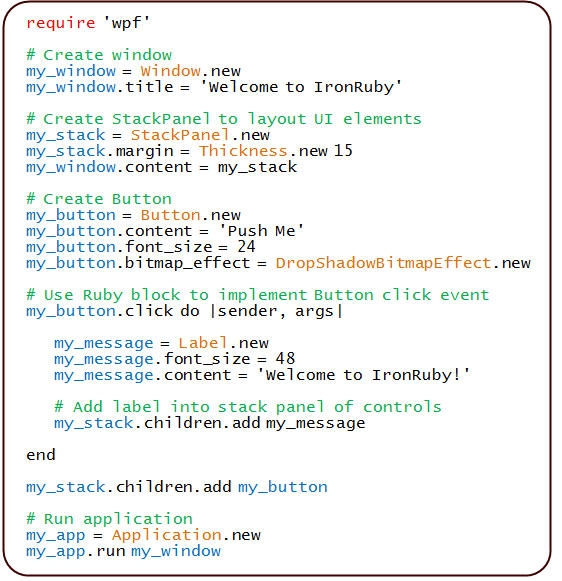
Here is a code snippet from Scott’s post with some Ruby script using WPF - pretty cool stuff!
This is some code that I wrote about a year ago at the Flex Component Developers Summit (and more recently presented at XTech) to show how declarative Ajax and Flex can work together to create dynamic, rich and compelling Internet applications.
The idea is simple. Take a single declaration - in this case XHTML - of some user-interface component and then use it to build a UI using either Ajax or Flex. All this from just one declaration.
What happens is that we take a single declarative data grid and converts it using XSLT on the client (so it only works Firefox, IE and soon Safari) into a declarative Nitobi Ajax Grid and to a Flex declarative MXML DataGrid. I use the FABridge to get the string of MXML generated from the XSL transformation into a stub Flex application where a Flex DataGrid is instantiated (deserialized) from the MXML declaration. It can an be seen live here (note: create the Flex grid first then the Ajax one - something funny that I can’t be bothered to fix ) and the code can be downloaded from here.
So by using a declarative approach and a little XSLT on the client we were able to quickly choose between using a Flex DataGrid or a Nitobi Ajax Grid to display our tabular data in!
Really the most interesting part is the MXML deserialization stuff. The only contents of the Flex application are two functions for performing the deserialization. I have listed the main part of the code that takes an XML document of an MXML DataGrid declaration and actually instantiates a DataGrid according to that declaration. It’s pretty quick and dirty but at least gets the right thing out! Essentially it just looks at each XML element and creates an Object out of it and sets all the properties on it from the XML element attributes and then recurses through the child elements doing the same. There are some special attributes though like datasources that need a little more care.
public function initGrid(html) {
// setup a tagname to datatype hash - maybe this already exists somewhere
controls['DataGrid'] = 'mx.controls.DataGrid';
controls['ArrayCollection'] = 'mx.collections.ArrayCollection';
controls['Object'] = 'Object';
controls['columns'] = 'Array';
controls['DataGridColumn'] = 'mx.controls.dataGridClasses.DataGridColumn';
// load the HTML into XML DOM
var mxml:XML = new XML('<root>'+html+'</root>');
parseXml(AjaxBox, mxml);
}
public function parseXml(parent, mxml) {
var item:String;
// get all the elements in our XML doc - this should of course walk the xml tree recursively
var itemList:XMLList = mxml.elements('*');
for (item in itemList) {
// get the tag name of the XML node
var tagName:String = itemList[item].localName();
// get the class by using getDefinitionByName() method
var ClassReference:Class = Class(getDefinitionByName(controls[tagName]));
// create an instance of the class
var myObject:Object = new ClassReference();
// get all the attributes and set the properties
var attrList:XMLList = XML(itemList[item]).attributes();
for (var attr:String in attrList) {
myObject[attrList[attr].localName()] = attrList[attr].toString();
}
// now parse the children of this node
parseXml(myObject, itemList[item]);
if (parent.hasOwnProperty(tagName)) {
parent[tagName] = myObject;
} else if (parent.hasOwnProperty("length")) {
if (parent.hasOwnProperty("source")) {
parent.source.push(myObject);
} else {
parent.push(myObject);
}
} else if (parent.hasOwnProperty("dataProvider") && tagName == "ArrayCollection") {
// This means we need to create a datasource for the Grid
parent.dataProvider = myObject;
} else {
parent.addChild(DisplayObject(myObject));
}
}
}
With the release of Safari 3 Beta and the recent renaming and Beta release of AIR (formerly Apollo) from Adobe, we have started to work on getting our components running in both of them.
We have run across a few problems - the biggest of which is the lack of any decent debugging tools for either one. I am sure that this will soon change. Currently the best thing around for debugging is Scout.
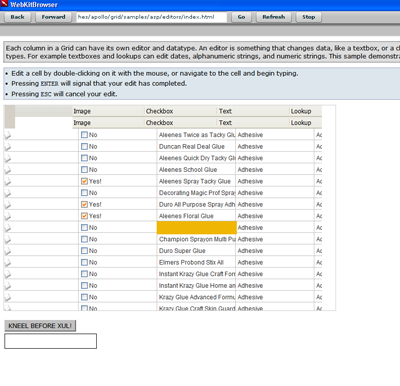
Grid is being a bit of a challenge given that there is no XSLT support in AIR - though there is in Safari 3. Jake and I got it almost working with a day or so of work / screaming at our computers. Here is a screenshot of what we got so far:
We are pretty happy with the progress and the fact that no one has been hurt - yet
There a few known problems in AIR currently such as CSS opacity not working, table width=0px with colgroups does not work and a few other small things like that. We are certainly happy that Safari 3 and AIR both support addRule and insertRule for working with CSS while a little disappointed in no XSLT support in AIR yet good support in Safari 3.
I posted some of our initial JSP taglib support for the Nitobi Complete UI and yesterday we posted some more good stuff!
Mike has been hard at work making a plugin for Eclipse WTP so that you can drag and drop your Nitobi components in the Eclipse IDE. He has also put together a plugin for Stuts 2. And for those that just want plain old JSP support he has also updated the JSP taglib. Go check out Mike’s post for the details of just download it below and give it a go!
We are pretty big fans of the declarative approach to Ajax. Our up and coming Complete UI Ajax component product line is firmly based around declarative programming. The idea behind this is that the developer can use HTML like markup to define the majority of the component functionality while still being able to write a little bit of JavaScript to get the extra 20% of custom functionality that they need.
As an example of this I have put together a declarative Google Map. Currently it only supports a few declarative tags but it at least serves to give you an idea of how a regular JavaScript component could be wrapped declaratively. It could also be simplified quite a bit by building a JavaScript component from the ground up with declarative programming in mind - as the Nitobi framework enables of course
If you went about putting a Google Map into a web page imperatively, it would look something like this:
var map = new GMap2(document.getElementById("map"));
map.setCenter(new GLatLng(49.290327, -123.11348), 12);
var polyline = new GPolyline([
new GLatLng(49.265788, -123.069877),
new GLatLng(49.276988, -123.069534),
new GLatLng(49.276988, -123.099746),
new GLatLng(49.278108, -123.112106),
new GLatLng(49.2949043, -123.136825),
new GLatLng(49.3029641, -123.145065)
], "#ff0000", 10);
map.addOverlay(polyline);
The result of this is a nice Google Map that shows part of my daily bike ride to work. If you view the source of the web page you will see just that same code.
On the other hand, we could make that same web page declaratively meaning that we don’t have any extra JavaScript code to write but instead define our Google Map through custom HTML markup. This has the advantage, on top of the many advantages (and disadvantages) of declarative programming in general, that most web developers are familiar with HTML markup though might not be as comfortable with writing JavaScript code. So the equivalent declarative Google Map might look like this:
All the same elements are there as the imperative JavaScript version but there is no code to worry about. And, of course, the result is also the same. Here is a direct link to the source code - the top 1/3 of the code is the only interesting stuff, the rest is just helper functions that poached from the Nitobi Ajax Toolkit.
Take a look at the source code if you are interested in the details. Btw it currently has only been tested in Firefox 1.5 and IE 6/7.
This will be some of what I talk about in my session at XTech.
We’ve had a number of customers request a JSP Taglib for our components and we can finally say here it is in all its fabulous glory - thanks to the great work of Mike. A nice thing with the taglib is you don’t have to worry about including the required javascript and stylesheet files, which I hope will be a boon for those using templates. The tag will automatically add the needed scripts and styles to your page (but you can use the toolkitjsurl, componentjsurl, and componentcssurl attributes to change where to find them). Plus, you don’t have to worry about forgetting the namespace declaration - shock horror! And of course, in Eclipse (and no doubt other IDEs) you get good ol’ code completion for free. Huzzah.
Like any other taglib, just put the jar file in your WEB-INF/lib and include it in your web.xml file, like so:
Suggestions are, of course, very welcome. So pipe up if you’ve got some in the comments below or on the forum! We’d love any sort of feedback about the taglib and more generally how you think we can improve our components for use in a Java EE environment.
Next in the pipeline is integration with Eclipse and Netbeans and we’ll also have some tutorials detailing how to use our components in Struts and Spring real soon.
So I finally got around to putting together some screencasts of all the components in the CompleteUI Ajax suite we released in March. These are not highly technical, they are meant to highlight the UI features that will benefit the end users so they’re applicable to both a developer and non-geek audience alike. The first one is an overview of all the components (~15min) the rest compiled to show individual components. Andre was even nice enough to edit them all together for me. They’re all at native resolution to make everything as clear as possible so it’ll be nice on a monitor bigger than 1024×768.
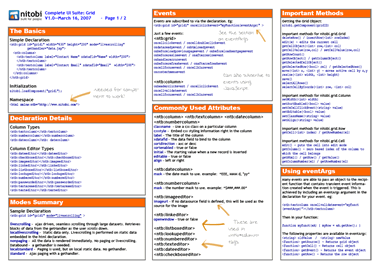
We have made up some short cheat sheets for the Complete UI components as well as the Nitobi Ajax Toolkit which comes free with Complete UI. You can check them out here and feel free to send in any feedback!
Just one or two more days now … we were shooting for Feb 28 but we decided to show a little more love to the docs to help get people up and running and quickly.
It should be cool though! What is even cooler are the new components we will be releasing in the next month or so - so stay tuned



 ) and the code can be downloaded from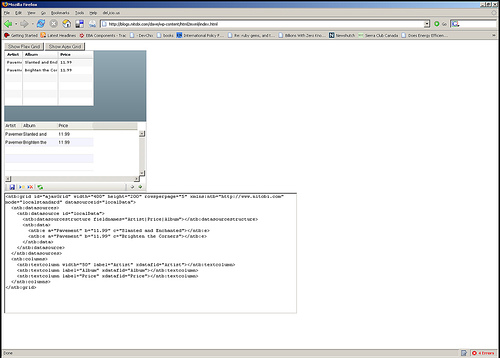

 Entries (RSS)
and
Entries (RSS)
and