Securing Ajax Mashups 
April 3rd, 2007
I just had a chance to read a good article from Brent Ashley over on IBM developerWorks about how to build secure Ajax mashups. He does a quick refresher on the Ajax and Mashup basics and then discusses current and future techniques for ensuring that your Mashup is a secure one.
Today we have little choice aside from including a cross domain JavaScript file in our web page like when making a Google Maps mashup that requires the Google JavaScript to be included in the page. For a secure mashup Brent suggests using the URL fragment identifier with hidden IFrames - this can be a good solution yet both sides of the IFrame need to agree on a protocol and it is limited to less than 256 bytes of data.
Brent also discusses the future solutions that are proposed from the JSONRequest object to the <module> HTML tag.
It will be interesting to see which proposal actually comes to fruition to enable more secure Ajax Mashups. I like the JSONRequest idea though I am still weary of such a proposal even if it doesn’t send cookies and only accepts valid JSON content. Since the proposal comes from Douglas Crockford I understand why it would be called JSONRequest but it would be pretty silly not to have it also accept XML IMHO - XML doesn’t even have any problems with being “exectuted” in the unsuspecting browser like JSON does. Otherwise, I am a big fan of the Flash approach with their cross-domain XML file that lives on the server and specifies to a Flash movie what domains it can load content from.
Posted in AJAX, Flash, JSON, security | 3 Comments »
Cross Domain AJAX with XML
February 10th, 2006
On a post I made a few days back I proposed a way to do cross domain AJaX using XML rather than the commonly used JSON. It is essentially an extension of the idea of JSONP (JSON with Padding). Since I generally find myself working with XML more often than JSON I decided to create the equivalent for XML based applications. I have not extensively tested it but did try it on IE6 and FF1.5 on Win2K server.
So here it is. The idea is that we pass an id, a context and a method as querystring parameters to a server script such as http://www.enterpriseajax.com/cross_domain_xml.asp?context=myObject&method=onXmlLoaded&id=1000 and we get back some JavaScript. That JavaScript can then be injected as a script tag in your web page.
This will then return JavaScript code that creates an XML document object and loads an XML string into it. Once the XML string is loaded into the object it then calls a callback method such as
myObject.onXmlLoaded()
and passes it the XML object that was created.
The id querystring parameter is used to uniquely identify each XML document that is requested, the conext is the object on which the callback is called and the method parameter is the name of the callback function.
The JavaScript returned from the pervious resource is this:
if (typeof(eba_ajax_xmlp) == "undefined"){
var eba_ajax_xmlp = {x: {}};
eba_ajax_xmlp.loadXml = function(s, uid){
if(document.implementation && document.implementation.createDocument) {
var objDOMParser = new DOMParser();
this.x[uid] = objDOMParser.parseFromString(s, “text/xml”);
} else if (window.ActiveXObject) {
this.x[uid] = new ActiveXObject(’MSXML2.DOMDocument.3.0′);
this.x[uid].async = false;
this.x[uid].loadXML(s);
}
}
}
eba_ajax_xmlp.loadXml(’This XML adata is from EnterpriseAjax.com‘, ‘1002′);
myObject.onXmlLoaded.call(myObject, eba_ajax_xmlp.x[’1002′]);
This is slightly different from the JSONP way of doing things but for the most part it’s the same sort of thing.
Try it out for your self with the sample page here - you should see an alert with contents of the loaded XML (just a root tag).
Note there is nothing on the Enterprise AJAX site but there will be soon 
Posted in AJAX, XML, Architecture, JSON | 12 Comments »
Injected JavaScript Object Notation (JSONP)
January 25th, 2006
I had a few comments on one of my previous posts from Brad Neuberg and Will (no link for him). Brad suggested using script injection rather than XHR + eval() to instantiate JavaScript objects as a way of getting around the poor performance that Will was having with his application (he was creating thousands of objects using eval(jsonString) and it was apparently grinding to a halt).
As a quick test I created a JavaScript file to inject into a web page using:
var s = document.getElementById(”s”);
s.src=”test.js”;
The script file contained an object declaration using the terse JSON type of format like:
var myObj = {"glossary": [
{”title”: “example glossary”,”GlossDiv”:
{”title”: “S”,”GlossList”: [
{”ID”: “SGML”,”SortAs”: “SGML”,”GlossTerm”: “Standard Generalized Markup Language”,”Acronym”: “SGML”,”Abbrev”: “ISO 8879:1986″,”GlossDef”: “A meta-markup language, used to create markup languages such as DocBook.”,”GlossSeeAlso”: [”GML”, “XML”, “markup”]
}]
}}
]}
(this is the sample found here)
I compared this with the bog standard:
var myObj = eval(jsonString);
I timed these two methods running on my localhost to avoid network effects on the timing for the injected script as much as possible and the eval() method had the same poor results as usual but the injected script was uber fast on IE 6. I have not checked Mozilla yet.
In the real world then one might want to have a resource such as http://server/customer/list?start=500&size=1000&var=myObj which would return records 500 to 1500 of your customer list but rather than pure JSON it would return it in a format that can be run as injected script and the result of this would be the instantiation of a variable called myObj (as specified in the querystring) that would refer to an array of those customers requested. Pretty simple and fast - the only drawback being that you are no longer returning purely data.
Posted in Web2.0, AJAX, XML, JSON | 2 Comments »
JSON Benchmarking: Beating a Dead Horse
December 21st, 2005
There has been a great discusson over at Quirksmode [1] about the best response format for your data and how to get it into your web application / page. I wish that I had the time to respond to each of the comments individually! It seems that PPK missed out on the option of using XSLT to transform your XML data to an HTML snippit. In the ensuing discussion there were only a few people mentioning XSLT and many of them just to say that it is moot! I have gone over the benefits of XSLT before but I don’t mind going through it once more Just so everyone knows, I am looking at the problem _primarily_ from the large client side dataset perspective but will highlight areas where JSON or HTML snippits are also useful. Furthermore, I will show recent results from JSON vs XSLT vs XML DOM in Firefox 1.5 on Windows 2000 and provide the benchmarking code so that everyone can try it themselves (this should be up shortly - just trying to make it readable).
As usual we need to take the “choose the right tool for the job” stance and try to be objective. There are many dimensions that tools may be evaluated on. To determine these dimensions let’s try and think about what our goals are. At the end of the day I want to see scaleable, useable, re-useable and high performance applications developed in as little time and for as little money as possible.
End-User Application Performance
In creating useable and high performance web applications (using AJAX of course) end-users will need to download a little bit of data up front to get the process going (and they will generally have to live with that) before using the application. While using the application there should be as little latency as possible when they edit or create data or interact with the page. To that end, users will likely need to be able to sort or filter large amounts of data in table and tree formats, they will need to be able to create, update and delete data that gets saved to the server and all this has to happen seemlessly. This, particularly the client side sorting and filtering of data, necessitates fast data manipulation on the client. So the first question is then what data format provides the best client side performance for the end-user.
HTML snippits are nice since they can be retieved from the server and inserted into your application instantly - very fast. But you have to ask if this achieves the performance results when you want to sort or filter that same data. You would either have to crawl through the HTML snippit and build some data structure or re-request the data from the server - if you have understanding users who don’t mind the wait or have the server resources and bandwidth of Google then maybe it will work for you. Furthermore, if you need fine grained access to various parts of the application based on the data then HTML snippits are not so great.
JSON can also be good. But as I will show shortly, and have before, it can be slow since the eval() function is slow and looping through your data creating bits of HTML for output is also slow. Sorting and filtering arrays of data in JavaScript can be done fairly easily and quickly (though you still have to loop through your data to create your output HTML) and I will show some benchmarks for this later too.
XML DOM is not great. You almost might as well be using JSON if you ask me. But it can have it’s place which will come up later.
XML + XSLT (XAXT) on the other hand is really quite fast in modern browsers and is a great choice for dealing with loads of data when you need things like conditional formatting and sorting abilities right on the client whithout any additional calls to the server.
System Complexity and Developement
On the other hand, we also have to consider how much more difficult it is to create an application that uses the various data formats as well as how extensible the system is for future development.
HTML snippits don’t really help anyone. They cannot really be used outside of the specific application that they are made for but when coupled with XSLT on the server can be useful.
JSON can be used between many different programming languages (not necessarily natively) and there are plenty of serializers available. Developers can work with JSON fairly easily in this way but it cannot be used with Web Services or SOA.
XML is the preferred data format for Web Services, many programming languages, and many developers. Java and C# have native support to serialize and de-serialize from XML. Importantly on the server, XML data can be typed, which is necessary for languages like Java and C#. Inside the enterprise, XML is the lingua franca and so interoperability and data re-use is maximized, particularly as Service Oriented Architecture begins to get more uptake. XSLT on the server is very fast and has the advantage that it can be used, like XML, in almost any porgamming language including JavaScript. Using XSLT with XML can have problems in some browsers but moving the transformations to ther server is one option, however, this entails more work for the developer.
Other factors
- The data format should also be considered due to bandwidth concerns that affects user-interface latency. Although many people say that XML is too bloated it can easily be encoded in many cases and becomes far more compact than JSON or HTML snippits.
- As I mentioned XML can be typed using Schemas, which can come in handy.
- Human readability of XML also has some advantages.
- JSON can be accessed across domains by dynamically creating script tags - this is handy for mash-ups.
- Standards - XML.
- Since XML is more widely used it is easier to find developers that know it in case you have some staff turnover.
- Finally, ECMAScript for XML (E4X) is a _very_ good reason to use XML [2]!
Business Cases
There are various business cases for AJAX and I see three areas that differentiate where one data format should be chosen over the other and these are: mash-ups or the public web (JSON can be good), B2B (XML), and internal corporate (XML or JSON). Let’s look at some of the particular cases:
- if you are building a service only to be consumed by your application in one instance then go ahead and use JSON or HTML (public web)
- if you need to update various different parts of an application / page based on the data then JSON is good or use XML DOM
- if you are building a service only to be consumed by JavaScript / AJAX applications then go ahead and use JSON or a server-side XML proxy (mash-up)
- if you are building a service to be consumed by various clients then you might want to use something that is standard like XML
- if you are building high performance AJAX applications then use XML and XSLT on the client to reduce server load and latency
- if your servers can handle it and you don’t need interaction with the data on the client (like sorting, filtering etc) then use the XSLT on the server and send HTML snippits to the browser
- if you are re-purposing your corporate data to be used in a highly interactive and low latency web based application then you had better use XML as your data message format and XSLT to process the data on the client without having to make calls back to the server - this way if the client does not support XSLT (and you don’t want to use the _very slow_ [3] Google XSLT engine) then you can always make requests back to the server to transform your data.
- if you want to have an easy time finding developers for your team then use XML
- if you want to be able to easily serialize and deserialize typed data on the server then use XML
- if you are developing a product to be used by “regular joe” type developers then XML can even be a stretch
I could go on and on …
Performance Benchmarks
For me, client side performance is one of the biggest reasons that one should stick with XML + XSLT (XAXT) rather than use JSON. I have done some more benchmarking on the recent release of Firefox 1.5 and it looks like the XSLT engine in FF has improved a bit (or JavaScript became worse).
The tests assume that I am retrieving some data from the server which is returned either as JSON or XML. In XML I can use the responseXML property of the XMLHTTPRequest object to get an XML object which can subsequently be transformed using a cached stylesheet to generate some HTML - I only time the actual transformation since the XSLT object is a singleton (ie loaded once globally at application start) and the responseXML property should have little effect different from the responseText property. Alternatively the JSON string can be accessed using the responseText property of the XMLHTTPRequest object. For JSON I measure the amount of time it takes to call the eval() function on the JSON string as well as the time it takes to build the output HTML snippit. So in both cases we start with the raw output (in either text or XML DOM) from the XMLHTTP and I measure the parts needed to get from there to a formatted HTML snippit.
Here is the code for the testJson function:
function testJson(records)
{
//build a test string of JSON text with given number of records
var json = buildJson(records);
var t = [];
for (var i=0; i<tests ; i++)
{
var startTime = new Date().getTime();
//eval the JSON string to instantiate it
var obj = eval(json);
//build the output HTML based on the JSON object
buildJsonHtml(obj);
t.push(new Date().getTime() - startTime);
}
done(’JSON EVAL’,records,t);
}
As for the XSLT test here it is below:
function testXml(records)
{
//build a test string of xml with given number of records
var sxml = buildXml(records);
//load the xml into an XML DOM object as we would get from XMLHTTPObj.responseXML
var xdoc = loadLocalXml(sxml, “4.0″);
//load the global XSLT
var xslt = loadXsl(sxsl, “4.0″, 0);
var t = [];
for (var i=0; i<tests ; i++)
{
var startTime = new Date().getTime();
//browser independent transformXml function
transformXml(xdoc, xslt, 0);
t.push(new Date().getTime() - startTime);
}
done(’XSLT’,records,t);
}
Now on to the results … the one difference from my previous tests is that I have also tried the XML DOM method as PPK suggested - the results were not that great.
For IE 6 nothing has changed of course, except that we can see using XML DOM is not that quick, however, I have not tried to optimise this code yet.
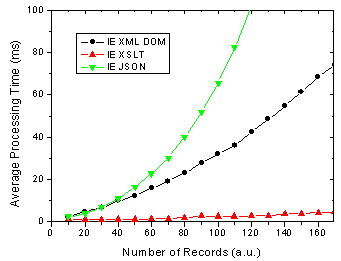
Figure 1. IE 6 results for JSON, XML DOM and XML + XSLT.
On the other hand, There are some changes for FF 1.5 in that the XSLT method is almost as fast as the JSON method. In previous versions of FF XSLT was considerably faster [4].
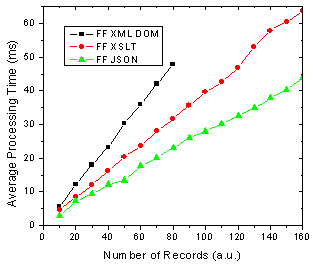
Figure 2. FF 1.5 results for JSON, XML DOM and XML + XSLT.
What does all this mean you ask? Well as before I am assuming that the end-users of my application are going to use FF 1.5 and IE 6 in aboutl equal numbers, 50-50. So this might be a public AJAX application on the web say whereas the division could be very different in a corporate setting. Below shows the results of this assumption and it shows that almost no matter how many data records you are rendering, XSLT is going to be faster given 50-50 usage of each browser.
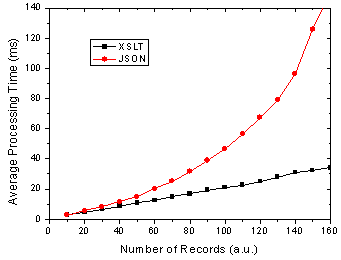
Figure 3. Total processing time in FF and IE given 50-50 usage split.
I will have the page up tomorrow I hope so that everyone can try it themselves - just need to get it all prettied up a bit so that it is understandable 
References
[1] The AJAX Response: XML, HTML or JSON - Peter-Paul Koch, Dec 17, 2005
[2] Objectifying XML - E4X for Mozilla 1.1 - Kurt Cagle, June 13, 2005
[3] JavaScript Benchmarking - Part 3.1 - Dave Johnson, Sept 15, 2005
[4] JavaScript Benchmarking IV: JSON Revisited - Dave Johnson, Sept 29, 2005
Posted in Web2.0, AJAX, JavaScript, XML, XSLT, JSON | 21 Comments »


 Entries (RSS)
and
Entries (RSS)
and