Archive for the 'XML' Category
The Mystery of Removing XML DOM Nodes 
January 16th, 2008
I was reviewing some code today and came across something that seemed very strange. There is a method we use for removing all the child nodes of a parent node in an XML document and it looked like this:
nitobi.xml.removeChildren = function(parentNode)
{
var children = nitobi.xml.getChildNodes(parentNode); // gets children that are not empty text nodes
for (var i = 0, len = children.length; i < len; i++)
{
parentNode.removeChild(children[i]);
}
}
Someone (probably me) was trying to save processing and store the child node collection length rather than re-calculate it every time through the loop. Seems good but one will notice that we are removing the child at the i’th index and so half way though deleting the child nodes we are going to try and delete the len/2+1 node but there will only be len/2 nodes in the collection (or something along those lines).
So I “fixed” it and made it look like this:
nitobi.xml.removeChildren = function(parentNode)
{
var children = nitobi.xml.getChildNodes(parentNode);
for (var i = 0, len = children.length; i < len; i++)
{
parentNode.removeChild(children[0]);
}
}
Now it would always remove the first element in the collection and iterate over the original collection length - done and done. Oh wait but no. So I go to test this in Firefox and low and behold it crashes like AAPL after MacWorld.
Then I finally get my act together and test both approaches in Internet Explorer and the latter approach - the expected solution - is the one that works. So Firefox is doing some strange things with the length of the child node collection.
Posted in AJAX, JavaScript, XML, quirks | 3 Comments »
Declarative Google Maps
April 7th, 2007
We are pretty big fans of the declarative approach to Ajax. Our up and coming Complete UI Ajax component product line is firmly based around declarative programming. The idea behind this is that the developer can use HTML like markup to define the majority of the component functionality while still being able to write a little bit of JavaScript to get the extra 20% of custom functionality that they need.
As an example of this I have put together a declarative Google Map. Currently it only supports a few declarative tags but it at least serves to give you an idea of how a regular JavaScript component could be wrapped declaratively. It could also be simplified quite a bit by building a JavaScript component from the ground up with declarative programming in mind - as the Nitobi framework enables of course 
If you went about putting a Google Map into a web page imperatively, it would look something like this:
var map = new GMap2(document.getElementById("map"));
map.setCenter(new GLatLng(49.290327, -123.11348), 12);
var polyline = new GPolyline([
new GLatLng(49.265788, -123.069877),
new GLatLng(49.276988, -123.069534),
new GLatLng(49.276988, -123.099746),
new GLatLng(49.278108, -123.112106),
new GLatLng(49.2949043, -123.136825),
new GLatLng(49.3029641, -123.145065)
], "#ff0000", 10);
map.addOverlay(polyline);
The result of this is a nice Google Map that shows part of my daily bike ride to work. If you view the source of the web page you will see just that same code.
On the other hand, we could make that same web page declaratively meaning that we don’t have any extra JavaScript code to write but instead define our Google Map through custom HTML markup. This has the advantage, on top of the many advantages (and disadvantages) of declarative programming in general, that most web developers are familiar with HTML markup though might not be as comfortable with writing JavaScript code. So the equivalent declarative Google Map might look like this:
<g:map id="map" width="370px" height="380px" smallmapcontrol="true" maptypecontrol="true">
<g:center zoom="12">
<g:point lat="49.2853" lng="-123.11348"></g:point>
</g:center>
<g:polyline color="#FF0000" size="10">
<g:point lat="49.265788" lng="-123.069877"></g:point>
<g:point lat="49.276988" lng="-123.069534"></g:point>
<g:point lat="49.276988" lng="-123.099746"></g:point>
<g:point lat="49.278108" lng="-123.112106"></g:point>
<g:point lat="49.294904" lng="-123.136825"></g:point>
</g:polyline>
</g:map>
All the same elements are there as the imperative JavaScript version but there is no code to worry about. And, of course, the result is also the same. Here is a direct link to the source code - the top 1/3 of the code is the only interesting stuff, the rest is just helper functions that poached from the Nitobi Ajax Toolkit.
Take a look at the source code if you are interested in the details. Btw it currently has only been tested in Firefox 1.5 and IE 6/7.
This will be some of what I talk about in my session at XTech.
Posted in Web2.0, AJAX, XML, Declarative Programming, Components, Google, Map | 3 Comments »
XML vs JSON: A Second Sober Look
January 8th, 2007
There has been a recent fleury of discussion about XML vs JSON. What a great topic for the holidays.
Although I have been talking about this topic for some time, some XML bloggers have recently started to discuss the topic (Tim Bray, Don Box, David Megginson, Dare Obsanjo and all the comments). For the most part the discussion is pretty tame and nothing really new.
Tim brings up the good points about extensibility and encoding. He also importantly acknowledges the fact that JSON is applicable in certain cases. To his points I would add the fact that one is able to use XPath with XML making it very powerful for quickly finding data. XPath is one XML technology that many ignore, particularly in the JavaScript sandbox.
The other important points are really in direct response to Dare Obsanjo’s posts from last week: Browser Security Model and Browser Programming Model. First of all, Dare suggests that one reason for JSON being so popular is due to cross-domain JSON (also called JSONP or JSON with Padding). Ignoring the data format, this pattern is applicable to any kind of data, including XML (XML with Padding is equally valid). There is no reason that Yahoo! could not provide a cross-domain XML API along side a cross-domain JSON API. In fact, I urge people to email everyone they know over at Yahoo! to do so for all their properties such as del.icio.us.
There are also a few points I have in response to the second post about the difference between the programming models of JSON and XML. The main thing that I noticed is that the example presents is not a realistic use case. What is most commonly done with data in an Ajax application is that the data is rendered to HTML. The fastest way to render data to HTML is using XML and XSLT. The other thing that he does not look at is cases where the data needs to be sorted or filtered, in which case XML and either XSLT or XPath provide a very nice solution. Of less importance, Dare also states that one should use a JSON parser in case of security concerns, however, the JavaScript based JSON parsers that I have used have had very extremely poor performance - even worse than plain eval().
The other interesting thing was a comment made by Kevin Hackman from TIBCO in the Ajaxian post. Kevin mentioned the fact that TIBCO uses XML to maintain the JavaScript state - i.e. each JavaScript object has a related XML document where the the object properties are stored and accessed using standard JavaScript accessor methods - which helps in terms of application memory usage. This is something that the soon to be released Nitobi Complete UI Framework also does, although for slightly different reasons like the fact that objects can then be easily serialized for use with server frameworks like JSF or ASP.NET.
At any rate, I am happy to see that some others are joining in on the discussion and if nothing else I hope that people start to talk more about using XSLT and XPath in the browser.
Posted in AJAX, XML, XSLT, Declarative Programming, Performance, markup | 7 Comments »
Nitobi Ajax Framework
December 12th, 2006
It has been a while since any serious blogging has taken place but I think that I should get some in over the upcoming holidays. Also, we have been very busy getting the final touches on Enterprise Ajax and getting started on new development plans.
As some will know from listening to the Nitobi podcast, we are currently building some new components such as a Tab, Tree and a Date Picker. For the start they will be fairly standard Ajax components but we have some cool new ideas for old patterns that should make some waves in the Ajax user-interface space.
At any rate, one of the first parts of our yet to be named Ajax user interface suite is going to be the Framework. The Framework is going to be where all the nuts and bolts are located that allow developers to build their own Ajax solutions using both our basic cross browser libraries as well as our component architecture.
For the most part, the Framework will have some important features such as:
- XMLHttpRequest (Throttling, polling, timeout, events etc)
- DOM Events
- JavaScript Events (MVC)
- DataSet / DataTable (ActiveRecord)
- Object Serialization (XML and JSON)
- Declaration Parsing
- Back Button History
- OOP Inheritance, Interfaces and Garbage Collection
- Effects
- Drag + Drop
- Cross Browser HTML and DOM
- Cross Browser CSS
- Cross Browser XML
While many are similar to those things found in other frameworks out there (like the DOM events), we are keen to hear both what people think is lacking in other frameworks and what is a must have.
I am most excited about the serialization and declartive component stuff myself. It should really help developers build their own declarative components really easily.
One final note is that the Framework will be included in the suite but other than that we are not too sure what to do. Any ideas or comments on if, when, and how we might open source the Framework code would be more than welcome!
Oh crap, one more thing. What is important to people for a cross browser XHR object? What’s missing? I think that comet, throttling, timeouts and better events are a good start but what do you think? As the pipe gets bigger and more action is happening on the client we are thinking a lot about how the data is flowing from the server and how it gets handled by the client.
Posted in Uncategorized, Energy, Web2.0, JavaScript, XML, Patterns, Copyright, Conference | No Comments »
Declarative AJAX Components and XML Namespaces
October 16th, 2006
Being on the OpenAjax committee has been pretty interesting so far despite the fact that I have only managed to be in on one call - luckily all the minutes are on the wiki and I have been following that pretty intently.
The declarative markup comittee is looking at how to standardize the definition and instantiation of declarative AJAX components or widgets. A good example of a complex component is the Nitobi Ajax Grid component while the Dojo framework has several smaller widgets like the very cool fisheye menu. To create an Ajax widget in a web page declaratively one might have some markup like this:
<ntb:grid ... />
Similarly, one could use something like this:
<div oatype="ntb:grid" ... />
This is very similar to the idea of microformats - and even makes them more expressive. In either case the OpenAjax bootstrapper would start using something like the
onload
event on the
window
object and it would search through the DOM and find all elements with a custom namespace or an
oatype
attribute. Once the bootstrapper finds a component declaration it refers to a registry to find the toolkit that is responsible for parsing and loading that specific component from the declaration. Personally, I like the former with the custom tag that is properly namespaced.
Unfortunately, IMHO, people generally opt for the later declaration that uses the build in HTML elements and simply adds custom attributes. While both are nearly identical, the use of namespace prefixes on the tags is possibly more “standard” and ensures that one doesn’t get a Grid component mixed up with a regular DIV element. For the most part, I think the gravitation towards the later declaration is due to the general contempt people hold for Internet Explorer - and indeed most of the people on the declarative markup committee feel this way. Having been building declarative components for Internet Explorer for over six years now we are pretty well versed in the problems with Internet Explorer, and I can assure you that the support for XML namespaces and custom tags in Internet Explorer is perfectly fine. I would argue, as you will see in a moment, that the support is even better in Internet Explorer than in Mozilla. Some Ajax frameworks, such as Dojo, support XML namespaces in Mozilla but not in IE due to perceived deficiencies.
From our experience, Firefox and not Internet Explorer has been the browser that breaks when custom namespaced tags are used. The biggest hurdle is that, as noted in the Dojo manual page that, one “must” (emphasis on the part of the author of the Dojo manual) define the xmlns:mynamespace on the page. Usually that is done on the HTML tag. Anyone that has worked with XML will surely know that if you want to have some elements in a different namespace then declaring that namespace is a fact of life. On the other hand, Firefox works in a quirky way if you define custom XML namespaced tags - forgetting the fact that it doesn’t even care if you define the namespace or not, which seems very bizarre to anyone familiar with XML. For the straight dope on custom tags in IE everyone should check out the relevant MSDN article (it is amazing all the good stuff on MSDN that many people ignore). The jist of the article is that you just need to specify your XML namespace on the HTML element like this:
<html xmlns:mynamespace>
How completely unexpected! However, it can also be specified on any other element that is a parent of an element that uses the namespace. The article describes the fact that support for custom tags was introduced for enabling behaviours - ie defining custom HTML elements that behave in some custom way - which were a great idea. Admitedly, the one drawback of the IE model is that it does not support the
document.getElementsByTagNameNS()
method, which can select tags with a namespace in Firefox. Instead one has to use the regular
getElementsByTagName
method and look at the namespace value. This is easily wrapped of course.
Having said all this, one should also remember that XHTML is not really there yet.
At any rate, we still want to use XML namespaced tags and there are a few problems we have found with Firefox regarding support for custom XML namespaced elements. The two main problems we have observed are:
Styles are not applied correctly
DOM methods do not work correctly
Self closing tags do not work
To illustrate this, I have made a simple example with some sample markup that might be used in some sort of windowing or panelling situation. I defined some buttons, panels and a title with some interspersed native HTML elements.
<div id="div1">
<ntb:button id="button1">button 1</ntb:button>
<ntb:button id="button2">button 2</ntb:button>
<ntb:panel id="panel1">
<ntb:title id="title1">
<div id="div2">panel title 1</div>
</ntb:title>
<ntb:contents id="contents1">
<div id="div3">Contents div3</div>
<div id="div4">Contents div4</div>
</ntb:contents>
</ntb:panel>
</div>
One common thing to do is define some custom styles for these elements such as this:
ntb\:panel {border:1px solid red;display:block;}
ntb\:contents {color:red;display:block;}
ntb\:title {border:1px solid black;background-color:#3366FF;display:block;}
ntb\:button {border:1px solid black;background-color:#CCCCCC;}
The results are fairly good in IE:
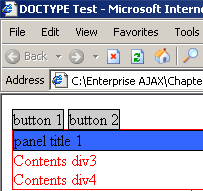
and pretty poor in Mozilla:
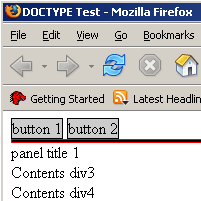
Granted that is quite contrived and the likelyhood of specifying styles for the custom elements is pretty low.
This brings us to the second point which is a bit more important. The native DOM methods in Mozilla don’t actually recognize the custom elements; or rather, to be more precise, DOM methods don’t reflect the true DOM hierarchy as it appears in your HTML. As an example, we will try and access the parent node of each of the nodes in our sample custom namespaced HTML. The results were as follows:
IE parentNode()
| Target Node ID |
Expected Parent ID |
Actual Parent ID |
| title1 |
title1 |
title1 |
| contents1 |
contents1 |
contents1 |
| … |
… |
… |
| ok you get the idea |
Mozilla parentNode()
| Target Node ID |
Expected Parent ID |
Actual Parent ID |
| div2 |
title1 |
div1 |
| div3 |
contents1 |
div1 |
| div4 |
contents1 |
div1 |
| button1 |
div1 |
div1 |
| button2 |
div1 |
div1 |
| panel1 |
div1 |
div1 |
| title1 |
panel1 |
panel1 |
| contents1 |
panel1 |
div1 |
Internet Explorer gets the parentNode as one would expect but Mozilla seems to have some difficulty. There are similar difficulties with many other of the DOM methods in Mozilla.
The big problem we have found is that Mozilla does not support self closing tags. One would expect that the following would be equivalent:
<ntb:grid />
<ntb:grid></ntb:grid>
Not so in Mozilla. The later syntax is ok, whereas the self closing tag does not get parsed correctly when you look at the innerHTML of an element and it is even worse once you have self closing tags in conjunction with DOM methods.
Mozilla has to get its act together with custom namespaced tags for declarative AJAX components to ever get anywhere. If anyone wants to compare war stories then please leave some comments.
Technorati tags:ajax, microformat, declarative, components, xml
Posted in Web2.0, AJAX, XML, Microformat, Declarative Programming, Components | 14 Comments »
Podcasting it up!
May 24th, 2006
Well, Captain AJAX and I finally got around to making our first podcast! It is a bit long and the audio sucks but we will be sure to get that fixed for next time  . Anyhow, Dre and I just talked about everything that happened in the past coupld weeks including Dre’s findings down at JavaOne, The AJAX Experience, DCamp and NetBeans Day.
We also talked about the launch of Nitobi Grid V3…and what's to come down the road - WARNING - could be considered shameless self promotion but we also talk about some AJAX technology stuff
Here is the podcast care of Audioblo. If anyone has any tips about posting and or making the old podcasts then let us know!
Technorati Tags: ajax podcast javaone ajaxexperience
Posted in Web2.0, AJAX, JavaScript, XML, Architecture, Business, Flex, Declarative Programming, Components | No Comments »
Help Wanted!
February 22nd, 2006
Once again, we are hiring some more AJAX developers. Anyone out there with mad AJAX skills or the work ethic to rapidly get up to speed on some exciting AJAX product development?
If so please email us!
Here is the full job description.
With that corporate malarky out of the way I just want to mention something about who we _really_ are.
We are dedicated ajax developers who take pride in high performance and user centric products. If you want to be challenged in a startup like environment with lots of responsibility (and reward) then this is the place to be. Although we work hard, as the saying goes, we also play hard. If we are not pushing the limits of JavaScript and XSLT then we are taking in everything that Vancouver has to offer like the mountains right in our backyard, the ocean at our feet and a beer in our hands. We are trying to build a place where people can grow not only as individuals but as part of a larger team in the business and as members of the Vancouver tech, web and social communities. We operate with our core values laid plain for everyone to see and expect the same openess and honesty from every one of our team members.
If you have what it takes then really please do email us!
Posted in Web2.0, AJAX, JavaScript, XML, XSLT, Business | No Comments »
Cross Domain AJAX with XML
February 10th, 2006
On a post I made a few days back I proposed a way to do cross domain AJaX using XML rather than the commonly used JSON. It is essentially an extension of the idea of JSONP (JSON with Padding). Since I generally find myself working with XML more often than JSON I decided to create the equivalent for XML based applications. I have not extensively tested it but did try it on IE6 and FF1.5 on Win2K server.
So here it is. The idea is that we pass an id, a context and a method as querystring parameters to a server script such as http://www.enterpriseajax.com/cross_domain_xml.asp?context=myObject&method=onXmlLoaded&id=1000 and we get back some JavaScript. That JavaScript can then be injected as a script tag in your web page.
This will then return JavaScript code that creates an XML document object and loads an XML string into it. Once the XML string is loaded into the object it then calls a callback method such as
myObject.onXmlLoaded()
and passes it the XML object that was created.
The id querystring parameter is used to uniquely identify each XML document that is requested, the conext is the object on which the callback is called and the method parameter is the name of the callback function.
The JavaScript returned from the pervious resource is this:
if (typeof(eba_ajax_xmlp) == "undefined"){
var eba_ajax_xmlp = {x: {}};
eba_ajax_xmlp.loadXml = function(s, uid){
if(document.implementation && document.implementation.createDocument) {
var objDOMParser = new DOMParser();
this.x[uid] = objDOMParser.parseFromString(s, “text/xml”);
} else if (window.ActiveXObject) {
this.x[uid] = new ActiveXObject(’MSXML2.DOMDocument.3.0′);
this.x[uid].async = false;
this.x[uid].loadXML(s);
}
}
}
eba_ajax_xmlp.loadXml(’This XML adata is from EnterpriseAjax.com‘, ‘1002′);
myObject.onXmlLoaded.call(myObject, eba_ajax_xmlp.x[’1002′]);
This is slightly different from the JSONP way of doing things but for the most part it’s the same sort of thing.
Try it out for your self with the sample page here - you should see an alert with contents of the loaded XML (just a root tag).
Note there is nothing on the Enterprise AJAX site but there will be soon 
Posted in AJAX, XML, Architecture, JSON | 12 Comments »
XML with Padding
January 27th, 2006
So Yahoo! supports the very nice JSONP data formatting for returning JSON (with a callback) to the browser - this of course enables cross domain browser mash-ups with no server proxy.
My question to Yahoo! is then why not support XMLP? I want to be able to get my search results in XML so that I can apply some XSLT and insert the resulting XHTML into my AJAX application. I am hoping that the “callback” parameter on their REST interface will soon be available for XML. It would be essentially the exact same as that for JSON and would call the callback after the XML data is loaded into an XML document in a cross-browser fashion. While that last point would be the most sticky it is, as everyone knows, dead simple to make cross browser XML documents
Please Yahoo! give me my mash-up’able XML!
If you want to make it really good then feel free to either return terse element names (like “e” rather than “searchResult” or something like that) or add some meta-data to describe the XML (some call it a schema but I am not sure JSON people will be familiar with it  ) so that people will not complain about how “bloated” the XML is. For example:
<metadata>
<searchResult encoding=”e” />
</metadata>
<data>
<e>Search result 1</e>
<e>Search result 2</e>
<e>Search result 3</e>
<e>Search result 4</e>
<e>Search result 5</e>
<e>Search result 6</e>
</data>
Come on Yahoo! help me help you!
Posted in Web2.0, AJAX, JavaScript, XML, XSLT | 2 Comments »
Injected JavaScript Object Notation (JSONP)
January 25th, 2006
I had a few comments on one of my previous posts from Brad Neuberg and Will (no link for him). Brad suggested using script injection rather than XHR + eval() to instantiate JavaScript objects as a way of getting around the poor performance that Will was having with his application (he was creating thousands of objects using eval(jsonString) and it was apparently grinding to a halt).
As a quick test I created a JavaScript file to inject into a web page using:
var s = document.getElementById(”s”);
s.src=”test.js”;
The script file contained an object declaration using the terse JSON type of format like:
var myObj = {"glossary": [
{”title”: “example glossary”,”GlossDiv”:
{”title”: “S”,”GlossList”: [
{”ID”: “SGML”,”SortAs”: “SGML”,”GlossTerm”: “Standard Generalized Markup Language”,”Acronym”: “SGML”,”Abbrev”: “ISO 8879:1986″,”GlossDef”: “A meta-markup language, used to create markup languages such as DocBook.”,”GlossSeeAlso”: [”GML”, “XML”, “markup”]
}]
}}
]}
(this is the sample found here)
I compared this with the bog standard:
var myObj = eval(jsonString);
I timed these two methods running on my localhost to avoid network effects on the timing for the injected script as much as possible and the eval() method had the same poor results as usual but the injected script was uber fast on IE 6. I have not checked Mozilla yet.
In the real world then one might want to have a resource such as http://server/customer/list?start=500&size=1000&var=myObj which would return records 500 to 1500 of your customer list but rather than pure JSON it would return it in a format that can be run as injected script and the result of this would be the instantiation of a variable called myObj (as specified in the querystring) that would refer to an array of those customers requested. Pretty simple and fast - the only drawback being that you are no longer returning purely data.
Posted in Web2.0, AJAX, XML, JSON | 2 Comments »


 Entries (RSS)
and
Entries (RSS)
and