
Nitobi
About Nitobi
Services
Products
Home -> Blogs -> Dave Johnson

Dave Johnson

Archive for the 'Grid' Category

Declarative Ajax and Flex Interop

July 3rd, 2007

This is some code that I wrote about a year ago at the Flex Component Developers Summit (and more recently presented at XTech) to show how declarative Ajax and Flex can work together to create dynamic, rich and compelling Internet applications.

The idea is simple. Take a single declaration - in this case XHTML - of some user-interface component and then use it to build a UI using either Ajax or Flex. All this from just one declaration.

What happens is that we take a single declarative data grid and converts it using XSLT on the client (so it only works Firefox, IE and soon Safari) into a declarative Nitobi Ajax Grid and to a Flex declarative MXML DataGrid. I use the FABridge to get the string of MXML generated from the XSL transformation into a stub Flex application where a Flex DataGrid is instantiated (deserialized) from the MXML declaration. It can an be seen live here (note: create the Flex grid first then the Ajax one - something funny that I can’t be bothered to fix ;) ) and the code can be downloaded from here.

So by using a declarative approach and a little XSLT on the client we were able to quickly choose between using a Flex DataGrid or a Nitobi Ajax Grid to display our tabular data in!
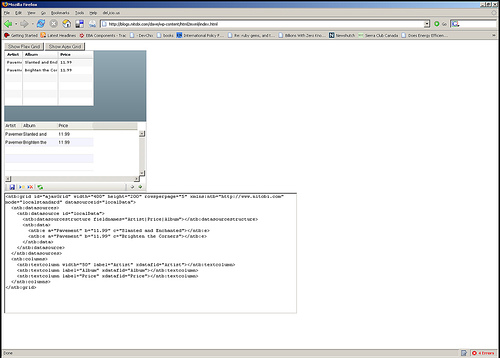
Really the most interesting part is the MXML deserialization stuff. The only contents of the Flex application are two functions for performing the deserialization. I have listed the main part of the code that takes an XML document of an MXML DataGrid declaration and actually instantiates a DataGrid according to that declaration. It’s pretty quick and dirty but at least gets the right thing out! Essentially it just looks at each XML element and creates an Object out of it and sets all the properties on it from the XML element attributes and then recurses through the child elements doing the same. There are some special attributes though like datasources that need a little more care.


public function initGrid(html) {
  // setup a tagname to datatype hash - maybe this already exists somewhere
  controls['DataGrid'] = 'mx.controls.DataGrid';
  controls['ArrayCollection'] = 'mx.collections.ArrayCollection';
  controls['Object'] = 'Object';
  controls['columns'] = 'Array';
  controls['DataGridColumn'] = 'mx.controls.dataGridClasses.DataGridColumn';

  // load the HTML into XML DOM
  var mxml:XML = new XML('<root>'+html+'</root>');

  parseXml(AjaxBox, mxml);
}

public function parseXml(parent, mxml) {
  var item:String;
  // get all the elements in our XML doc - this should of course walk the xml tree recursively
  var itemList:XMLList = mxml.elements('*');

  for (item in itemList) {
    // get the tag name of the XML node
    var tagName:String = itemList[item].localName();

    // get the class by using getDefinitionByName() method
    var ClassReference:Class = Class(getDefinitionByName(controls[tagName]));

    // create an instance of the class
    var myObject:Object = new ClassReference();

    // get all the attributes and set the properties
    var attrList:XMLList = XML(itemList[item]).attributes();
    for (var attr:String in attrList) {
      myObject[attrList[attr].localName()] = attrList[attr].toString();
    }

    // now parse the children of this node
    parseXml(myObject, itemList[item]);

    if (parent.hasOwnProperty(tagName)) {
      parent[tagName] = myObject;
    } else if (parent.hasOwnProperty("length")) {
      if (parent.hasOwnProperty("source")) {
        parent.source.push(myObject);
      } else {
        parent.push(myObject);
      }
    } else if (parent.hasOwnProperty("dataProvider") && tagName == "ArrayCollection") {
      // This means we need to create a datasource for the Grid
      parent.dataProvider = myObject;
    } else {
      parent.addChild(DisplayObject(myObject));
    }
  }
}

HTML Rendering Pains

January 30th, 2007

We had a recent project where a client was trying to render 150 columns and 100 rows in a Nitobi Grid. Now, to most people, this sort of use case may seem very strange, but in reality, rendering thousands of cells in a rich user interface is a regular occurance with our sort of customers. Due to these extreme requires of our users, for the most part I am _very_ happy we chose to implement our data rendering engine with XSLT rather than standard string building :)

However, this time we hit the wall and the application was dog slow. Even though we were using very fast XSLT to generate HTML from XML data which was then inserted into the document, we still ran into a big bottleneck using the HTMLElement.innerHTML property. The HTML structure was not that complicated to begin with. It was just some floated DIVs that made up the Grid rows / cells anas I started by just removing attributes until we got to the bare bones of the structure. Even then there were problems and the structure had to be changed completely.

In the end it was due to a mixture of three problems. Here is what we did to fix things:

  • Shortening the element IDs. With longer ID attributes on the HTML elements the browser was having a hard time processing them. This sped things up a little bit.
  • Used TABLEs elements for the structure. Changing from DIVs to TABLEs made a dramatic improvement of over one order of magnitude. The floated DIVs require a lot more processing on the part of the browser so that makes sense.
  • Removed inline events. Having inline events such as mouseover and mouseout specified on the HTML element was a bad idea. If we had tried to attach all the events through script we would have seen the same problem I am sure. The solution there was to assign more general event handlers higher up in the DOM hierarchy and let the events bubble up to a single handler. This improved the performance by almost another order of magnitude.

Things like the styling, number of classes or any additional custom attributes had pretty much no effect on the performance.

Grid V3.2 - Just One More Day

September 14th, 2006

We have been up all night but to no avail - Alexei is gone home dreary eyed and even Andre has headed back to Squamish.

James and I will be here for a little while still as we push to get the release out before the weekend.

Stay tuned.

Grid V3.2

September 10th, 2006

It’s 10:30 on saturday night and I am just finishing up another pass over the documentation for Grid V3.2 which we are planning on launching this thursday (sept 14th). It is looking like a not _so_ unrealistic deadline. I am looking forward to getting the new JSDocs out there and hearing some feedback as the current docs are admitedly sparse at best. This time around the docs will not only be better but the Grid will have far better support for runtime manipulation and local data sources. Andre, Alexei and I took 30 minutes today to do a quick podcast as well that should be up tomorrow I guess.

It’s time for a drink. Hope everyone is having a good weekend!

Nitobi Grid Launch Date

September 7th, 2006

Ok so we have set a date of Sept 14 for launching the latest version of our Grid control. Given some quality control issues in the last release we are trying to tighten her down and get her ready to work nicely with our framework. Best of all the docs will be kick ass ;)

Once we launch then I can get my GMaps mashup online too!


Search Posts

You are currently browsing the archives for the Grid category.

Pages

Archives

Categories

All contents are (c) Copyright 2006, Nitobi Software Inc. All rights Reserved
Dave Johnson Entries (RSS) and Comments (RSS).