

Ajax Deleting 
January 25th, 2007
The topic of this post is about deletion using Ajax. Truth be told, it’s not really even about Ajax but about the deletion pattern and related user experience in general.
So often it is the case that when a person deletes some data - like a photo tag in Flickr for example - the application insists on confirming that the user really wants to delete the item. This kind of interaction is really annoying when you are deleting several items from a list or even just one when you are a “power user”. In fact, more often than not, the user wants the delete to occur immediately and requires no confirmation. The confirmation dialog is just an over-engineered catch all for those rare cases when the user presses the delete button in error. In the case of Flickr photo tags then who even cares if you accidentally delete one tag?
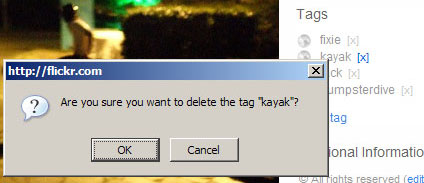
There are a few good options for Ajax delete that I think one consider when building data intensive web applications.
- Make the delete button smaller but communicate its meaning more clearly.
Using large and unfamiliar buttons for signifying a delete action makes it easier for a person to make a mistake - thus re-inforcing the need for a confirmation dialog. A smaller button means the user has to work a little harder to perform the delete operation, but not quite as hard as confirming the delete, and the more clear the button is for deleting (through a tooltip or whatever) then the fewer inadvertent deletes there will be. - Store all deleted data the client before executing the deletes.
Although it could be a good option, the previous suggestion still provided no way to undo a delete. To that end, rather than having a difficult confirm dialogue the developer can take a different approach to deletions such as batch deletions with a single confirm dialogue or even an easy way to roll back the deletes if they are in error. I imagine the reason for using a confirm dialogue is because it is easiest for the developer, but certainly not the user. - Use a timer on the delete action giving the user the opportunity to cancel the delete.
Finally, an approach that could encompass both of the previous suggestions would be a delete timer. This would be an animation to indicate that the item is pending a delete in say 5 seconds. The key here is that this is ample time for the user to cancel the delete if they want but otherwise the deletion will continue if the user does not take any action to prevent the delete from happening.
At any rate, this is one area where most web application fail miserably and there are great advances to be made with Ajax based applications.
 Entries (RSS)
and
Entries (RSS)
and