Complete UI Q2 Released! 
May 1st, 2008
We managed to finally pull things together and get the release out despite some attempts by .NET build tools to sabotage the entire release!
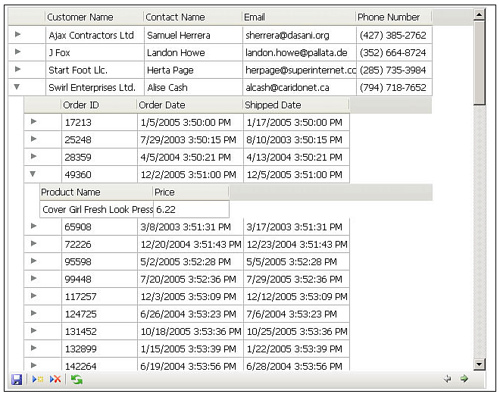
With this release we now support Safari 3, have added a bunch of new themes to help you make your apps look hot, some new Dreamweaver extensions that mean there is no JavaScript to write to make master-detail grid or combo applications, and most importantly Mike did an awesome job on getting the new TreeGrid component done!
There are some exciting things in the works as well for next week - including screencasts and even some JavaServer Faces love!
Posted in AJAX, JSF, Nitobi, completeui, safari, treegrid | No Comments »
Complete UI Q2 Progress
April 28th, 2008
We are almost a month behind now on the Q2 release of Complete UI but Mike and I are in the final throws of polishing. We are shooting for releasing today and if that fails tomorrow at the latest. As people will know from the beta we are releasing support for Safari 3, new Dreamweaver Extensions, new themes and, most importantly, a new component called TreeGrid for displaying hierarchical data. I have a can of Red Bull in hand and one last Safari Combo bug to fix before the building will commence!
Posted in Uncategorized, AJAX, Nitobi, completeui, safari, dreamweaver | No Comments »
Salesforce.com AIR Application
July 18th, 2007
Since Andre was invited to go on the Adobe AIR bus tour we decided to build a cool sample application that would exhibit some of the cool features of AIR and our components. Since we like to focus on the “business case” for our Ajax components and our custom development, we built an AIR application that integrated with the Salesforce.com API. Being the RIA nutters that we are and knowing that most people would be building Flex based applications - which we are currently building a few of for various customers - we decided to build an HTML / Ajax based application instead.
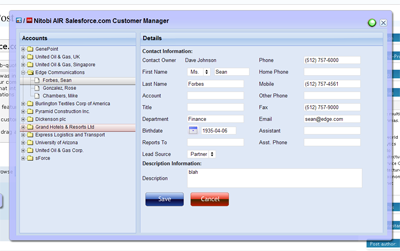
The cool AIR features that we wanted to show off were things like
1. custom chrome to make things look hawt
2. drag and drop from the desktop for vcard integration
3. file system integration for taking things offline
Since we had a pretty tight timeline we went fairly simple and built the application in about three person weeks. The idea was centered around a mobile sales person being able to have access to their Salesforce Account and Contact data while online or offline. Of course, being an Ajax application it should also prove to be a much nicer interface than the current Web 1.0 based Salesforce user interface - man would I like to be able to redesign the Salesforce UI!
Custom Chrome
The most important part of the application was to make it look hawt. This involved a bit of design assistance from Alexei and the creation of some JavaScript and text based activity indicators since animated gifs don’t work in the current AIR beta  What we did use a lot though was the CSS3 border-image style. It doesn’t seem to work quite right but if you just go with it you can make something that looks half decent.
So on the outer window we applied a style like this:
-webkit-border-image:url(../images/app-border.png) 18 18 18 18 stretch stretch; border: 18px;
Where the app-border.png looks like this:

As well as looking great the chrome needs to be functional. It needs to have minimize, maximize, restore and close buttons. It needs to be resizable and draggable. Maximize, minimize, restore and close are easy - for example:
window.htmlControl.stage.window.restore();
All of those methods (restore, close, minimize, maximize) are created on the nitobi.air.Window JavaScript class. To enable draggability we attach an HTML event handler to the our main window DIV element like this:
nitobi.html.attachEvent($(”main_window”), “mousedown”, handleMove, this);
The handleMove method is shown below where we just do a quick check first to see if the element that the user is trying to drag has the chrome class on it - this lets us make the window draggable from various points like the header and around the edges. Once they get the chrome we just call startMove() like this:
nitobi.air.Window.prototype.handleMove = function(evt)
{
if (nitobi.html.Css.hasClass(evt.srcElement, “chrome”))
window.nativeWindow.startMove();
}
Desktop Integration
The other cool thing about using AIR is that rather than having some ridiculous multi file upload utility written in Java or Flash, with AIR we can just take files from the desktop and drag them onto the application. What this means is that we can take things like VCards or CSV files full of contact information and have them automagically entered into Salesforce. If offline they get saved as updategrams and get uploaded once the computer is back online. The events for the drag and drop are Flex events on the AIR htmlControl but they connect to JavaScript methods as handlers.
window.htmlControl.addEventListener(
runtime.flash.events.NativeDragEvent.NATIVE_DRAG_ENTER,
nitobi.lang.close(this, doEnter));
window.htmlControl.addEventListener(
runtime.flash.events.NativeDragEvent.NATIVE_DRAG_DROP,
nitobi.lang.close(this, doDrop));
When the drag operation enters the AIR window we call the acceptDragDrop method with the htmlControl as the only argument. This will enable dropping onto our HTML application.
nitobi.air.Window.prototype.doEnter = function( e )
{
if(e.transferable.hasFormat(air.TransferableFormats.FILE_LIST_FORMAT ) ) {
runtime.flash.desktop.DragManager.acceptDragDrop(window.htmlControl);
onDragEnter.notify();
}
}
Now that we have enabled dropping on our HTML app we can actually process the information when it is dropped by accessing the transferred data like this:
nitobi.air.Window.prototype.doDrop = function( e )
{
var files = e.transferable.dataForFormat(
air.TransferableFormats.FILE_LIST_FORMAT,
air.TransferableTransferMode.CLONE_PREFERRED );
for( var f = 0; f < files.length; f++ ) {
onDragDrop.notify(files[f]);
}
}
In this case we specify that the drop should be a list of files and we are able to iterate over that list to add each of the VCards to Salesforce.
Offline Operation
Finally, we did some filesystem integration for working offline and that was pretty cool. Rather than using the SQL-Lite database that comes with AIR, we wanted a solution that would be more conducive to a web way of working - ie something that will essentially queue HTTP POSTs and subsequently POST them when a network connection is present. Because frankly, unless you have A LOT of data on the client and interfacing to a SQL-Lite database is generally going to be overkill and make a lot more work for the developer since they will have to write not one backend in their server language of choice but also a client side backend in JavaScript. Anyhow, in the Nitobi CompleteUI framework, all changes on the client are stored as XML “updategrams”. So it was a pretty easy task to put a layer between the client side JavaScript DataTable and the XMLHttpRequest that sends data to the server when it is “saved”. Instead of the data being sent to the server with an XHR, if the client is offline the updategram is just persisted to disk. Even when online, the data is continually saved to the disk for offline use at any time. All this took very little extra coding since we just serialized the server messages rather than actually transforming them into SQL statements that would store the data in SQL-Lite.
For all of this to work we needed to be notified when the computer is connected to the network. This is done in the nitobi.air.Window class by using the AIR service monitor. This has the additional requirement of having the servicemonitor.swf library in the web page by using a script tag with the src as servicemonitor.swf. To create the service monitor we do something like this:
var req = new air.URLRequest(’http://www.adobe.com’);
this.monitor = new window.runtime.air.net.URLMonitor(req);
this.monitor.addEventListener(
air.StatusEvent.STATUS, handleStatusChange
);
this.monitor.start();
Where the handleStatusChange method will notify any objects that are connected to the the onOnline and onOffline events of the nitobi.air.Window class.
nitobi.air.Window.prototype.handleStatusChange = function(evt) {
// Fire the event for online / offline notification
if (evt.code == “Service.unavailable”)
onOffline.notify();
else
onOnline.notify();
}
For writing the data to disk we use the AIR filesystem integration and wrap it all in two IO methods for reading and writing. The air.File.applicationStorageDirectory is (on Windows) in c:\documents and settings\username\application data\Application-Name folder.
nitobi.data.IO.readXml = function(filename) {
var file = air.File.applicationStorageDirectory.resolve(filename);
var stream = new air.FileStream();
stream.open(file, air.FileMode.READ);
var str = stream.readMultiByte(file.size, air.File.systemCharset);
stream.close();
return nitobi.xml.createXmlDoc(str);
}
nitobi.data.IO.writeXml = function(xmlDoc, filename) {
if (typeof xmlDoc != ’string’) xmlDoc = nitobi.xml.serialize(xmlDoc);
var file = air.File.applicationStorageDirectory.resolve(filename);
var stream = new air.FileStream();
stream.open(file, air.FileMode.WRITE);
var str = stream.writeMultiByte(xmlDoc, air.File.systemCharset);
stream.close();
}
I think that those were definitely the coolest parts of the application and made for a a pretty sweet little app for managing Salesforce Contacts and Accounts. There is still a little more work that I would like to do in the coming weeks like allowing adding and saving of both Contacts and Accounts without VCards as well as some other searching features. Alas, this will have to do for now  Also, when Adobe gets XSLT support in there it will be even more awesome!
You can check out the half baked source code here and get the AIR application for installation here. I am working on a version of the AIR app that will allow the user to enter their Salesforce.com credentials and actually see their data - and there will be a HUGE disclaimer that you use at your own risk 
Update: I just found out that the Mac version of AIR does not have XPathResult (!!!) so selectNodes doesn’t work … sorry Mac users but it should be fixed soon.
Posted in Web2.0, AJAX, Nitobi, completeui, air, onairbustour, salesforce | 7 Comments »
Grid With AIR and Safari 3
June 14th, 2007
With the release of Safari 3 Beta and the recent renaming and Beta release of AIR (formerly Apollo) from Adobe, we have started to work on getting our components running in both of them.
We have run across a few problems - the biggest of which is the lack of any decent debugging tools for either one. I am sure that this will soon change. Currently the best thing around for debugging is Scout.
Grid is being a bit of a challenge given that there is no XSLT support in AIR - though there is in Safari 3. Jake and I got it almost working with a day or so of work / screaming at our computers. Here is a screenshot of what we got so far:
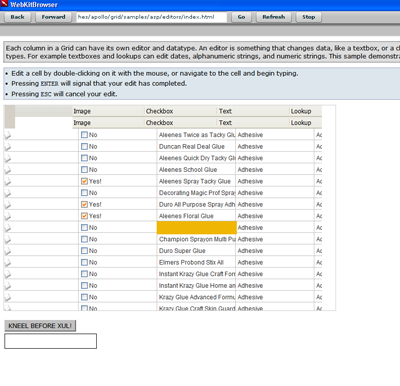
We are pretty happy with the progress and the fact that no one has been hurt - yet 
There a few known problems in AIR currently such as CSS opacity not working, table width=0px with colgroups does not work and a few other small things like that. We are certainly happy that Safari 3 and AIR both support addRule and insertRule for working with CSS while a little disappointed in no XSLT support in AIR yet good support in Safari 3.
Posted in Web, AJAX, XSLT, Components, Nitobi, apollo, completeui, air, safari | No Comments »
Complete UI Q2 Released!
June 3rd, 2007
We were able to get out the Q2 release of Complete UI without too much trouble!
With the help of a keg of beer last night Jake, Mike, Alexei and I were able to pull everything together at the last moment (of course there are a few small things we are still fixin up) and get it out there. Grid is looking awesome with much improved performance and we have also released Spotlight and Calendar - as I have mentioned previously.
Its up online so check it out and let me know what you think
Time to catch up on my blog reading / writing and have a looooooong sleep.
Posted in Uncategorized, AJAX, Nitobi, completeui | No Comments »
Release Creeps Closer
May 30th, 2007
A mere two days now until the next quarterly release of Complete UI!
We be workin hard like little elves to get out a very much improved version of Grid and new products called Spotlight and Calendar.
To celebrate our efforts we will:
a) Ship Complete UI Q2
b) Drink a keg of beer and play XBox
c) …
d) Profit!
I don’t even want to think about what might happen if we don’t release on Friday!
Posted in Uncategorized, AJAX, Nitobi, completeui, beer | No Comments »
Complete UI Q2 Update
May 28th, 2007
In between all the other exciting stuff happening here like JaveOne, XTech and RobotReplay, we have also been working on improving the Complete UI suite!
In particular we will have a new Calendar control (which is integrated with Grid of course) and also something we call Spotlight that can be used to build a tour of your web application for help users.
What I have been working on (as anyone who has seen my twitter can attest to) is fixing up our flagship product, Grid. I have mostly been focusing on two aspects of it:
- Improving layout and theming. This has been a long time coming and it is much better now but there is still some work to do to get it up to par with all the other components. Layout has been changed a lot and should make it much nicer to work with.
- Improving performance. Another thing that has been a long time coming is better general performance. We have slimmed things down a bit in terms of code size and in fixing the layout we have also increased performance significantly.
I should also mention that Mike has been doing a bang-up job lately on getting the Java backend code ship shape as well as improving the docs - which everyone will probably be very happy about!
There has also been a slew of bug fixes going out for several of our customers that will become available to everyone with this release.
We are shooting for June 1 (this coming friday) so stay tuned!
Posted in Uncategorized, AJAX, Nitobi, completeui | 1 Comment »


 Entries (RSS)
and
Entries (RSS)
and