Archive for the 'Flash' Category
Ajax Alive and Kicking 
December 14th, 2007
I think that people still finding new and interesting features of old browsers is a good sign that Ajax still has some gas left. Even more recently there are developments around charting, comet, sound and widgets. For those reasons I am not convinced that new “RIA” frameworks like Flex, Silverlight and JavaFX are the nirvana that will save us poor web application developers from the hell that is cross-browser JavaScript and DOM development. Even the very idea that Ajax is a cross-browser hell is really a misnomer in this day and age when there are so many different mature Ajax frameworks that take care of a lot of the cross-browser issues Ajax developers have to deal with on a daily basis - Ajax frameworks are to Ajax developers as the Flash player is to Flex developers. Most of the rest of this is to build on what Kevin Hoyt recently posted.
Where Have We Been
Over the past few years both Ajax and Flex have come a long way. Previous versions of Flex (and Flash before that) were nowhere near where Flex 2 / 3 Beta are at and one can achieve amazing things with Flex these days. The same can be said for Ajax. I think that both Flex and Ajax have been moving forward in step. In fact, Ajax has been around for a lot longer than Flex and was already creating real RIAs back in the late 90’s when Flash 3 was still only being used to make website intro’s. Certain frameworks, like Ext, make it simple to create applications with a desktop like feel using splitters, panels and common desktop UI widgets.
What is an RIA
I use the term RIA here with some reservation just because of the differing perceptions of what it really means - sort of like early perceptions of DHTML only being useful for annoying flashing text and simple animations. In terms of Ajax, one needs only look to today’s best of breed Ajax applications such as the Google online application suite including their great spreadsheet and mapping applications, which either don’t have equivalents in other RIA technologies or are simply better than their competitors; most people would choose Google Maps over the Flex based Yahoo! maps any day. Really, other than Buzzword, there are few popular Flex based RIAs (and even fewer that are actually available to the public) and frankly is there anything that much more amazing about Buzzword compared to a Google Doc? Google Doc even “feels” faster and more responsive to boot.
If RIA is about eliminating the page refresh or drag and drop then Ajax definitely has the right tools to create an RIA application. If RIA is about creating a “desktop like” experience then Ajax is definitely an RIA. If RIA is about improving the user experience and usability of network connect applications then Ajax is undoubtedly an RIA. One look at Google Mail and anyone can appreciate that it for the most part loads faster, searches faster, and generally performs far better than a desktop mail program like Outlook. Even in areas that Ajax may struggle, such as video or graphics, Ajax can take advantage of a wide variety of other technologies such as Flash, SVG or Canvas.
Flex Shortcomings
As with Ajax there are a lot of shortcomings to Flex applications. Dealing with the browser back button, search indexing, rendering HTML content are just a few of the problems that face Flex developers - some of them equally problematic for Ajax applications others not.
On the other hand, one of the biggest strengths of Ajax, which is often quoted as a weakness, is that it depends on the fragmentation of browsers and standards. As we know, overspecializing breeds in weakness. While Ajax may change rather slowly due to the glacial pace of browser advances and constant bickering over standards (something that is changing more rapidly now as the browser market becomes more competitive), at least the people doing the standards are less impacted from having budgets, managers and boards to report to - i.e. closed products like Flex are produced by companies that need to make money. Furthermore, any gaps in the technologies provided by the browser vendors are often filled in by the tireless work of Ajax framework developers.
And you know what the best part of being standards based is? You get included in all the coolest new technologies. Can the same be said of the de-facto standards? Well, Opera is doing ok 
Development Process
Flex has a hard time fitting into conventional - and I dare say preferred - web development processes, which will keep it on the fringe for some time to come. The process that Flash and now Flex developers go through when building an application is that they have Flex builder to design their application and maybe write some ActionScript to access some web service endpoints on a server somewhere. Then the developer needs to build their web service endpoints using a different tool (likely Eclipse or Visual Studio). Everything is separated between the client and server only connected by the web service endpoints yet the client side development is still not strictly for a designer but a designer and an engineer need to work on the Flex application. One interesting thing about this approach to development is that it fits in well with the enterprise SOA sort of idea; the Flex app is only a consumer of enterprise services and does nothing on the server. This is one reason that Flex is becoming popular in applications for SAP and Salesforce I think. However, hat is not to say that Ajax has no place in enterprise applications. The one thing that I do really like about Flex development is the declarative approach which few Ajax frameworks have done, I digress.
On the other hand, Ajax developers are used to using one tool for doing their server and client development whether it be Dreamweaver, Eclipse, or Visual Studio. Arguably the most popular Ajax frameworks, notably ASP.NET Ajax and Google Web Toolkit, actually combine both server and client development in one environment. In those environments Ajax developers are able to write server side code (binding to databases, interfacing with external web services, writing server side events, and so on) as well as client side code (CSS, JavaScript and HTML) all in one place. Even better, the server side code often encapsulates all the HTML, JavaScript and CSS required for an Ajax component like a tree or grid making Ajax development a painless and productive RIA endeavour.
Ajax developers also have so many choices between different Ajax frameworks that provide different widgets and various fundamental approaches to Ajax itself. Some are integrated with the server while others are completely client side. Whereas if a developer chooses Flex, they have really only got one option for their framework, their widgets, their tech support and their sanity.
Testing
Unit testing is all well and good but where is the functional test framework for Flex that is Selenium to Ajax? I concede that functional testing is more important for Ajax just because you may be trying to hit four or five different web browsers with your application but it is important for Flex development even beyond just checking for browser nuances.
Mashups
Finally, one of the biggest drawbacks of Flex, and strengths of Ajax as evidenced by the Web 2.0 craze, is the fact that Flex simply does not play nice in the world of the web. Sure you can access data across domains from Flex if the remote server has read permissions set in the crossdomain.xml file, however, in general Flex is not amenable to building mashup applications. There is no easy way to specify some Flex widget and have it dynamically included in another Flex application (probably due to what I say in the conclusion). On the other hand Ajax RIAs are free to use any of the many technologies at their disposal and mashup content from anywhere on the net - including Flex content. Ajax applications were popularized due to the early mashup - in particular maps based ones with Google Maps. Flex is a heavy (handed?), non-standard, monolithic approach to building RIAs that are conducive to keeping the application separate from others.
Conclusion
Ajax is made for the browser and the browser will continue to be the universal approach to accessing content over a network for some time to come. Not the least reason of which is the rule of least power. The web became popular for a reason and that reason is the ease with which content can be created. This is as true for HTML as it is for Ajax and is the main reason that Ajax is alive, kicking and will be around for a while despite new RIA technologies.
Posted in AJAX, Flash, Flex, air, adobe, adobeair | 3 Comments »
Declarative Ajax and Flex Interop
July 3rd, 2007
This is some code that I wrote about a year ago at the Flex Component Developers Summit (and more recently presented at XTech) to show how declarative Ajax and Flex can work together to create dynamic, rich and compelling Internet applications.
The idea is simple. Take a single declaration - in this case XHTML - of some user-interface component and then use it to build a UI using either Ajax or Flex. All this from just one declaration.
What happens is that we take a single declarative data grid and converts it using XSLT on the client (so it only works Firefox, IE and soon Safari) into a declarative Nitobi Ajax Grid and to a Flex declarative MXML DataGrid. I use the FABridge to get the string of MXML generated from the XSL transformation into a stub Flex application where a Flex DataGrid is instantiated (deserialized) from the MXML declaration. It can an be seen live here (note: create the Flex grid first then the Ajax one - something funny that I can’t be bothered to fix  ) and the code can be downloaded from here.
So by using a declarative approach and a little XSLT on the client we were able to quickly choose between using a Flex DataGrid or a Nitobi Ajax Grid to display our tabular data in!
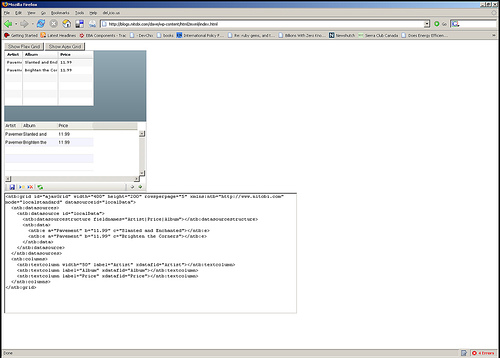
Really the most interesting part is the MXML deserialization stuff. The only contents of the Flex application are two functions for performing the deserialization. I have listed the main part of the code that takes an XML document of an MXML DataGrid declaration and actually instantiates a DataGrid according to that declaration. It’s pretty quick and dirty but at least gets the right thing out! Essentially it just looks at each XML element and creates an Object out of it and sets all the properties on it from the XML element attributes and then recurses through the child elements doing the same. There are some special attributes though like datasources that need a little more care.
public function initGrid(html) {
// setup a tagname to datatype hash - maybe this already exists somewhere
controls['DataGrid'] = 'mx.controls.DataGrid';
controls['ArrayCollection'] = 'mx.collections.ArrayCollection';
controls['Object'] = 'Object';
controls['columns'] = 'Array';
controls['DataGridColumn'] = 'mx.controls.dataGridClasses.DataGridColumn';
// load the HTML into XML DOM
var mxml:XML = new XML('<root>'+html+'</root>');
parseXml(AjaxBox, mxml);
}
public function parseXml(parent, mxml) {
var item:String;
// get all the elements in our XML doc - this should of course walk the xml tree recursively
var itemList:XMLList = mxml.elements('*');
for (item in itemList) {
// get the tag name of the XML node
var tagName:String = itemList[item].localName();
// get the class by using getDefinitionByName() method
var ClassReference:Class = Class(getDefinitionByName(controls[tagName]));
// create an instance of the class
var myObject:Object = new ClassReference();
// get all the attributes and set the properties
var attrList:XMLList = XML(itemList[item]).attributes();
for (var attr:String in attrList) {
myObject[attrList[attr].localName()] = attrList[attr].toString();
}
// now parse the children of this node
parseXml(myObject, itemList[item]);
if (parent.hasOwnProperty(tagName)) {
parent[tagName] = myObject;
} else if (parent.hasOwnProperty("length")) {
if (parent.hasOwnProperty("source")) {
parent.source.push(myObject);
} else {
parent.push(myObject);
}
} else if (parent.hasOwnProperty("dataProvider") && tagName == "ArrayCollection") {
// This means we need to create a datasource for the Grid
parent.dataProvider = myObject;
} else {
parent.addChild(DisplayObject(myObject));
}
}
}
Posted in Web2.0, AJAX, XSLT, Flash, Flex, Declarative Programming, Components, Grid, RIA, FABridge | 1 Comment »
JavaScript Flash Integration Kit
April 20th, 2007
For those of you out there that are thinking of using the JavaScript Flash Integration Kit for building an application watch out for this little bug.
In the FlashTag.addFlashVars(string) function it just sets the internal variable this.flashVarsStr. However, in the FlashTag.toString() method it checks if the this.flashVars variable is null or not to determine if it should write the flash variables into the Flash HTML tag. To fix it, I just changed it from this:
FlashTag.prototype.addFlashVars = function(fvs) {
this.flashVarsStr = fvs;
}
to this:
FlashTag.prototype.addFlashVars = function(fvs) {
this.flashVarsStr = fvs;
if (this.flashVars == null)
this.flashVars = new Object();
}
Other than that it seems to work pretty nicely.
Posted in Uncategorized, AJAX, Flash, bug | 1 Comment »
Securing Ajax Mashups
April 3rd, 2007
I just had a chance to read a good article from Brent Ashley over on IBM developerWorks about how to build secure Ajax mashups. He does a quick refresher on the Ajax and Mashup basics and then discusses current and future techniques for ensuring that your Mashup is a secure one.
Today we have little choice aside from including a cross domain JavaScript file in our web page like when making a Google Maps mashup that requires the Google JavaScript to be included in the page. For a secure mashup Brent suggests using the URL fragment identifier with hidden IFrames - this can be a good solution yet both sides of the IFrame need to agree on a protocol and it is limited to less than 256 bytes of data.
Brent also discusses the future solutions that are proposed from the JSONRequest object to the <module> HTML tag.
It will be interesting to see which proposal actually comes to fruition to enable more secure Ajax Mashups. I like the JSONRequest idea though I am still weary of such a proposal even if it doesn’t send cookies and only accepts valid JSON content. Since the proposal comes from Douglas Crockford I understand why it would be called JSONRequest but it would be pretty silly not to have it also accept XML IMHO - XML doesn’t even have any problems with being “exectuted” in the unsuspecting browser like JSON does. Otherwise, I am a big fan of the Flash approach with their cross-domain XML file that lives on the server and specifies to a Flash movie what domains it can load content from.
Posted in AJAX, Flash, JSON, security | 3 Comments »
Podcast #17
March 29th, 2007
This one almost never saw the light of day but it has been resurrected. Not even really sure what is on it aside from Ryan Stewart
Posted in AJAX, Flash, Flex, Podcast, Nitobi, FABridge, apollo | No Comments »
Flex + AJAX = FlexJAX
May 19th, 2006
We have just put together a little demo that uses the Adobe FABridge library for their new Flex technology and married it with our AJAX Grid control.
Check out the cool screencast here on our Nitobi Labs site. Essentially what it lets you do is plot data from our Grid control using the Flex / Flash.
It should be even more cool once we put in our newly released, cross-browser, AJAX Grid component (which I will post a screencast about very soon)!
Technorati Tags: ajax grid web2.0 eba flex flash
Posted in Web2.0, AJAX, Flash, Flex, Declarative Programming, Components | 1 Comment »
AJAX and Flex - A Match Made in Heaven?
March 8th, 2006
Today a few of us at Nitobi had a sneak peak at some really cool Flex technology from the team over at Adobe.
Essentially we saw how one can go beyond the ExternalInterface feature in Flash 8, which only supports function calls across the JavaScript / ActionScript boundary with primitive objects, to a situation where one can access Flex objects directly from JavaScript and vice versa. This is being called the Flex-AJAX Bridge or FABridge. All the info (with Alpha download) can be found here on Adobe Labs.
Today this means that AJAX developers can better leverage native Flash capabilities such as local storage (hopefully it is faster than ExternalInterface), cross-domain data access, and sockets. It should get really interesting when the AJAX Client for Flex Data Services become available (later this year) which should provide data persistence, pub/sub, push, etc.
As a component vendor, I like the idea of marrying the benefits of both AJAX and Flex - it particularly makes sense for doing anything with charting etc. With the SVG/VML/Canvas battle for vectors graphics dominance pretty much going nowhere (and they can’t even do video or audio), Flash is the best option for rich media that works on a large majority of today’s web browsers. It was a good move on Adobe’s part to provide some incremental benefit for AJAX developers rather than trying to push a full Flex framework where the open standards of the AJAX technology stack rule. Something like XAML, which is Microsoft’s next generation declarative user-interface language, will have a tough time for that exact reason.
Flex seems to be shaping up into something that should, in the near term at the very least, be a great addition to the AJAX developers toolbox. I can’t wait to get into the guts of it - just as soon as Grid V3 is done 
Posted in Web2.0, AJAX, Flash, Flex | No Comments »
AJAX Offline
October 8th, 2005
Just a quick post about running AJaX offline. With the recent release of Flash 8 it seems a good time to bring this up since Flash 8 has everything you need for a robust cross-browser data persistence layer. The two main features of Flash 8 are the SharedObject (although this has been around for a few years now - since Flash 6) and more importantly full JavaScript support. The SharedObject allows you to store as much data as the end user wants to allow and this limit can be configured by the end user.
In the Flash file you can use the ExternalInterface to expose methods to the JavaScript runtime like this:
import flash.external.ExternalInterface;
ExternalInterface.addCallback("JavaScriptInterfaceName", null, FlashMethod);
Similarly you can call JavaScript functions from within the Flash file using the call method of the ExternalInterface
ExternalInterface.call("JavaScriptMethod");
And you can call methods in the Flash movie from JavaScript like this:
function CallMethod() {
if (document.getElementById)
myFlash = document.getElementById("FlashMovieNodeId");
if (myFlash)
myFlash.flashFunction();
}
The other piece of the puzzle is the SharedObject which is accessible through ActionScript in Flash.
var my_SO:SharedObject = SharedObject.getLocal("MySharedObjectName");
my_SO.data.eba = dat;
var ret_val = my_SO.flush();
It is importatnt to note that if the end user specified data size limit is smaller than the requested amount of data to be saved it needs to show the Flash movie to the user (do this simply with a little JavaScript) so the user can either increase the cache size or not. The
ret_val
from the SharedObject
flush
method can be checked to see the result and determine if the Flash movie needs to be shown for input or not.
The other great thing about this is that the upgrade path to Flash 8 has been made a bit better. You can actually have the Flash 8 player installed through the old Flash player from what I understand (called Express Install I believe).
All and all a pretty slick way to persist data with AJaX without relying on cookies or the User Data behaviour in IE.
Posted in AJAX, JavaScript, Flash, Flex | 5 Comments »


 Entries (RSS)
and
Entries (RSS)
and