Archive for the 'Components' Category
Nitobi Complete UI Beta 1 
February 17th, 2007
Alright, we were supposed to have everything together and ready for full launch last Thursday but we came across a few difficult IE7 problems that has cause us to push back release by about 2 weeks.
However, we did release the beta 1 last night. There are still a few little bugs with the packaging and docs but for the most part the components are looking sweet! We got all the good stuff like:
- Tree
- Tab
- Fisheye Menu
- Callout
- Ajax Toolkit
- Grid
- Combo
More info here.
All components are pretty much 100% client side with the exception of small server side components (ASP, CFM, PHP, JAVA, ASP.NET) that serve up the data. We are going to try and pack in one or two more features before release so speak up and let us know what you would like to see!
Posted in AJAX, Components, Nitobi, RIA | No Comments »
Flex Ajax Dashboard
October 17th, 2006
We have just made a quick Flex/Ajax dashboard to show how Flex and Ajax can work together to make a very compelling user-interface for something like a corporate information dashboard. You can check it out the demo here and an article about the demo here.
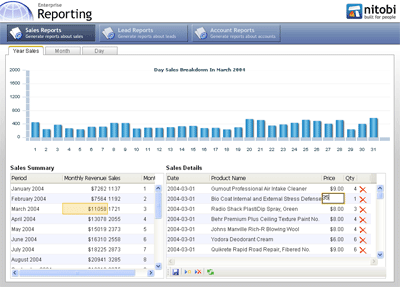
Using the FABridge along with the Nitobi Ajax Grid and Adobe Flex Charting, we have created a scenario where one can view monthly sales data and then see the sales details for the month in both a tabular format in a grid and visually represented in a Flex chart.
Under the hood we have used PHP and MySQL to provide the data to both the data grids and the chart. When a user clicks on a record in the sales data grouped by month, the details grid makes a request to the server for all the sales data for that month - this ends up being between 200 to 1000 records or so. To ensure that the details grid is still fast, we only render the part of the dataset that the user is looking at rather than rendering all 1000 records say, which can take a long time when you use the DOM
innerHTML
property. The other thing that happens when a month is selected in the master grid is that the Flex chart is also updated with information about the sales for that month, except that the sales data is then grouped by day. Grouping of the sales data could either be done on the client or the server, however, since we have already retreived all the sales data for the month and displayed it in the detail grid we simply take that same data and group it very quickly using an XSL transformation (yes currently only IE and Moz but the latest Safari build also has it - finally!). The grouped data we output from the XSL transformation is actually formatted as JSON which is then evaluated into a JavaScript object and passed to the Flex chart for rendering. The grouping XSLT is pretty simple and uses the
Muenchian method:
<xsl:stylesheet version="1.0"
xmlns:xsl="http://www.w3.org/1999/XSL/Transform" xmlns:ntb="http://www.nitobi.com">
<xsl:output method="text" encoding="utf-8"/>
<xsl:key name="sales-by-day" match="ntb:e" use="@h" />
<xsl:template match="/">
[<xsl:apply-templates select="//ntb:data" />{}]
</xsl:template>
<xsl:template match="ntb:data">
<xsl:for-each select="ntb:e[count(. | key('sales-by-day', @h)[1]) = 1]">
{'totalSales': <xsl:value-of select="sum(key('sales-by-day', @h)/@i)"/>,
'day': <xsl:value-of select="@h" />,
'month': <xsl:value-of select="@f" />,
'year': <xsl:value-of select="@g" />},
</xsl:for-each>
</xsl:template>
</xsl:stylesheet>
We have also hooked up a few other events so that the chart will be updated when changes to the data in the detail grid are made.
All in all, by using the FABridge to move data to and from a Flex chart we can create very compelling and ultimately very useful dashboard type of application by merrying the Flex and Ajax technologies.
Posted in Web2.0, AJAX, Flex, Declarative Programming, Components, Nitobi, RIA | 11 Comments »
Declarative AJAX Components and XML Namespaces
October 16th, 2006
Being on the OpenAjax committee has been pretty interesting so far despite the fact that I have only managed to be in on one call - luckily all the minutes are on the wiki and I have been following that pretty intently.
The declarative markup comittee is looking at how to standardize the definition and instantiation of declarative AJAX components or widgets. A good example of a complex component is the Nitobi Ajax Grid component while the Dojo framework has several smaller widgets like the very cool fisheye menu. To create an Ajax widget in a web page declaratively one might have some markup like this:
<ntb:grid ... />
Similarly, one could use something like this:
<div oatype="ntb:grid" ... />
This is very similar to the idea of microformats - and even makes them more expressive. In either case the OpenAjax bootstrapper would start using something like the
onload
event on the
window
object and it would search through the DOM and find all elements with a custom namespace or an
oatype
attribute. Once the bootstrapper finds a component declaration it refers to a registry to find the toolkit that is responsible for parsing and loading that specific component from the declaration. Personally, I like the former with the custom tag that is properly namespaced.
Unfortunately, IMHO, people generally opt for the later declaration that uses the build in HTML elements and simply adds custom attributes. While both are nearly identical, the use of namespace prefixes on the tags is possibly more “standard” and ensures that one doesn’t get a Grid component mixed up with a regular DIV element. For the most part, I think the gravitation towards the later declaration is due to the general contempt people hold for Internet Explorer - and indeed most of the people on the declarative markup committee feel this way. Having been building declarative components for Internet Explorer for over six years now we are pretty well versed in the problems with Internet Explorer, and I can assure you that the support for XML namespaces and custom tags in Internet Explorer is perfectly fine. I would argue, as you will see in a moment, that the support is even better in Internet Explorer than in Mozilla. Some Ajax frameworks, such as Dojo, support XML namespaces in Mozilla but not in IE due to perceived deficiencies.
From our experience, Firefox and not Internet Explorer has been the browser that breaks when custom namespaced tags are used. The biggest hurdle is that, as noted in the Dojo manual page that, one “must” (emphasis on the part of the author of the Dojo manual) define the xmlns:mynamespace on the page. Usually that is done on the HTML tag. Anyone that has worked with XML will surely know that if you want to have some elements in a different namespace then declaring that namespace is a fact of life. On the other hand, Firefox works in a quirky way if you define custom XML namespaced tags - forgetting the fact that it doesn’t even care if you define the namespace or not, which seems very bizarre to anyone familiar with XML. For the straight dope on custom tags in IE everyone should check out the relevant MSDN article (it is amazing all the good stuff on MSDN that many people ignore). The jist of the article is that you just need to specify your XML namespace on the HTML element like this:
<html xmlns:mynamespace>
How completely unexpected! However, it can also be specified on any other element that is a parent of an element that uses the namespace. The article describes the fact that support for custom tags was introduced for enabling behaviours - ie defining custom HTML elements that behave in some custom way - which were a great idea. Admitedly, the one drawback of the IE model is that it does not support the
document.getElementsByTagNameNS()
method, which can select tags with a namespace in Firefox. Instead one has to use the regular
getElementsByTagName
method and look at the namespace value. This is easily wrapped of course.
Having said all this, one should also remember that XHTML is not really there yet.
At any rate, we still want to use XML namespaced tags and there are a few problems we have found with Firefox regarding support for custom XML namespaced elements. The two main problems we have observed are:
Styles are not applied correctly
DOM methods do not work correctly
Self closing tags do not work
To illustrate this, I have made a simple example with some sample markup that might be used in some sort of windowing or panelling situation. I defined some buttons, panels and a title with some interspersed native HTML elements.
<div id="div1">
<ntb:button id="button1">button 1</ntb:button>
<ntb:button id="button2">button 2</ntb:button>
<ntb:panel id="panel1">
<ntb:title id="title1">
<div id="div2">panel title 1</div>
</ntb:title>
<ntb:contents id="contents1">
<div id="div3">Contents div3</div>
<div id="div4">Contents div4</div>
</ntb:contents>
</ntb:panel>
</div>
One common thing to do is define some custom styles for these elements such as this:
ntb\:panel {border:1px solid red;display:block;}
ntb\:contents {color:red;display:block;}
ntb\:title {border:1px solid black;background-color:#3366FF;display:block;}
ntb\:button {border:1px solid black;background-color:#CCCCCC;}
The results are fairly good in IE:
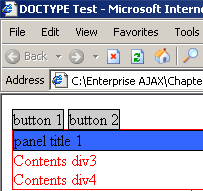
and pretty poor in Mozilla:
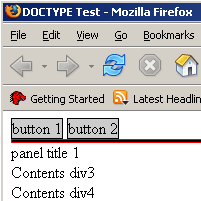
Granted that is quite contrived and the likelyhood of specifying styles for the custom elements is pretty low.
This brings us to the second point which is a bit more important. The native DOM methods in Mozilla don’t actually recognize the custom elements; or rather, to be more precise, DOM methods don’t reflect the true DOM hierarchy as it appears in your HTML. As an example, we will try and access the parent node of each of the nodes in our sample custom namespaced HTML. The results were as follows:
IE parentNode()
| Target Node ID |
Expected Parent ID |
Actual Parent ID |
| title1 |
title1 |
title1 |
| contents1 |
contents1 |
contents1 |
| … |
… |
… |
| ok you get the idea |
Mozilla parentNode()
| Target Node ID |
Expected Parent ID |
Actual Parent ID |
| div2 |
title1 |
div1 |
| div3 |
contents1 |
div1 |
| div4 |
contents1 |
div1 |
| button1 |
div1 |
div1 |
| button2 |
div1 |
div1 |
| panel1 |
div1 |
div1 |
| title1 |
panel1 |
panel1 |
| contents1 |
panel1 |
div1 |
Internet Explorer gets the parentNode as one would expect but Mozilla seems to have some difficulty. There are similar difficulties with many other of the DOM methods in Mozilla.
The big problem we have found is that Mozilla does not support self closing tags. One would expect that the following would be equivalent:
<ntb:grid />
<ntb:grid></ntb:grid>
Not so in Mozilla. The later syntax is ok, whereas the self closing tag does not get parsed correctly when you look at the innerHTML of an element and it is even worse once you have self closing tags in conjunction with DOM methods.
Mozilla has to get its act together with custom namespaced tags for declarative AJAX components to ever get anywhere. If anyone wants to compare war stories then please leave some comments.
Technorati tags:ajax, microformat, declarative, components, xml
Posted in Web2.0, AJAX, XML, Microformat, Declarative Programming, Components | 14 Comments »
Grid V3.2
September 10th, 2006
It’s 10:30 on saturday night and I am just finishing up another pass over the documentation for Grid V3.2 which we are planning on launching this thursday (sept 14th). It is looking like a not _so_ unrealistic deadline. I am looking forward to getting the new JSDocs out there and hearing some feedback as the current docs are admitedly sparse at best. This time around the docs will not only be better but the Grid will have far better support for runtime manipulation and local data sources. Andre, Alexei and I took 30 minutes today to do a quick podcast as well that should be up tomorrow I guess.
It’s time for a drink. Hope everyone is having a good weekend!
Posted in AJAX, Components, Grid, Nitobi | No Comments »
Extending an Ajax Component
August 14th, 2006
Ajax components are not only cool but actually quite useful - and I am not just saying that as a component vendor but as a web application developer. At nitobi we do both consulting and component development and when doing consulting we shy away from actually changing the component source code to do things that we need and instead focus on extending core components.
Since JavaScript is a dynamic language, one can really easily extend functionality. Most notably, many will have at least heard of aspect oriented programming which is the idea of adding before, after, or around advice - which just means running some code before, after or around some predefined method.
Let’s take a look at a quick example. As many already know, classes in JavaScript are defined as functions.
// Define the Dog class
function Dog()
{
this.breed = ‘berner’;
}
// Define the speak method on the Dog class
Dog.prototype.speak = function()
{
alert(’w00f’);
}
That defines a Dog class that has a public property for the dog breed and a public method to make that pooch sing.
So let’s pretend that I am an Ajax component vendor (who knew) and to make my JavaScript load faster I might go ahead and remove the white-space, remove comments, and even replace long variable names with shorter ones. This all happens when I “compile” my JavaScript on my server before I let people access it.
If this were a compiled DLL say, then it would be more problematic to do something like change what the dog says based on the breed of the dog - particularly if this has to be done at runtime rather than compile time. Luckily for us AJAX developers, JavaScript is very flexible 
The first thing that we can do is create a new instance of our Dog class and actually replace the speak method with something completely different.
// Create a new instance of a Dog
var berner = new Dog();
// Re-define the speak method for this instance only
berner.speak = function() {
alert(’I am a Bernese Mountain Dog’);
}
If we wanted to change every new instance of the Dog class we can also change the actual class definition by changing the prototype property just as the original author did.
// Re-define the speak method for the class
Dog.prototype.speak = function()
{
alert(’I am a ‘ + this.breed);
}
Alternatively, we can also add code that will run before or after the speak function. We can define a static function called attachAfter in the aspect namespace that will take an object to which some method belongs (sourceContext), a string that is the name of a method on that object (sourceMethod), and a reference to function object that we want to call after the source method is called (aspectMethod). aspect.attachAfter is pretty simple and looks something like this:
aspect.attachAfter = function(sourceContext, sourceMethod, aspectMethod)
{
var oldMethod = sourceContext[sourceMethod];
sourceContext[sourceMethod] = function()
{
oldMethod.apply(sourceContext, arguments);
aspectMethod.apply(sourceContext, arguments);
}
}
We use the JavaScript apply method here such that we can pass the arguments list that the method is to be called with. To actually use this with our Dog class we could either augment the instance of the class or even the class itself. Here is an example of attaching some function that will alert the breed property of the dog after the dog speaks.
var berner = new Dog();
// This will just alert ‘w00f’ as we expect
berner.speak();
// Now attach an after function to the speak method
aspect.attachAfter(berner, “speak”, function(){alert(’I am a ‘+this.breed)});
// This will now alert ‘w00f’ and then ‘berner’
berner.speak();
Notice that we can even execute the after function in the context of the berner object and therefore we have access to the this keyword in our attached function.
I am going to look at more JavaScript features in the coming weeks including inheritance and dynamic XML parsing. If anyone sees any problems here let me know!
Technorati Tags: ajax, components, javascript, patterns, architecture
Posted in AJAX, JavaScript, Architecture, Components | 4 Comments »
Nitobi Grid and Google Maps Mash’d-up
August 2nd, 2006
I have been meaning to do some mashup action for a long time now and finally found some time. Andre tried to steal my screenshot cause I originally made it for his talk at GeoWeb. I have just made a screencast of it to give people an idea of how it all works.
The idea was to use our Ajax Grid control to provide a nice interface into which addresses could be entered and then plotted on a Google Map.
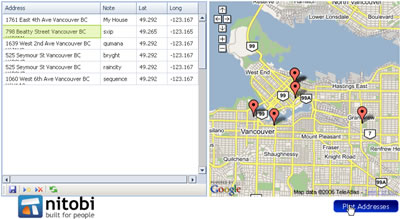
So what this enables people to do is copy addresses from MS Word, Excel or even OpenOffice products - no proprietary tricks here. Of course the Grid currently only works in FF and IE (sorry safari users). Then when I click on the “plot addresses” button (which could also happen every time I edit a record in the Grid for example) a request is made to the Google server for each record in the Grid and it does the geocoding - ie converting an address to lat/long - which can then be plotted on the map. It is a pretty sweet thing to be able to take a bunch of addresses and get them plotted on am online map!
Here is the screencast (sorry about the crappy audio ) and I will try and get the sample up in the next few days so that people can actually try it out!
Technorati Tags: google, ajax, map, web2.0
Posted in Web2.0, AJAX, Components, Google, Map | 10 Comments »
Podcasting with Michael Mahemoff
July 25th, 2006
I didn’t get a chance to post this yesterday, but Michael Mahemoff (one of the of Ajaxians) had me on his latest Ajax functionality and usability podcast about page architecture patterns. We discussed several Ajax patterns including pop-up, virtual workspace and portlet.
Check out the post here.
Technorati Tags: patterns, ajax, podcast
Posted in AJAX, Components, Podcast, Patterns | No Comments »
AJAX and Java
June 13th, 2006
I have been preparing some screencasts showing how to use DWR with NetBeans over the weekend and I will be presenting that along with a few slides about AJAX + Java on a webcast over at developer.com. Check out the link there for all the details.
Here is the preliminary slide deck if anyone cares to take a look and give any feedback. If you want the real goods you will just have to join the webcast!
We should also be doing another podcast tomorrow night so if you can’t make the webcast maybe check out the pod version. Lots of good Nitobi news this week and I am sure there will be some stimulating AJAX talk! If wants any topics covered be sure to let us know.
Technorati Tags: java, jsf, ajax, components, webcast, netbeans
Posted in AJAX, Architecture, JSF, Components, NetBeans | 4 Comments »
Podcasting it up!
May 24th, 2006
Well, Captain AJAX and I finally got around to making our first podcast! It is a bit long and the audio sucks but we will be sure to get that fixed for next time  . Anyhow, Dre and I just talked about everything that happened in the past coupld weeks including Dre’s findings down at JavaOne, The AJAX Experience, DCamp and NetBeans Day.
We also talked about the launch of Nitobi Grid V3…and what's to come down the road - WARNING - could be considered shameless self promotion but we also talk about some AJAX technology stuff
Here is the podcast care of Audioblo. If anyone has any tips about posting and or making the old podcasts then let us know!
Technorati Tags: ajax podcast javaone ajaxexperience
Posted in Web2.0, AJAX, JavaScript, XML, Architecture, Business, Flex, Declarative Programming, Components | No Comments »
Flex + AJAX = FlexJAX
May 19th, 2006
We have just put together a little demo that uses the Adobe FABridge library for their new Flex technology and married it with our AJAX Grid control.
Check out the cool screencast here on our Nitobi Labs site. Essentially what it lets you do is plot data from our Grid control using the Flex / Flash.
It should be even more cool once we put in our newly released, cross-browser, AJAX Grid component (which I will post a screencast about very soon)!
Technorati Tags: ajax grid web2.0 eba flex flash
Posted in Web2.0, AJAX, Flash, Flex, Declarative Programming, Components | 1 Comment »


 Entries (RSS)
and
Entries (RSS)
and