Archive for the 'XML' Category
XML/XSLT in Mozilla 
January 17th, 2006
I had just clicked the “save and preview” button and lost my entire post … anyhow I will give it another shot but it will surely not be anywhere as lucid given my rising urge to kill 
Given that we have been developing AJaX solutions for some time now based on Internet Explorer it is becoming a wee bit annoying that we have to cater so much to the Firefox/Mozilla using crowd simply because they are the most vocal and influential! Luckily most of our customers still use Internet Explorer. Nonetheless we are doing our best and hope to have a cross browser architecture for our AJaX components very soon. In so doing, I have been having a fun time figuring our XPath and XSLT in Mozilla so that it emulates Internet Explorer (I will likely just end up using sarissa in the end though). Having gone through most of this process, I finally understand why the majority of Mozilla developers hate XML/XSLT and love JSON! It also helps that MSDN has such great documentation I guess as well :S
Most of this work has been in an effort to create a small library that I call J4X - JSON for XML - which essentially dynamically creates a JavaScript object representing the XML behind it. This liberates developers from having to use XML interfaces to access their objects and insteads makes it just like JSON. So you get the best of both worlds - easy programatic access and XML based message formatting! In that respect it is more or less a stop-gap technology until E4X becomes more widely supported.
Posted in AJAX, XML, XSLT | 2 Comments »
Declarative Data Binding
December 30th, 2005
I am currently looking into various markup based / declarative languages such as SVG, XForms, MXML/Flex, XUL, XAML and Laszlo. These are all picking up steam to various degrees. I find it hard to imagine a Microsoft future without XAML (or Adobe without Flex for that matter) - though I suppose it is _possible_…
At any rate, the evolving declarative landscape is very interesting particularly since every language is similar to the next - so close in fact that they are really just a quick XSL Transformation away from each other. The question is which technology will be the trail blazer that defines the new landscape? To my way of thinking, the most important part of any of these declarative languages is data binding and that is where the war will be won.
Several of these technologies are W3C standards (SVG, XForms, XBL) while the others are being pushed by various companies / foundations such as Mozilla (XUL), Adobe (MXML/Flex), Microsoft (XAML) and Laszlo (Laszlo).
What I do like quite a bit on the W3C side of things is XBL - it seems pretty well thought out but there are still lingering questions that I need to get sorted. When looking at these different languages the first thing that I examine is how easy it is to create a simple lookup or listbox. So essentially consider some foreign key relationship between to sets of data such as a list of people records. In the user-interface you want to display their list of names while actually binding to the person’s ID. This is fairly easily achieved in XForms from what I have seen (when using select or select1), however, the other languages are a bit more ambiguous on these sorts of issues I find. Here is the snippit from XForms:
<select model=”cone” ref=”my:order”>
<label>Flavors</label>
<itemset model=”flavors” nodeset=”/my:flavors/my:flavor”>
<label ref=”my:description”/>
<value ref=”my:description”/>
</itemset>
</select>
Essentially by using the <value ref=”my:description”/> tag tells the XForms processor the xpath in the data source / model that the selected value should come from - which can be different from the label path.
If anyone can point me to some good examples in any of these languages I would love to see them!
Posted in Web2.0, AJAX, XML, Declarative Programming | 1 Comment »
JSON Benchmarking: Beating a Dead Horse
December 21st, 2005
There has been a great discusson over at Quirksmode [1] about the best response format for your data and how to get it into your web application / page. I wish that I had the time to respond to each of the comments individually! It seems that PPK missed out on the option of using XSLT to transform your XML data to an HTML snippit. In the ensuing discussion there were only a few people mentioning XSLT and many of them just to say that it is moot! I have gone over the benefits of XSLT before but I don’t mind going through it once more Just so everyone knows, I am looking at the problem _primarily_ from the large client side dataset perspective but will highlight areas where JSON or HTML snippits are also useful. Furthermore, I will show recent results from JSON vs XSLT vs XML DOM in Firefox 1.5 on Windows 2000 and provide the benchmarking code so that everyone can try it themselves (this should be up shortly - just trying to make it readable).
As usual we need to take the “choose the right tool for the job” stance and try to be objective. There are many dimensions that tools may be evaluated on. To determine these dimensions let’s try and think about what our goals are. At the end of the day I want to see scaleable, useable, re-useable and high performance applications developed in as little time and for as little money as possible.
End-User Application Performance
In creating useable and high performance web applications (using AJAX of course) end-users will need to download a little bit of data up front to get the process going (and they will generally have to live with that) before using the application. While using the application there should be as little latency as possible when they edit or create data or interact with the page. To that end, users will likely need to be able to sort or filter large amounts of data in table and tree formats, they will need to be able to create, update and delete data that gets saved to the server and all this has to happen seemlessly. This, particularly the client side sorting and filtering of data, necessitates fast data manipulation on the client. So the first question is then what data format provides the best client side performance for the end-user.
HTML snippits are nice since they can be retieved from the server and inserted into your application instantly - very fast. But you have to ask if this achieves the performance results when you want to sort or filter that same data. You would either have to crawl through the HTML snippit and build some data structure or re-request the data from the server - if you have understanding users who don’t mind the wait or have the server resources and bandwidth of Google then maybe it will work for you. Furthermore, if you need fine grained access to various parts of the application based on the data then HTML snippits are not so great.
JSON can also be good. But as I will show shortly, and have before, it can be slow since the eval() function is slow and looping through your data creating bits of HTML for output is also slow. Sorting and filtering arrays of data in JavaScript can be done fairly easily and quickly (though you still have to loop through your data to create your output HTML) and I will show some benchmarks for this later too.
XML DOM is not great. You almost might as well be using JSON if you ask me. But it can have it’s place which will come up later.
XML + XSLT (XAXT) on the other hand is really quite fast in modern browsers and is a great choice for dealing with loads of data when you need things like conditional formatting and sorting abilities right on the client whithout any additional calls to the server.
System Complexity and Developement
On the other hand, we also have to consider how much more difficult it is to create an application that uses the various data formats as well as how extensible the system is for future development.
HTML snippits don’t really help anyone. They cannot really be used outside of the specific application that they are made for but when coupled with XSLT on the server can be useful.
JSON can be used between many different programming languages (not necessarily natively) and there are plenty of serializers available. Developers can work with JSON fairly easily in this way but it cannot be used with Web Services or SOA.
XML is the preferred data format for Web Services, many programming languages, and many developers. Java and C# have native support to serialize and de-serialize from XML. Importantly on the server, XML data can be typed, which is necessary for languages like Java and C#. Inside the enterprise, XML is the lingua franca and so interoperability and data re-use is maximized, particularly as Service Oriented Architecture begins to get more uptake. XSLT on the server is very fast and has the advantage that it can be used, like XML, in almost any porgamming language including JavaScript. Using XSLT with XML can have problems in some browsers but moving the transformations to ther server is one option, however, this entails more work for the developer.
Other factors
- The data format should also be considered due to bandwidth concerns that affects user-interface latency. Although many people say that XML is too bloated it can easily be encoded in many cases and becomes far more compact than JSON or HTML snippits.
- As I mentioned XML can be typed using Schemas, which can come in handy.
- Human readability of XML also has some advantages.
- JSON can be accessed across domains by dynamically creating script tags - this is handy for mash-ups.
- Standards - XML.
- Since XML is more widely used it is easier to find developers that know it in case you have some staff turnover.
- Finally, ECMAScript for XML (E4X) is a _very_ good reason to use XML [2]!
Business Cases
There are various business cases for AJAX and I see three areas that differentiate where one data format should be chosen over the other and these are: mash-ups or the public web (JSON can be good), B2B (XML), and internal corporate (XML or JSON). Let’s look at some of the particular cases:
- if you are building a service only to be consumed by your application in one instance then go ahead and use JSON or HTML (public web)
- if you need to update various different parts of an application / page based on the data then JSON is good or use XML DOM
- if you are building a service only to be consumed by JavaScript / AJAX applications then go ahead and use JSON or a server-side XML proxy (mash-up)
- if you are building a service to be consumed by various clients then you might want to use something that is standard like XML
- if you are building high performance AJAX applications then use XML and XSLT on the client to reduce server load and latency
- if your servers can handle it and you don’t need interaction with the data on the client (like sorting, filtering etc) then use the XSLT on the server and send HTML snippits to the browser
- if you are re-purposing your corporate data to be used in a highly interactive and low latency web based application then you had better use XML as your data message format and XSLT to process the data on the client without having to make calls back to the server - this way if the client does not support XSLT (and you don’t want to use the _very slow_ [3] Google XSLT engine) then you can always make requests back to the server to transform your data.
- if you want to have an easy time finding developers for your team then use XML
- if you want to be able to easily serialize and deserialize typed data on the server then use XML
- if you are developing a product to be used by “regular joe” type developers then XML can even be a stretch
I could go on and on …
Performance Benchmarks
For me, client side performance is one of the biggest reasons that one should stick with XML + XSLT (XAXT) rather than use JSON. I have done some more benchmarking on the recent release of Firefox 1.5 and it looks like the XSLT engine in FF has improved a bit (or JavaScript became worse).
The tests assume that I am retrieving some data from the server which is returned either as JSON or XML. In XML I can use the responseXML property of the XMLHTTPRequest object to get an XML object which can subsequently be transformed using a cached stylesheet to generate some HTML - I only time the actual transformation since the XSLT object is a singleton (ie loaded once globally at application start) and the responseXML property should have little effect different from the responseText property. Alternatively the JSON string can be accessed using the responseText property of the XMLHTTPRequest object. For JSON I measure the amount of time it takes to call the eval() function on the JSON string as well as the time it takes to build the output HTML snippit. So in both cases we start with the raw output (in either text or XML DOM) from the XMLHTTP and I measure the parts needed to get from there to a formatted HTML snippit.
Here is the code for the testJson function:
function testJson(records)
{
//build a test string of JSON text with given number of records
var json = buildJson(records);
var t = [];
for (var i=0; i<tests ; i++)
{
var startTime = new Date().getTime();
//eval the JSON string to instantiate it
var obj = eval(json);
//build the output HTML based on the JSON object
buildJsonHtml(obj);
t.push(new Date().getTime() - startTime);
}
done(’JSON EVAL’,records,t);
}
As for the XSLT test here it is below:
function testXml(records)
{
//build a test string of xml with given number of records
var sxml = buildXml(records);
//load the xml into an XML DOM object as we would get from XMLHTTPObj.responseXML
var xdoc = loadLocalXml(sxml, “4.0″);
//load the global XSLT
var xslt = loadXsl(sxsl, “4.0″, 0);
var t = [];
for (var i=0; i<tests ; i++)
{
var startTime = new Date().getTime();
//browser independent transformXml function
transformXml(xdoc, xslt, 0);
t.push(new Date().getTime() - startTime);
}
done(’XSLT’,records,t);
}
Now on to the results … the one difference from my previous tests is that I have also tried the XML DOM method as PPK suggested - the results were not that great.
For IE 6 nothing has changed of course, except that we can see using XML DOM is not that quick, however, I have not tried to optimise this code yet.
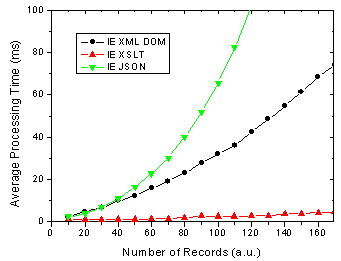
Figure 1. IE 6 results for JSON, XML DOM and XML + XSLT.
On the other hand, There are some changes for FF 1.5 in that the XSLT method is almost as fast as the JSON method. In previous versions of FF XSLT was considerably faster [4].
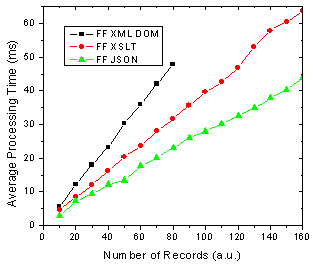
Figure 2. FF 1.5 results for JSON, XML DOM and XML + XSLT.
What does all this mean you ask? Well as before I am assuming that the end-users of my application are going to use FF 1.5 and IE 6 in aboutl equal numbers, 50-50. So this might be a public AJAX application on the web say whereas the division could be very different in a corporate setting. Below shows the results of this assumption and it shows that almost no matter how many data records you are rendering, XSLT is going to be faster given 50-50 usage of each browser.
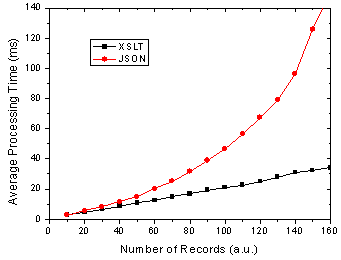
Figure 3. Total processing time in FF and IE given 50-50 usage split.
I will have the page up tomorrow I hope so that everyone can try it themselves - just need to get it all prettied up a bit so that it is understandable 
References
[1] The AJAX Response: XML, HTML or JSON - Peter-Paul Koch, Dec 17, 2005
[2] Objectifying XML - E4X for Mozilla 1.1 - Kurt Cagle, June 13, 2005
[3] JavaScript Benchmarking - Part 3.1 - Dave Johnson, Sept 15, 2005
[4] JavaScript Benchmarking IV: JSON Revisited - Dave Johnson, Sept 29, 2005
Posted in Web2.0, AJAX, JavaScript, XML, XSLT, JSON | 19 Comments »
Structured Blogging
December 16th, 2005
Paul Kedrosky chimed in on the recent introduction of Structured Blogging (SB). Paul suggests that laziness is going to prevent SB from taking off and I would have to agree. Like many Web 2.0 concepts, it puts too much faith in the hands of the user - and aside from over zealous alpha-geeks, it will likely be too much work for users to actually use.
As time goes on I am certainly finding that just using a search engine is actually faster than using del.icio.us and is less work to boot! Flickr is the one exception where tagging is actually slightly more useful [1,2] - seeing as how search engines have a hard time indexing image content . This is my common conclusion from using many different online services. Sure I sign up for all the great new Web 2.0 / AJAX services … I signed up for Writely and they can use me in their stats of doubling their user base every X weeks but I am never going to use it again; not because it is not cool and slightly useful but because I am simply too lazy.
This subject also came up yesterday as I was reading one of the latest fire stoking, “Five somethings about Web2.0 / AJAX”, post [3] by Dion Hinchcliffe over on the Web 2.0 blog. Dion’s number one reason that Web 2.0 matters is because it “seeks to ensure that we engage ourselves, participate and collaborate together”. Again I can’t help but think about how lazy most people are. Sure people that are actually interested in Web 2.0, tagging and the like make it seem really great but for the most part they cannot be bothered.
For Web 2.0 to get traction beyond the alpha-geeks I think it needs to empower developers and ask less of end-users.
References
[1] More Tags - Dave Johnson, Dec 14, 2005
[2] Tagging Tags - Dave Johnson, Dec 1, 2005
[3] Five Reasons Why Web 2.0 Matters - Dion Hinchcliffe, Dec 7, 2005
Posted in Web2.0, XML, Service Oriented Architecture, Semantic Web, Microformat | No Comments »
E4X and JSON
December 2nd, 2005
Given the fact that many people prefer to use JSON over XML (likely because they have not realized the beautiful simplicity of XSLT) it is interesting that ECMA is actually taking a step away from JavaScript in introducing ECMAScript for XML. There is lots of interest in it so far [1-4] and it should prove to be quite useful in building AJAX components. For a good overview check out Brendan Eich’s presentation.
Will E4X make JSON go the way of the Dodo?
[1] Introduction to E4X - Jon Udell, Sept 29, 2004
[2] Objectifying XML - E4X for Firefox 1.1 - Kurt Cagle, June 13, 2005
[3] AJAX and E4X for Fun and Profit - Kurt Cagle, Oct 25, 2005
[4] AJAX and Scripting Web Services with E4X, Part 1 - Paul Fremantle, Anthony Elder, Apr 8, 2005
Posted in Web2.0, AJAX, JavaScript, XML, JSON | No Comments »
Identity, Mash-ups and Open APIs
October 23rd, 2005
There was a recent post on Ajaxian [1] about a �call to arms� by Sam Schillace from Writely [2] for open mash-up APIs. Essentially the jist of it was that people who are developing Web 2.0 applications should create APIs in some �standard� format to promote interoperability between services. From what I recall there has been a lot of effort put towards describing interfaces to web based services using some sort of standard XML based vocabulary. So just because it is Web 2.0 does that mean we should simply ignore everything that has been done in the past and try to re-invent the wheel Web 2.0 Style at every chance we get? Anyhow, Chris Kolhardt of Silver Tie then offered up some more ideas about this [3] regarding what needs to happen for an open API. I have listed the ideas below and I offer my comments in devil�s advocate style �
Single sign on and Identity management, using an open standard � This would be great in a perfect world. There are many problems with SSO not the least of which being users not trusting who owns your identity information (do you think that Microsoft was using Passport just to make your life easier �) or the risks of forged credentials (sure just because the user has an eBay account doesn�t mean much). EWallets and the like were all the rage during Web 1.0 and not even Microsoft could make Passport work - we might be waiting a while for this despite the hard work of our fellow Vancouverite Dick Hardt over at Sxip.
Ability to list and select resources from other services � there have been lots of engineers working on this problem for some time and just two examples of the results being UDDI and ebXML Registry which are both already �standards�. I can�t help but ask why do we need more �standards� like this? Oh sure people may find it to be too complicated but the the problem itself is actually quite complicated. Here is a novel idea, why not use the existing standard for descibine web based service interfaces called WSDL. What? Use a standard from W3C? That is sooooo Web 1.0, we want ad-hoc micro-formats and useless folksonomies.
Ability to easily import documents from one service, and embed them in another, even if the imported document is not publicly published to the world � this could be really difficult. Of the four problems mentioned this one actually sounds somewhat interesting.
All the while keeping in mind that the user experience must be easy and seamless � sure we can do this thanks to the AJaX technology of Internet Explorer 5 circa 1999.
These sort of ideas just re-affirm my belief that Web 2.0 is actually is more hype than version 1.0. It seems that the combination of tech buy-outs (Flickr, Blogger, Upcoming, whatever) by successful Web 1.0 and previous companies (Google, Yahoo, Microsoft, etc) and the fame achived by people who make simple Google Maps mash-ups is causing a lot of entrepreneurs to see bags of money again. While Google has a real business plan that makes them money the new Web 2.0 business plan, unlike the Web 1.0 busines plan of trying to actually make money (this is _obviously_ where Web 1.0 went wrong), can be summarized in four easy steps:
- provide free social software (bonus for using tags or AJaX)
- get as many people to sign up as possible
- sell to Google/Yahoo
- profit (of course)
references
[1] Open Mashup APIs - Ajaxian, Oct 17, 2005
[2] Mashups and Openess - Sam Schillace, Oct 7, 2005
[3] Standard Interoperability API - Chris Kolhardt, Oct 8, 2005
Posted in AJAX, XML, Business | No Comments »
JavaScript Benchmarking IV: JSON Revisited
September 29th, 2005
My last post [1] about JSON had a helpful comment from Michael Mahemoff, the driving force behind the great AJaX Patterns site (I recommend taking a quick gander at the comments/responses from/to Michael and Dean who are both very knowledgeable in the AJaX realm).
Experimental: Comparing Processing Time of JSON and XML
Michael had commented that there was a JavaScript based JSON parser that is an alternative to using the native JavaScript
eval()
function which provides a more secure deserialization method. So I put the JSON parser to the test in both IE 6 and Firefox and compared it to using
eval()
as well as using XML. The results are shown below:
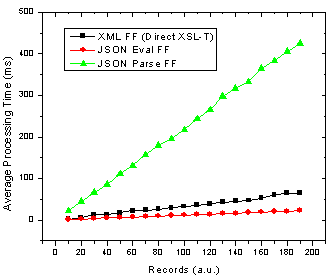
Figure 1. JSON parse and eval() as well as XML transformation processing time with number of records in Firefox.
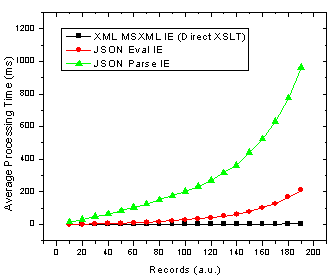
Figure 2. JSON parse and eval() as well as XML transformation processing time with number of records in Internet Explorer.
Ok so it’s pretty clear that the JSON parser is by far the slowest option in both browsers! The result that muddies the water is that in Firefox using JSON with the
eval()
function is actually the fastest method. These results also re-inforce those I found in an earlier JavaScript benchmarking post [2] which revealed that JavaScript was faster than XSL-T for building an HTML table in Firefox but not in IE 6.
Analysis: Implications of Varying DataSet Size
Now, to make it crystal clear that I am not simply saying that one method is better than another I will look at what this means for choosing the proper technology. If you look at browser usage stats from say W3Schools, then we can determine the best solution depending on the expected number of records you are going to be sending to the browser and inserting into HTML. To do this I divide each set of data by the browser usage share and then add the JSON Firefox + JSON Internet Explorer processing times and do the same for the XML data. This then gives the expected average processing time given the expected number of people using each browser. The results are below.
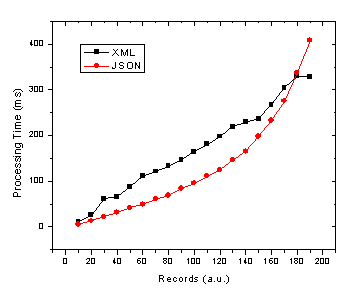
Figure 3. JSON and XML average processing time against record number given 72% and 20% market share of Internet Explorer and Firefox/Mozilla respectively.
Due to the apparent x^2 / exponential dependence of JavaScript / JSON processing time on the number of records in IE (see Fig. 2) it is no wonder that as we move to more records the JSON total average processing time increases in the same manner. Therefore, the JSON processing time crosses the more linear processing time for XML at somewhere in the neighbourhood of 180 records. Of course this exact cross-over point will change depending on several factors such as:
- end user browser usage for your application
- end user browser intensity (maybe either IE or FF users will actually use the application more often due to different roles etc)
- end user computer performance
- object/data complexity (nested objects)
- object/data operations (sorting, merging, selecting etc)
- output HTML complexity
Keep in mind that this will all could all change with the upcoming versions of Internet Explorer and Firefox in terms of the speed of their respective JavaScript and XSL-T processors. Still there are also other slightly less quantitative reasons for using XML [1,3] or JSON.
References
[1] JSON and the Golden Fleece - Dave Johnson, Sept 22, 2005
[2] JavaScript Benchmarking - Part I - Dave Johnson, July 10, 2005
[3] JSON vs XML - Jep Castelein, Sept 22 2005
Posted in Web2.0, AJAX, JavaScript, XML, XSLT | 11 Comments »
JSON and the Golden Fleece
September 22nd, 2005
JavaScript Object Notation (JSON) is a clever, AJaXian way of representing data for use in a web browser that supports the JavaScript programming language. However, like the golden fleece (and the fair Medea) retrieved by Jason in Greek mythology, I believe that in time it will be forgotten. Gotta love all the AJaX Greek cliches!
People have before argued that JSON is a good alternative to XML for many reasons. Here are my reasons for why I prefer XML.
Processing
First and foremost, something really irks me about using
eval()
in JavaScript to create objects. This can be a both a security problem and, despite what many people seem to think (I am not sure who started it), it is relatively slow, particularly as you start having nested objects. Meanwhile XML can be deserialized into objects in most OO languages and / or formatted using XSL-T (using JavaScript for example) to create any XML dialect one wishes (such as XHTML for AJaX purposes). Furthermore, in the realm of AJaX you are using XMLHTTP requests to get the data anyway, which returns the data as XML using the
responseXML
property.
Simplicity
Ok both XML and JSON are pretty simple. I find XML easier to write and read myself.
Extensibility
They don’t put the X in XML for nothing.
Interoperability and Data Exchange
On the server JSON requires platform / language specific converters. XML has the lovely XSL-T which is not only widely supported but it is really fast on the client AND server. This is a big plus for AJaX to have the ability to process the same data on either the client or server with one XSL-T file so there is no re-writing or converting code.
Structure and Data Types
Sure JSON has something that you could consider structure but XML has a little something called a schema which is widely supported and a necessity that allows definition of data structure as well as data types.
Data Size
In the extreme both formats could be encoded to be essentially the same. We use an encoded format for our AJaX applications which is about as small as you can get without zipping or ignoring the data.
Emerging Technologies
E4X anyone? (thanks for the link Dan)
Acronyms
Yes, you would need to change AJaX to AJaJ if you wanted to use JSON and it doesn’t really roll off the tongue.
One can really see the benefit of XML when you consider dealing with large datasets for something like an AJaX grid control. For example, a common operation in a data grid is sorting - not only is it faster to sort using XSL-T rather than an array of JavaScript objects but the exact same XSL-T can by used to sort the data on either the server or client in different situations. To investigate this further I wrote some JavaScript to test the performance of
eval()
ing JSON data and compared it to the performance of the same data in XML being processed using XSL-T. The script essentially generated data sets in both XML and JSON formats with varying numbers of records and then procesed them accordingly into HTML fragments to be inserted into the DOM using
innerHTML
. Both tests were done in IE6 on Win2K (didn’t get around to Firefox or Opera:(). The results are illustrated below.
As is plain to see the XML data is processed much faster - especially as we move to larger data sets. This makes sense since once the data is ready it is transformed using a fast XSL-T stylesheet which outputs XHTML. On the other hand for JSON one needs to apply the slow
eval()
function to the data after which the JavaScript objects have to be looped through and concatenated into a string. Admittedly, if for some reason you actually want to deal with a singular JavaScript object (ie not having many records that are being put straight into XHTML) then JSON may be the way to go.
A second interesting thing I noticed here was that using a data-driven XSL-T stylesheet rather than a declaritive one resulted in noticeably slower transformations (though still much faster than JSON). I expected this result but did not expect it to be so evident. The reason for this is because a data-driven stylesheet uses many
<xsl:apply-templates select="*" />
and
<xsl:template match="nodeName" />
whereas a declaritive one uses only one
<xsl:template match="/" />
for the root node and many nested
<xsl:for-each select="nodeName" />
.
Posted in Web2.0, AJAX, XML, XSLT | 11 Comments »
JavaScript Benchmarking - Part 3.1
September 15th, 2005
With the open source release of Google�s GOOG-AJAXSLT JavaScript library I thought that it would be interesting to look at the performance in various browsers. It is of particular importance when building responsive AJaX applications on Opera, which does not support XSL-T at this time. Of course there is no reason for using this library in Firefox or Internet Explorer since they both have support for doing XSL-T transformations.
I made a simple XSL-T document that used various functions such as
, ,
etc and had it generates some HTML output. I measured the time taken to perform the transform operation with varying numbers of rows in the output HTML. The result is short and sweet and can be seen below.
Luckily, it performs best on Opera which is the browser that does not natively support XSL-T. That being said, in the region of interest here the built-in transformation engines in IE, NS and FF can do the work in the 1ms range.
The question is can there be any optimization done to make the code run faster? Looking through the code I did notice that there are many loops that check values such as
node.children.length
on every iteration and similarly access
node.children[i]
. Also, there are many functions that use += to concatenate strings and we all know that building an array and calling
stringArray.join('')
can be very fast when dealing with large strings. Depending on the size of the transformation there could be performance gains there.
Tests were done on a 2GHz Celeron running Win2K server using IE6, NS8, FF1 and OP8.
Posted in Web2.0, AJAX, XML, XSLT | 1 Comment »
SOAP + WSDL in Mozilla
September 12th, 2005
I sure am behind the times. I just saw found out about the SOAP and WSDL support in Mozilla / Gecko based browsers. This is very cool and I am not sure why more people are not using this � especially in AJaX circles.
The other interesting thing that I found was that you can extend the DOM in Mozilla to support Microsoft HTML Component files or HTC�s - these are used in Internet Explorer to implement things such as SOAP and WSDL support. So you can in fact have SOAP and WSDL support in Gecko with either the built in objects or using HTC�s.
Ok so why aren�t more AJaX people using this built in support for SOAP + WSDL in Mozilla? If you prefer to generate JSON on the server and pass that up you are just crazy since you could instead pass it up as XML embedded in SOAP and then use XSLT on the client to (very quickly) generate HTML or CSS or whatever from the XML.
Posted in AJAX, XML, Service Oriented Architecture, XSLT, Semantic Web | 3 Comments »


 Entries (RSS)
and
Entries (RSS)
and