Archive for the 'JavaScript' Category
AJAX and focus() 
March 2nd, 2006
Another little tidbit for everyone - don’t use
element.focus()
when you have a lot of HTML elements on your page.
This is quite closely related to my previous post about using a:hover.
We thought we were sooooo smart - well actually James-no blog-Douma thought so (of course he has some right to think that since he is uber smart).
Anyhow, in the latest version of our Grid we thought that we would use <A> tags for each cell in the grid such that we could take advantage of using things like A:hover pseudo classes in CSS and the ability to set the focus on the cells - all this we assumed would be fast since it is built into the browser and does not require so much manual labour with setting active colours etc. Low and behold we found that performance of the keyboard navigation started to drop fairly rapidly as we rendered more cells on the page.
Posted in AJAX, JavaScript | No Comments »
A:Hover an AJAX Mistake
February 25th, 2006
As some will know we are currently getting into development of our latest version of Nitobi Grid and getting it up to snuff for our Firefox users - don’t worry we will have a Beta out very soon!
Anyhow, when we started on the new version we decided to overhaul the old IE centric architecture. With that in mind we chose to try using <A> tags for each cell such that we could take advantage of the built in cross-browser CSS support for A:hover and the other CSS pseudo classes that apply to the anchor tag. The reason for this was to simply the code so we didn’t have to explicitly set mouseover / mouseout type event handlers just to change the style of the active or mouseover’ed cell.
The result of this was disasterous. It was very slow. So to give you an idea of how slow it is I have made a screen cast - take a look. You can see in the “fast” part the mouseover highlighting works as expected - whereas when we used the intrinsic A:hover pseudo class then it was bleedin slow.
By the way - we are still looking for AJAX developers.
Posted in AJAX, JavaScript | 1 Comment »
Help Wanted!
February 22nd, 2006
Once again, we are hiring some more AJAX developers. Anyone out there with mad AJAX skills or the work ethic to rapidly get up to speed on some exciting AJAX product development?
If so please email us!
Here is the full job description.
With that corporate malarky out of the way I just want to mention something about who we _really_ are.
We are dedicated ajax developers who take pride in high performance and user centric products. If you want to be challenged in a startup like environment with lots of responsibility (and reward) then this is the place to be. Although we work hard, as the saying goes, we also play hard. If we are not pushing the limits of JavaScript and XSLT then we are taking in everything that Vancouver has to offer like the mountains right in our backyard, the ocean at our feet and a beer in our hands. We are trying to build a place where people can grow not only as individuals but as part of a larger team in the business and as members of the Vancouver tech, web and social communities. We operate with our core values laid plain for everyone to see and expect the same openess and honesty from every one of our team members.
If you have what it takes then really please do email us!
Posted in Web2.0, AJAX, JavaScript, XML, XSLT, Business | No Comments »
XML with Padding
January 27th, 2006
So Yahoo! supports the very nice JSONP data formatting for returning JSON (with a callback) to the browser - this of course enables cross domain browser mash-ups with no server proxy.
My question to Yahoo! is then why not support XMLP? I want to be able to get my search results in XML so that I can apply some XSLT and insert the resulting XHTML into my AJAX application. I am hoping that the “callback” parameter on their REST interface will soon be available for XML. It would be essentially the exact same as that for JSON and would call the callback after the XML data is loaded into an XML document in a cross-browser fashion. While that last point would be the most sticky it is, as everyone knows, dead simple to make cross browser XML documents 
Please Yahoo! give me my mash-up’able XML!
If you want to make it really good then feel free to either return terse element names (like “e” rather than “searchResult” or something like that) or add some meta-data to describe the XML (some call it a schema but I am not sure JSON people will be familiar with it  ) so that people will not complain about how “bloated” the XML is. For example:
<metadata>
<searchResult encoding=”e” />
</metadata>
<data>
<e>Search result 1</e>
<e>Search result 2</e>
<e>Search result 3</e>
<e>Search result 4</e>
<e>Search result 5</e>
<e>Search result 6</e>
</data>
Come on Yahoo! help me help you!
Posted in Web2.0, AJAX, JavaScript, XML, XSLT | 2 Comments »
JSON Benchmarking: Beating a Dead Horse
December 21st, 2005
There has been a great discusson over at Quirksmode [1] about the best response format for your data and how to get it into your web application / page. I wish that I had the time to respond to each of the comments individually! It seems that PPK missed out on the option of using XSLT to transform your XML data to an HTML snippit. In the ensuing discussion there were only a few people mentioning XSLT and many of them just to say that it is moot! I have gone over the benefits of XSLT before but I don’t mind going through it once more Just so everyone knows, I am looking at the problem _primarily_ from the large client side dataset perspective but will highlight areas where JSON or HTML snippits are also useful. Furthermore, I will show recent results from JSON vs XSLT vs XML DOM in Firefox 1.5 on Windows 2000 and provide the benchmarking code so that everyone can try it themselves (this should be up shortly - just trying to make it readable).
As usual we need to take the “choose the right tool for the job” stance and try to be objective. There are many dimensions that tools may be evaluated on. To determine these dimensions let’s try and think about what our goals are. At the end of the day I want to see scaleable, useable, re-useable and high performance applications developed in as little time and for as little money as possible.
End-User Application Performance
In creating useable and high performance web applications (using AJAX of course) end-users will need to download a little bit of data up front to get the process going (and they will generally have to live with that) before using the application. While using the application there should be as little latency as possible when they edit or create data or interact with the page. To that end, users will likely need to be able to sort or filter large amounts of data in table and tree formats, they will need to be able to create, update and delete data that gets saved to the server and all this has to happen seemlessly. This, particularly the client side sorting and filtering of data, necessitates fast data manipulation on the client. So the first question is then what data format provides the best client side performance for the end-user.
HTML snippits are nice since they can be retieved from the server and inserted into your application instantly - very fast. But you have to ask if this achieves the performance results when you want to sort or filter that same data. You would either have to crawl through the HTML snippit and build some data structure or re-request the data from the server - if you have understanding users who don’t mind the wait or have the server resources and bandwidth of Google then maybe it will work for you. Furthermore, if you need fine grained access to various parts of the application based on the data then HTML snippits are not so great.
JSON can also be good. But as I will show shortly, and have before, it can be slow since the eval() function is slow and looping through your data creating bits of HTML for output is also slow. Sorting and filtering arrays of data in JavaScript can be done fairly easily and quickly (though you still have to loop through your data to create your output HTML) and I will show some benchmarks for this later too.
XML DOM is not great. You almost might as well be using JSON if you ask me. But it can have it’s place which will come up later.
XML + XSLT (XAXT) on the other hand is really quite fast in modern browsers and is a great choice for dealing with loads of data when you need things like conditional formatting and sorting abilities right on the client whithout any additional calls to the server.
System Complexity and Developement
On the other hand, we also have to consider how much more difficult it is to create an application that uses the various data formats as well as how extensible the system is for future development.
HTML snippits don’t really help anyone. They cannot really be used outside of the specific application that they are made for but when coupled with XSLT on the server can be useful.
JSON can be used between many different programming languages (not necessarily natively) and there are plenty of serializers available. Developers can work with JSON fairly easily in this way but it cannot be used with Web Services or SOA.
XML is the preferred data format for Web Services, many programming languages, and many developers. Java and C# have native support to serialize and de-serialize from XML. Importantly on the server, XML data can be typed, which is necessary for languages like Java and C#. Inside the enterprise, XML is the lingua franca and so interoperability and data re-use is maximized, particularly as Service Oriented Architecture begins to get more uptake. XSLT on the server is very fast and has the advantage that it can be used, like XML, in almost any porgamming language including JavaScript. Using XSLT with XML can have problems in some browsers but moving the transformations to ther server is one option, however, this entails more work for the developer.
Other factors
- The data format should also be considered due to bandwidth concerns that affects user-interface latency. Although many people say that XML is too bloated it can easily be encoded in many cases and becomes far more compact than JSON or HTML snippits.
- As I mentioned XML can be typed using Schemas, which can come in handy.
- Human readability of XML also has some advantages.
- JSON can be accessed across domains by dynamically creating script tags - this is handy for mash-ups.
- Standards - XML.
- Since XML is more widely used it is easier to find developers that know it in case you have some staff turnover.
- Finally, ECMAScript for XML (E4X) is a _very_ good reason to use XML [2]!
Business Cases
There are various business cases for AJAX and I see three areas that differentiate where one data format should be chosen over the other and these are: mash-ups or the public web (JSON can be good), B2B (XML), and internal corporate (XML or JSON). Let’s look at some of the particular cases:
- if you are building a service only to be consumed by your application in one instance then go ahead and use JSON or HTML (public web)
- if you need to update various different parts of an application / page based on the data then JSON is good or use XML DOM
- if you are building a service only to be consumed by JavaScript / AJAX applications then go ahead and use JSON or a server-side XML proxy (mash-up)
- if you are building a service to be consumed by various clients then you might want to use something that is standard like XML
- if you are building high performance AJAX applications then use XML and XSLT on the client to reduce server load and latency
- if your servers can handle it and you don’t need interaction with the data on the client (like sorting, filtering etc) then use the XSLT on the server and send HTML snippits to the browser
- if you are re-purposing your corporate data to be used in a highly interactive and low latency web based application then you had better use XML as your data message format and XSLT to process the data on the client without having to make calls back to the server - this way if the client does not support XSLT (and you don’t want to use the _very slow_ [3] Google XSLT engine) then you can always make requests back to the server to transform your data.
- if you want to have an easy time finding developers for your team then use XML
- if you want to be able to easily serialize and deserialize typed data on the server then use XML
- if you are developing a product to be used by “regular joe” type developers then XML can even be a stretch
I could go on and on …
Performance Benchmarks
For me, client side performance is one of the biggest reasons that one should stick with XML + XSLT (XAXT) rather than use JSON. I have done some more benchmarking on the recent release of Firefox 1.5 and it looks like the XSLT engine in FF has improved a bit (or JavaScript became worse).
The tests assume that I am retrieving some data from the server which is returned either as JSON or XML. In XML I can use the responseXML property of the XMLHTTPRequest object to get an XML object which can subsequently be transformed using a cached stylesheet to generate some HTML - I only time the actual transformation since the XSLT object is a singleton (ie loaded once globally at application start) and the responseXML property should have little effect different from the responseText property. Alternatively the JSON string can be accessed using the responseText property of the XMLHTTPRequest object. For JSON I measure the amount of time it takes to call the eval() function on the JSON string as well as the time it takes to build the output HTML snippit. So in both cases we start with the raw output (in either text or XML DOM) from the XMLHTTP and I measure the parts needed to get from there to a formatted HTML snippit.
Here is the code for the testJson function:
function testJson(records)
{
//build a test string of JSON text with given number of records
var json = buildJson(records);
var t = [];
for (var i=0; i<tests ; i++)
{
var startTime = new Date().getTime();
//eval the JSON string to instantiate it
var obj = eval(json);
//build the output HTML based on the JSON object
buildJsonHtml(obj);
t.push(new Date().getTime() - startTime);
}
done(’JSON EVAL’,records,t);
}
As for the XSLT test here it is below:
function testXml(records)
{
//build a test string of xml with given number of records
var sxml = buildXml(records);
//load the xml into an XML DOM object as we would get from XMLHTTPObj.responseXML
var xdoc = loadLocalXml(sxml, “4.0″);
//load the global XSLT
var xslt = loadXsl(sxsl, “4.0″, 0);
var t = [];
for (var i=0; i<tests ; i++)
{
var startTime = new Date().getTime();
//browser independent transformXml function
transformXml(xdoc, xslt, 0);
t.push(new Date().getTime() - startTime);
}
done(’XSLT’,records,t);
}
Now on to the results … the one difference from my previous tests is that I have also tried the XML DOM method as PPK suggested - the results were not that great.
For IE 6 nothing has changed of course, except that we can see using XML DOM is not that quick, however, I have not tried to optimise this code yet.
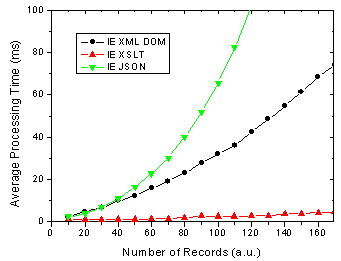
Figure 1. IE 6 results for JSON, XML DOM and XML + XSLT.
On the other hand, There are some changes for FF 1.5 in that the XSLT method is almost as fast as the JSON method. In previous versions of FF XSLT was considerably faster [4].
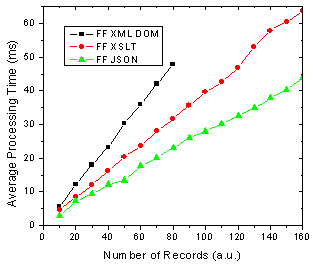
Figure 2. FF 1.5 results for JSON, XML DOM and XML + XSLT.
What does all this mean you ask? Well as before I am assuming that the end-users of my application are going to use FF 1.5 and IE 6 in aboutl equal numbers, 50-50. So this might be a public AJAX application on the web say whereas the division could be very different in a corporate setting. Below shows the results of this assumption and it shows that almost no matter how many data records you are rendering, XSLT is going to be faster given 50-50 usage of each browser.
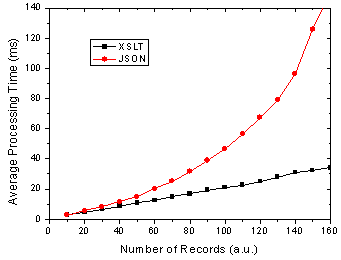
Figure 3. Total processing time in FF and IE given 50-50 usage split.
I will have the page up tomorrow I hope so that everyone can try it themselves - just need to get it all prettied up a bit so that it is understandable
References
[1] The AJAX Response: XML, HTML or JSON - Peter-Paul Koch, Dec 17, 2005
[2] Objectifying XML - E4X for Mozilla 1.1 - Kurt Cagle, June 13, 2005
[3] JavaScript Benchmarking - Part 3.1 - Dave Johnson, Sept 15, 2005
[4] JavaScript Benchmarking IV: JSON Revisited - Dave Johnson, Sept 29, 2005
Posted in Web2.0, AJAX, JavaScript, XML, XSLT, JSON | 19 Comments »
E4X and JSON
December 2nd, 2005
Given the fact that many people prefer to use JSON over XML (likely because they have not realized the beautiful simplicity of XSLT) it is interesting that ECMA is actually taking a step away from JavaScript in introducing ECMAScript for XML. There is lots of interest in it so far [1-4] and it should prove to be quite useful in building AJAX components. For a good overview check out Brendan Eich’s presentation.
Will E4X make JSON go the way of the Dodo?
[1] Introduction to E4X - Jon Udell, Sept 29, 2004
[2] Objectifying XML - E4X for Firefox 1.1 - Kurt Cagle, June 13, 2005
[3] AJAX and E4X for Fun and Profit - Kurt Cagle, Oct 25, 2005
[4] AJAX and Scripting Web Services with E4X, Part 1 - Paul Fremantle, Anthony Elder, Apr 8, 2005
Posted in Web2.0, AJAX, JavaScript, XML, JSON | No Comments »
AJAX Offline
October 8th, 2005
Just a quick post about running AJaX offline. With the recent release of Flash 8 it seems a good time to bring this up since Flash 8 has everything you need for a robust cross-browser data persistence layer. The two main features of Flash 8 are the SharedObject (although this has been around for a few years now - since Flash 6) and more importantly full JavaScript support. The SharedObject allows you to store as much data as the end user wants to allow and this limit can be configured by the end user.
In the Flash file you can use the ExternalInterface to expose methods to the JavaScript runtime like this:
import flash.external.ExternalInterface;
ExternalInterface.addCallback("JavaScriptInterfaceName", null, FlashMethod);
Similarly you can call JavaScript functions from within the Flash file using the call method of the ExternalInterface
ExternalInterface.call("JavaScriptMethod");
And you can call methods in the Flash movie from JavaScript like this:
function CallMethod() {
if (document.getElementById)
myFlash = document.getElementById("FlashMovieNodeId");
if (myFlash)
myFlash.flashFunction();
}
The other piece of the puzzle is the SharedObject which is accessible through ActionScript in Flash.
var my_SO:SharedObject = SharedObject.getLocal("MySharedObjectName");
my_SO.data.eba = dat;
var ret_val = my_SO.flush();
It is importatnt to note that if the end user specified data size limit is smaller than the requested amount of data to be saved it needs to show the Flash movie to the user (do this simply with a little JavaScript) so the user can either increase the cache size or not. The
ret_val
from the SharedObject
flush
method can be checked to see the result and determine if the Flash movie needs to be shown for input or not.
The other great thing about this is that the upgrade path to Flash 8 has been made a bit better. You can actually have the Flash 8 player installed through the old Flash player from what I understand (called Express Install I believe).
All and all a pretty slick way to persist data with AJaX without relying on cookies or the User Data behaviour in IE.
Posted in AJAX, JavaScript, Flash, Flex | 5 Comments »
JavaScript Benchmarking IV: JSON Revisited
September 29th, 2005
My last post [1] about JSON had a helpful comment from Michael Mahemoff, the driving force behind the great AJaX Patterns site (I recommend taking a quick gander at the comments/responses from/to Michael and Dean who are both very knowledgeable in the AJaX realm).
Experimental: Comparing Processing Time of JSON and XML
Michael had commented that there was a JavaScript based JSON parser that is an alternative to using the native JavaScript
eval()
function which provides a more secure deserialization method. So I put the JSON parser to the test in both IE 6 and Firefox and compared it to using
eval()
as well as using XML. The results are shown below:
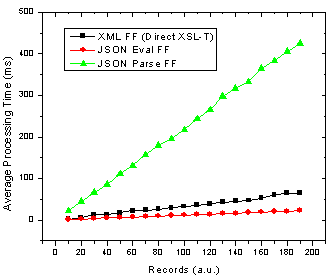
Figure 1. JSON parse and eval() as well as XML transformation processing time with number of records in Firefox.
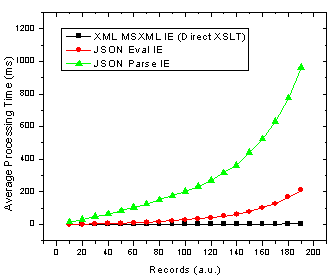
Figure 2. JSON parse and eval() as well as XML transformation processing time with number of records in Internet Explorer.
Ok so it’s pretty clear that the JSON parser is by far the slowest option in both browsers! The result that muddies the water is that in Firefox using JSON with the
eval()
function is actually the fastest method. These results also re-inforce those I found in an earlier JavaScript benchmarking post [2] which revealed that JavaScript was faster than XSL-T for building an HTML table in Firefox but not in IE 6.
Analysis: Implications of Varying DataSet Size
Now, to make it crystal clear that I am not simply saying that one method is better than another I will look at what this means for choosing the proper technology. If you look at browser usage stats from say W3Schools, then we can determine the best solution depending on the expected number of records you are going to be sending to the browser and inserting into HTML. To do this I divide each set of data by the browser usage share and then add the JSON Firefox + JSON Internet Explorer processing times and do the same for the XML data. This then gives the expected average processing time given the expected number of people using each browser. The results are below.
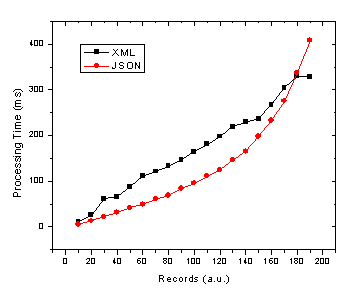
Figure 3. JSON and XML average processing time against record number given 72% and 20% market share of Internet Explorer and Firefox/Mozilla respectively.
Due to the apparent x^2 / exponential dependence of JavaScript / JSON processing time on the number of records in IE (see Fig. 2) it is no wonder that as we move to more records the JSON total average processing time increases in the same manner. Therefore, the JSON processing time crosses the more linear processing time for XML at somewhere in the neighbourhood of 180 records. Of course this exact cross-over point will change depending on several factors such as:
- end user browser usage for your application
- end user browser intensity (maybe either IE or FF users will actually use the application more often due to different roles etc)
- end user computer performance
- object/data complexity (nested objects)
- object/data operations (sorting, merging, selecting etc)
- output HTML complexity
Keep in mind that this will all could all change with the upcoming versions of Internet Explorer and Firefox in terms of the speed of their respective JavaScript and XSL-T processors. Still there are also other slightly less quantitative reasons for using XML [1,3] or JSON.
References
[1] JSON and the Golden Fleece - Dave Johnson, Sept 22, 2005
[2] JavaScript Benchmarking - Part I - Dave Johnson, July 10, 2005
[3] JSON vs XML - Jep Castelein, Sept 22 2005
Posted in Web2.0, AJAX, JavaScript, XML, XSLT | 11 Comments »
Internet Explorer OnResize
September 2nd, 2005
I recently came across a very strange behaviour in Internet Explorer - shock, horror!
It is related to the OnResize event. In Internet Explorer the onresize event will fire on any node for which the event is defined. Take, for example, the following HTML snippit:
If you have this in a web page and resize the window, in Internet Explorer 6 you will first see the alert from the body and then it will start at the deepest part of the hierarchy (ie the div child node) and fire all resize events until it reache the top of the node tree at which point it will again fire the event on the body tag! There are also situations where if you resize an element through JavaScript this will cause the body resize event to fire - but only once rather than twice as it does when you manually resize the window.
When run in Firefox, Opera or Netscape my sample code only fires the body onresize event once and does not fire the onresize events on elements contained in the body element.
So be careful when building AJaX components that take advantage of the onresize event.
Posted in AJAX, JavaScript | No Comments »
Theoretical Dogma
August 24th, 2005
There are a multitude of ways to get data to and from the client in an AJaX application.
A recent article by Jon Tiresn [1] outlines what he feels are the three most useful methods of returning data to AJaX client applications and makes a point of dismissing the idea of sticking to standards and other theoretical dogmas. I highly recommend reading the article but will mention the three methods he discusses which are:
1) simple return
2) snippit return
3) behaviour return
and I will add what I feel is an important fourth:
4) XML return
I added the last one because it is a very important tool in the AJaX toolbox since XML data can be transformed on the client very quickly using XSL-T thus reducing server load, enabling the inherent use of app server data caching and adhering to standard design principles. You can even do various tricks to reduce the size of your XML data so that you are actually transferring very little data.
All of these four options are good if used in the proper situation. I generally agree with Jon that there should not be any of this generic interface (SOAP, SOA, WS-*) type malarky in AJaX applications. There may be some special cases where one might put high value on being able to re-purpose AJaX data and thus make the client and server very loosely coupled but for the most part AJaX services will not be available to the general public and exist primarily to support the user interface.
Furthermore, due to the constraints that JavaScript places on AJaX applications in terms of latency and usability, one has to engineer both the client and sever interfaces for the best performance possible; this often includes performing time consuming operations on the server rather than the client and returning ready to process JavaScript snippets or behaviours as opposed to raw data / XML. This is not interoperable or standards based (yet) but pays huge dividends in terms of application usability.
That being said there may be instances where you are dealing with the same data in both internal and external applications and it might be helpful to be more standards based. Another strong case for being standards based arises from situations where you are building AJaX based components for use by the development community in web applications. These type of developer components should be easily integrated into internal systems and thus can benefit from being standards based - that is why there are standards in the first place after all.
In the end one has to ask several questions to determine what method to use. Some of the important questions to ask about the application would be
- is the data going to be used for several interfaces or systems inside or outside of your company (SOA type situations)
- is the application a one off (Google Suggest)
- how important is application latency
- how important is browser compatibility
- how much traffic and server load is expected
- how much client processing can be done without compromising latency goals
- how important is it to be standards based
- how difficult will it be for a new developer to extend / debug the application
- how much raw data is being transferred between the server and client
- how much formatted (HTML or JavaScript) data is being transferred
and so on (its late and I am tired:)). One thing is certain - the lines that define a traditional MVC architecture can get very blurry when dealing with AJaX.
What are other metrics that people have found useful when considering data access in an AJaX application?
[1] Designs for Remote Calles in AJaX
Posted in Web2.0, AJAX, JavaScript, XML, XSLT | No Comments »


 Entries (RSS)
and
Entries (RSS)
and