onAIR Bus Tour - Next Stop Vancouver 
July 11th, 2007
Tonight the Adobe onAIR Bus Tour is stopping in Vancouver - home of Nitobi. I think that the bus should be rolling into town right about now.
Andre will again be giving his _amazing_ presentation about Ajax / JavaScript / HTML development in AIR so be there!
It is at Ceili’s (formerly Sky Bar) - check here for all the detailson.
|  Del.icio.us Del.icio.us
Posted in Uncategorized, AJAX, JavaScript, Nitobi, air, onair | 2 Comments »
IPhone SDK Released!
July 5th, 2007
And of course by “SDK” I mean an Apple SDK that consists of a single HTML page with half a dozen snippits of HTML.
Nonetheless there are some good tidbits there.
I was wondering about some event stuff and here is the general event info:
| Gesture |
Result |
| Double tap |
Zoom in and center a block of content |
| Touch and hold |
Display an information bubble |
| Drag |
Move the viewport or pan |
| Flick |
Scroll up or down (depending on the direction of the finger movement) |
| Pinch open |
Zoom in |
| Pinch close |
Zoom out |
Remember, since there is no mouse, hover events will not work.
You can have the iPhone make calls for you from HTML pages using tel: in the URL like this:
<a href="tel:1-408-555-5555">1-408-555-5555</a>
An iPhone specific CSS can be applied using the media attribute in the link element - which most developers probably ignore.
<link media="only screen and (max-device-width: 480px)"
href="iPhone.css" type="text/css" rel="stylesheet" />
Also of interest is the viewport meta tag that lets you tell Safari on the iPhone how to scale and zoom your content:
<meta name="viewport" content="width = 320" />
<meta name="viewport" content="initial-scale=2.3, user-scalable=no" />
For lots more good info check out the recent post on Ajaxian and the google group.
| Del.icio.us
Posted in Uncategorized, Web, iphone | No Comments »
Declarative Ajax and Flex Interop
July 3rd, 2007
This is some code that I wrote about a year ago at the Flex Component Developers Summit (and more recently presented at XTech) to show how declarative Ajax and Flex can work together to create dynamic, rich and compelling Internet applications.
The idea is simple. Take a single declaration - in this case XHTML - of some user-interface component and then use it to build a UI using either Ajax or Flex. All this from just one declaration.
What happens is that we take a single declarative data grid and converts it using XSLT on the client (so it only works Firefox, IE and soon Safari) into a declarative Nitobi Ajax Grid and to a Flex declarative MXML DataGrid. I use the FABridge to get the string of MXML generated from the XSL transformation into a stub Flex application where a Flex DataGrid is instantiated (deserialized) from the MXML declaration. It can an be seen live here (note: create the Flex grid first then the Ajax one - something funny that I can’t be bothered to fix  ) and the code can be downloaded from here. ) and the code can be downloaded from here.
So by using a declarative approach and a little XSLT on the client we were able to quickly choose between using a Flex DataGrid or a Nitobi Ajax Grid to display our tabular data in!
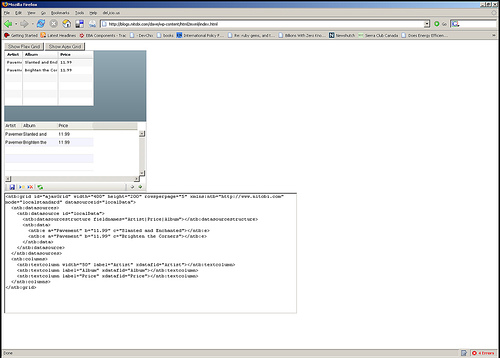
Really the most interesting part is the MXML deserialization stuff. The only contents of the Flex application are two functions for performing the deserialization. I have listed the main part of the code that takes an XML document of an MXML DataGrid declaration and actually instantiates a DataGrid according to that declaration. It’s pretty quick and dirty but at least gets the right thing out! Essentially it just looks at each XML element and creates an Object out of it and sets all the properties on it from the XML element attributes and then recurses through the child elements doing the same. There are some special attributes though like datasources that need a little more care.
public function initGrid(html) {
// setup a tagname to datatype hash - maybe this already exists somewhere
controls['DataGrid'] = 'mx.controls.DataGrid';
controls['ArrayCollection'] = 'mx.collections.ArrayCollection';
controls['Object'] = 'Object';
controls['columns'] = 'Array';
controls['DataGridColumn'] = 'mx.controls.dataGridClasses.DataGridColumn';
// load the HTML into XML DOM
var mxml:XML = new XML('<root>'+html+'</root>');
parseXml(AjaxBox, mxml);
}
public function parseXml(parent, mxml) {
var item:String;
// get all the elements in our XML doc - this should of course walk the xml tree recursively
var itemList:XMLList = mxml.elements('*');
for (item in itemList) {
// get the tag name of the XML node
var tagName:String = itemList[item].localName();
// get the class by using getDefinitionByName() method
var ClassReference:Class = Class(getDefinitionByName(controls[tagName]));
// create an instance of the class
var myObject:Object = new ClassReference();
// get all the attributes and set the properties
var attrList:XMLList = XML(itemList[item]).attributes();
for (var attr:String in attrList) {
myObject[attrList[attr].localName()] = attrList[attr].toString();
}
// now parse the children of this node
parseXml(myObject, itemList[item]);
if (parent.hasOwnProperty(tagName)) {
parent[tagName] = myObject;
} else if (parent.hasOwnProperty("length")) {
if (parent.hasOwnProperty("source")) {
parent.source.push(myObject);
} else {
parent.push(myObject);
}
} else if (parent.hasOwnProperty("dataProvider") && tagName == "ArrayCollection") {
// This means we need to create a datasource for the Grid
parent.dataProvider = myObject;
} else {
parent.addChild(DisplayObject(myObject));
}
}
}
| Del.icio.us
Posted in Web2.0, AJAX, XSLT, Flash, Flex, Declarative Programming, Components, Grid, RIA, FABridge | No Comments »
Messenger Bag Reviews
July 1st, 2007
What an odd coincidence. I was going through my RSS feeds today and found that Web Worker Daily posted a link to the messenger bag review page that I was using just recently when looking to purchase a new messenger bag. I personally went for a Chrome bag. Most people seem to like Bailey Works, RELoad and Chrome.
| Del.icio.us
Posted in Uncategorized, messengerbag | No Comments »
Ajax and Flex Job Opportunities
June 28th, 2007
Who wants a job? We have some very exciting Flex and Ajax development opportunities coming up with some high profile companies and we need some kick ass people to help us out.
To apply just do something awesome with our components or maybe something cool with say JavaFX, Adobe AIR (not that Adobe AIR) or Flex.
Send it to jobs=at=nitobi.com.
Just to give an idea of what goes on here and why it is great …

mmmmmm mountains - don’t worry it’s really nice in the summer too
xbox 360 or wii anyone?

sea monkeys ???
we also work … sometimes
| Del.icio.us
Posted in Uncategorized, AJAX, Flex, Nitobi, air, jobs | No Comments »
Popfly Management
June 22nd, 2007
The Popfly project over at Microsoft looks pretty interesting if not just a cheap rip off of Yahoo! Pipes.
I just wanted to comment not on the application itself but an interesting thing that I noticed when looking at the list of people on the team - all of whom I am sure are very smart and skilled people. But here is the list of titles of the team members.
Group Program Manager, Program Manager, Developer, Developer, Program Manager, Program Manager, Engineering Manager, Test Developer, Developer, Product Manager, Developer, Program Manager, Program Manager, Product Unit Manager, Developer.
This can be summed up nicely in a simple graph.

Coming from a small company with something more like a 10 to 1 ratio of developers to managers I can’t help but feel somewhat bewildered! It just makes it even more amazing that large software companies don’t just crumble under the immense weight of the bureaucratic bloat.
| Del.icio.us
Posted in Web, AJAX, Business, popfly | 4 Comments »
Grid 3.5 and Beyond
June 20th, 2007
Just a quick note about the recent release of Complete UI and Grid in particular.
There are a few things to note about the recent release.
As Mike mentioned, both Grid and Combo now, like the rest of Complete UI, support standards mode - w00t. This has been a long time coming but it seems to be working pretty well so far!
Also of note with Grid is that it is much faster to load up in most cases. For example, the editors sample loads in about half the time of the the previous release. But don’t worry, there is still lots more room to improve there and we are actively working on it!
Complete UI also has two new components - Calendar, and Spotlight. AND Calendar has been integrated into the Date Picker control for Grid!
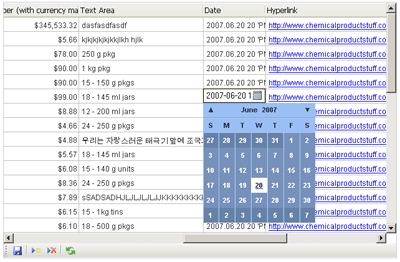
More fun stuff coming up with support for Safari 3, AIR and some new components and major updates to old ones like Tree and Grid.
| Del.icio.us
Posted in Web, AJAX, Nitobi, air, safari | 4 Comments »
Grid With AIR and Safari 3
June 14th, 2007
With the release of Safari 3 Beta and the recent renaming and Beta release of AIR (formerly Apollo) from Adobe, we have started to work on getting our components running in both of them.
We have run across a few problems - the biggest of which is the lack of any decent debugging tools for either one. I am sure that this will soon change. Currently the best thing around for debugging is Scout.
Grid is being a bit of a challenge given that there is no XSLT support in AIR - though there is in Safari 3. Jake and I got it almost working with a day or so of work / screaming at our computers. Here is a screenshot of what we got so far:
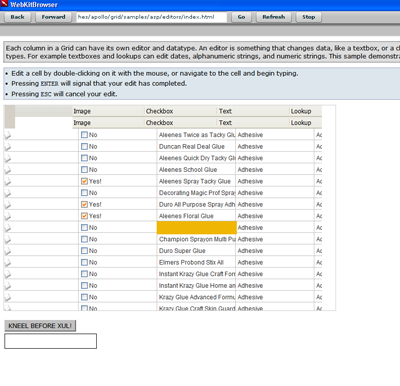
We are pretty happy with the progress and the fact that no one has been hurt - yet
There a few known problems in AIR currently such as CSS opacity not working, table width=0px with colgroups does not work and a few other small things like that. We are certainly happy that Safari 3 and AIR both support addRule and insertRule for working with CSS while a little disappointed in no XSLT support in AIR yet good support in Safari 3.
| Del.icio.us
Posted in Web, AJAX, XSLT, Components, Nitobi, apollo, completeui, air, safari | No Comments »
Firebug “Copy XPath”
June 6th, 2007
I have been playing around with the Ruby plugin Hpricot the last few days while I have been creating a news reading tool. It is pretty darn cool and hopefully I will get my project done this weekend.
However, the point of this post is Just a note for others using Firebug to get XPath expressions for use in Hpricot - don’t do it!!! Well ok, you can do it, but make sure you watch out for any <tbody> elements that Firebug sneaks in there that don’t exist … I spent _way_ too long figuring that one out.
| Del.icio.us
Posted in Uncategorized, rails, ruby, ror, hpricot | 2 Comments »
CSS Pseudo Class Madness
June 4th, 2007
Through the course of building an Ajax Grid component we have come across many a quirk in both Firefox and Internet Explorer.
The latest thing we found was something that cropped up when we finally converted our Grid to support standards mode in Internet Explorer 6 and 7. To do this we had to fall back on a good blog post from a while back about the use of the table-layout: fixed; and white-space: nowrap; styles in creating an HTML table where the contents of the cells do not wrap if the contents are wider than the cell width.
Essentially what he came up with was that you needed the following:
width: 0px; and table-layout: fixed; on the table
white-space: nowrap; and overflow: hidden; on the cells
and use <col> tags to specify the column widths but place them at the bottom of the table
How he came up with that last one I don’t know!
At any rate, that seemed all well and good; things were great in our small prototype in both quirks and standards mode. Then when we actually brought it into the product, it was not working at all in standards mode. Several hours and coffees / beers later I finally determined that there was some other completely unrelated CSS that was causing it not to work. The culprit was one of the great new CSS features of IE 7 - the pseudo class. We were using pseudo classes like :hover since it makes life much easier in a lot of cases so you don’t have to attach mouseover / mouseout handlers to some elements just to change a color.
So just having any :hover pseudo classes in the page would cause the nowrap behaviour of the table to fail! Even if they were on some random class that is not used with no contents inside the CSS rule, as soon as you move your mouse onto the web page the table layout reverts to not respect overflow: hidden; on the table cells. Check it out here in IE.
At that point I thought I was home free… clearly I had been sniffing too much of the Internet Explorer glue.
Once again I moved my code into the actual product and once again it did not work. At that point the only difference between the product and the prototype was one thing: in the product we use generated CSS. What we do is use XSLT to build a stylesheet with all the column widths etc and then insert it into the page using document.createStyleSheet(); and then set the CSS contents using stylesheet.cssText = myCSS; . Once again we were astounded (really???) at the crapness of IE 7.
In the end it came down to adopting the age old approach of placing div’s inside of each table cell and setting the overflow and white-space CSS properties on it. This really sucks since it dramaticall increases the number of elements in the web page and therefore can really slow down application performance.
In the past I have posted a few other interesting tidbits about using a:hover being bad as well as inline event definitions. We have recently found a really great problem in Firefox with calling focus() on an element that I will cover soon.
| Del.icio.us
Posted in AJAX, InternetExplorer, CSS, quirks, ie7 | No Comments »
|


 Entries (RSS)
and
Entries (RSS)
and