Those that have developed or used Ajax components to build an application will be familiar with the idea of using some sort of declarative structure to define or configure a component. This is commonly achieved through either HTML or JSON.
For example, a simple dynamic table or grid JavaScript object may take a parameter that sets the height of each row in the table. Through JavaScript it might look like this:
var myTable = new Table({”id”:”myTable”, “rowHeight”:”20px”,”data”:[”dog”,”cat”,”bird”]});
This could in theory instantiate a dynamic table with rows of height 20px and contents as defined by the data array.
Everything is right in the world.
Class it up
However, there are some out there - I won’t name any names - that might prefer to set something a table row height through CSS instead. So rather than setting the rowHeight in the configuration directly they may instead just specify a rowClass that is the class that will be applied to each TR element in the table. Defining the table would then look something like this:
var myTable = new Table({”id”:”myTable”, “rowClass”:”tableRow”,”data”:[”dog”,”cat”,”bird”]});
and the corresponding CSS would look like this:
.tableRow {height:20px;}
Now the only problem here is that there are situations where we may want to know what the height of the rows in the table are through the objects API. For example:
alert(myGrid.getRowHeight());
So the question is, how can we support using CSS as the declaration for a component (too bad you can’t just put any name/value pairs in CSS in Firefox
Bridging the API Divide
Luckily for us we have the DOM. In the Nitobi Toolkit it is pretty easy to find a class in a stylesheet and read properties from it. In our Grid control we do something like this for rowHeight such that it can be defined through an HMTL declaration or CSS and still be accessible through the API. We end up with some code like this:
var ntbRow = nitobi.html.getClass(”ntbrow”);
if (ntbRow != null && ntbRow.height != null)
this.rowHeight = parseInt(ntbRow.height);
The getClass function essentially scours all the included stylesheets for rules that contain the class in question.
This solution makes the components more skinnable and easier to work with in general while at the same time preserving the JavaScript API.
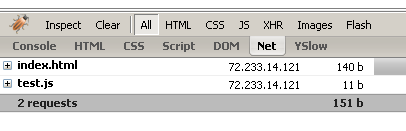
However, I noticed yesterday that Firebug seems to have a problem reporting the true status of cached pages in the Net tab. With a simple page that has one JavaScript file included the Firebug report looks like this:
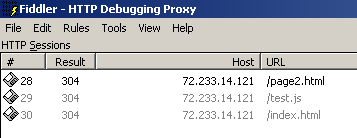
While if you look at Fiddler it says this:
Firebug will occasionally report that the resources have been cached but Fiddler consistently reports the 304 “Not Modified” HTTP header.
Am I doing something wrong here? Is there a great Firebug feature that I am missing?
Looks like I am heading to Dallas to do some on-site Ajax training and consulting. If anyone knows a good place to go for a beer pls let me know - cause I will definitely need it!
So I finally got around to putting together some screencasts of all the components in the CompleteUI Ajax suite we released in March. These are not highly technical, they are meant to highlight the UI features that will benefit the end users so they’re applicable to both a developer and non-geek audience alike. The first one is an overview of all the components (~15min) the rest compiled to show individual components. Andre was even nice enough to edit them all together for me. They’re all at native resolution to make everything as clear as possible so it’ll be nice on a monitor bigger than 1024×768.
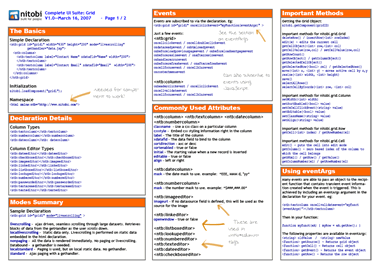
We have made up some short cheat sheets for the Complete UI components as well as the Nitobi Ajax Toolkit which comes free with Complete UI. You can check them out here and feel free to send in any feedback!
It appears that I have been accepted to give a talk at JavaOne this year - w00t.
The title of the presentation is “Practical Parallels: From Development on the Java Platform to Development with the JavaScript Programming Language”. So essentially I will be talking about all the tools of the JavaScript trade used for testing, debugging, deployment, and documentation.
I will be talking at 6:45 on the Wednesday night (May 9 I think) and will certainly be around for some beers afterwards
We had a recent project where a client was trying to render 150 columns and 100 rows in a Nitobi Grid. Now, to most people, this sort of use case may seem very strange, but in reality, rendering thousands of cells in a rich user interface is a regular occurance with our sort of customers. Due to these extreme requires of our users, for the most part I am _very_ happy we chose to implement our data rendering engine with XSLT rather than standard string building
However, this time we hit the wall and the application was dog slow. Even though we were using very fast XSLT to generate HTML from XML data which was then inserted into the document, we still ran into a big bottleneck using the HTMLElement.innerHTML property. The HTML structure was not that complicated to begin with. It was just some floated DIVs that made up the Grid rows / cells anas I started by just removing attributes until we got to the bare bones of the structure. Even then there were problems and the structure had to be changed completely.
In the end it was due to a mixture of three problems. Here is what we did to fix things:
Shortening the element IDs. With longer ID attributes on the HTML elements the browser was having a hard time processing them. This sped things up a little bit.
Used TABLEs elements for the structure. Changing from DIVs to TABLEs made a dramatic improvement of over one order of magnitude. The floated DIVs require a lot more processing on the part of the browser so that makes sense.
Removed inline events. Having inline events such as mouseover and mouseout specified on the HTML element was a bad idea. If we had tried to attach all the events through script we would have seen the same problem I am sure. The solution there was to assign more general event handlers higher up in the DOM hierarchy and let the events bubble up to a single handler. This improved the performance by almost another order of magnitude.
Things like the styling, number of classes or any additional custom attributes had pretty much no effect on the performance.
The topic of this post is about deletion using Ajax. Truth be told, it’s not really even about Ajax but about the deletion pattern and related user experience in general.
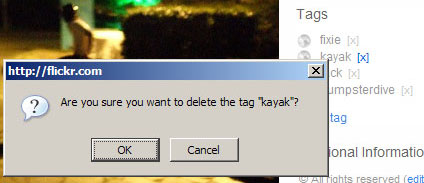
So often it is the case that when a person deletes some data - like a photo tag in Flickr for example - the application insists on confirming that the user really wants to delete the item. This kind of interaction is really annoying when you are deleting several items from a list or even just one when you are a “power user”. In fact, more often than not, the user wants the delete to occur immediately and requires no confirmation. The confirmation dialog is just an over-engineered catch all for those rare cases when the user presses the delete button in error. In the case of Flickr photo tags then who even cares if you accidentally delete one tag?
There are a few good options for Ajax delete that I think one consider when building data intensive web applications.
Make the delete button smaller but communicate its meaning more clearly.
Using large and unfamiliar buttons for signifying a delete action makes it easier for a person to make a mistake - thus re-inforcing the need for a confirmation dialog. A smaller button means the user has to work a little harder to perform the delete operation, but not quite as hard as confirming the delete, and the more clear the button is for deleting (through a tooltip or whatever) then the fewer inadvertent deletes there will be.
Store all deleted data the client before executing the deletes.
Although it could be a good option, the previous suggestion still provided no way to undo a delete. To that end, rather than having a difficult confirm dialogue the developer can take a different approach to deletions such as batch deletions with a single confirm dialogue or even an easy way to roll back the deletes if they are in error. I imagine the reason for using a confirm dialogue is because it is easiest for the developer, but certainly not the user.
Use a timer on the delete action giving the user the opportunity to cancel the delete.
Finally, an approach that could encompass both of the previous suggestions would be a delete timer. This would be an animation to indicate that the item is pending a delete in say 5 seconds. The key here is that this is ample time for the user to cancel the delete if they want but otherwise the deletion will continue if the user does not take any action to prevent the delete from happening.
At any rate, this is one area where most web application fail miserably and there are great advances to be made with Ajax based applications.





 Entries (RSS)
and
Entries (RSS)
and