Ok so we have some news. The nice folks over at O’Reilly have contributed some swag for people that attend hack day - this will most likely be given away as prizes. We are also trying to swing some more free stuff in the way of software and hopefully Andre will contribute some hardware for the best hack day app! We have also almost secured a keg of beer for those thirsty hackers and I will try my best to prevent it from being tapped until sometime in the afternoon just to keep the coding quality up to par
Just to be sure the day is Sat Oct 20 from 9am till whenever - we will likely go out for some drinks afterwards in Gastown and maybe even beyond.
Let us know you are coming (on facebook or upcoming) so that we reserve a spot for you in case there is no room on the day!
For those that don’t want to hack then at least come by to have a beer and say hi!
This time around we left the major Complete UI release in Beta for a month to give us a bit more time to work out all the quirks with our major new feature - Complete UI Dreamweaver Extensions. Now you can go from a database to an Ajax application in minutes using the awesome Dreamweaver Extensions that allow you drag and drop Nitobi components into your web page and have server CRUD (ASP, PHP, JSP, CFM) generated according to the database that you are connecting to!
Also if you are at Adobe MAX in Chicago ping Andre or Alexei who are there representing Nitobi and presented an Inspire session today about AIR and Ajax!
I just completed an eSeminar about Adobe AIR and building AIR applications with Ajax and HTML. It was a good turnout (~250 peeps) and I hope that I gave all the attendees a good idea of some of the features of AIR and how to achieve some cool results.
People can download the slide deck here or check out the Adobe OnDemand site to see/hear it in all its glory.
I also wanted to post answers to some of the questions that I did not get to answer during the seminar.
Q: Can you explain in a nutshell offline data store with sql lite?
Through JavaScript or ActionScript one can write to or read from a SQLITE database that can be created on the users computer.
Q: Is it free like adobe reader?
Yes
Q: I mean can you mix ajax and flex controls
Yes
Q: Must the end user install the AIR Runtime on their machine to run air apps or can they be run on any machine line a flash projector file?
The AIR Runtime can be included in your application and installed with your application. It can also be installed from a Flash file.
Q: A question, mind sound a bit weird but, can you mix up html and flex controls?
Yes
Q: AIR can connect to external hardware (card reader etc)?
Not sure about that one!
Q: Can you access the webcam from an AIR app?
Yes
Q: The BETA label after Apollo made my manager a bit skeptical on using it through out the whole company, any insight in that ?
I think there is something to that - the difference between Beta 1 and Beta 2 is fairly large. However, I think that from Beta 2 onwards it will be much more stable.
Q: I also did not hear if you heard if u can use ruby on rails with air apps
You can use any server backend with AIR apps
Q: Will AIR be integrated w/products after CS3?
Not sure
Q: Can we make a executable in the future .. which would include the runtime with it
Your AIR application can include the runtime already
Q: What about MySQL?
You can use MySQL on the server but not on the client
Q: When is the final release of AIR 1.0?
Early 2008
Q: AIR release will be synchronize to the WebKit release?
AIR will be very close to Webkit - even providing bug fixes etc to the project
Q: Is iTunes created with AIR?
No
Q: Do you know when the expected release for AIR (for public use) will be?
The current Beta 1 version is for public use and the anticipated 1.0 release is early 2008
Q: How does this work with ColdFusion? As expected?
Yes as expected - any server technology will work
Q: MS Access mainform / subform - is there a plug-in that does something similiar?
Not sure at the moment
Q: Will there be a separate AIR development environment?
No. You can use Dreamweave, Aptana, or Eclipse at the moment I believe
Q: Where to start? Extensions for dreamweaver or handcoding
Do some hand coding and get familiar with the application.xml file and
Q: Is there an AIR plugin for Dreamweaver 8??
I don’t think so but don’t quote me
Q: Can I develop with Flex and use AIR?
Absolutely
Q: Maybe you said, but what rendering engine does AIR use? do we have to account for CSS issues liek we do for IE?
It is Webkit
Q: What must you go through to visually place objects in the appplication where you want them to appear?
Flex, Dreamweaver, Aptana. Just use your preferred HTML IDE
Q: Why would the application not update on its own?
There is update functionality I think - the AIR installer for your application generally deals with upgrades nicely
Q: Will Adobe Air be open source if not what will it retail for?
It is not open source but it is free. Well it is partially open source I guess since it uses WebKit
Q: Is Adobe Air the same thing as Adobe Apollo?
Yes
Q: Linux??
Not yet - after V1.0 comes out
Q: Does it go beyond the root of the XML file? for example ../..?
Good question - haven’t tried it!
Q: Is all of this code applicable to all Operating systems or do does it have to be coded differently for each OS
AIR is OS agnostic. You can run AIR apps on any platform although currently there are a few bugs that have been logged and will be fixed
Q: I thought I saw the use of .attachEvent previously; now it looks like a Flash .addEventListener call… what’s the difference?
attachEvent was the Nitobi Ajax Toolkit event attachment so that the code could run in a browser (IE et al) or AIR
Q: Does the system chrome command apply to osx as it does to windows?
Yes
Q: Can you change the appearance of the Windows XP window with AIR?
Not that I know of
Q: External files are included in the air file or they are on a server?
They can be either
Q: What about movies? Quicktime etc…
I think the same as Flash or Flex
Q: I assume that this will run on Mac the same why it runs on Vista?
Yes it works the same on both Windows and OS X
Q: Can you configure your AIR app with all the HTML and JS files residing on a web server?
Yes
Q: Would you say that AIR replaces the way Director used to be used for desktop apps?
To a certain degree yes. But it is definitely focused more on bringing the web experience to the desktop
Q: What does ADL stand for?
ADL is the name of the EXE used for debugging your AIR apps
Q: Will Air be able to play FLV movies?
Not sure
Q: Does AIR allow for a main form /subform similiar to an Access database? (Not something you have to answer now - just whenever there’s something similiar mentioned)
Yes you just have to build it
Q: So what kind of CSS compliance is AIR in compairson with conventional online browsers?
AIR uses CSS 3.0 like the latest WebKit versions - whereas current versions of most browsers support CSS 2.0. I will probably get lambasted for making such a broad generalization!
Q: Can we use air to rotate 3D models?
Why not!
Q: How would this compare to Google Gears? Especially the offline capability.
I think that AIR provides a lot more than just offline capabilities like Google Gears does. It provides cross platform file IO, drag and drop, windowing and more
Thanks for all the questions and feel free to post more below!
Those that have developed or used Ajax components to build an application will be familiar with the idea of using some sort of declarative structure to define or configure a component. This is commonly achieved through either HTML or JSON.
For example, a simple dynamic table or grid JavaScript object may take a parameter that sets the height of each row in the table. Through JavaScript it might look like this:
var myTable = new Table({”id”:”myTable”, “rowHeight”:”20px”,”data”:[”dog”,”cat”,”bird”]});
This could in theory instantiate a dynamic table with rows of height 20px and contents as defined by the data array.
Everything is right in the world.
Class it up
However, there are some out there - I won’t name any names - that might prefer to set something a table row height through CSS instead. So rather than setting the rowHeight in the configuration directly they may instead just specify a rowClass that is the class that will be applied to each TR element in the table. Defining the table would then look something like this:
var myTable = new Table({”id”:”myTable”, “rowClass”:”tableRow”,”data”:[”dog”,”cat”,”bird”]});
and the corresponding CSS would look like this:
.tableRow {height:20px;}
Now the only problem here is that there are situations where we may want to know what the height of the rows in the table are through the objects API. For example:
alert(myGrid.getRowHeight());
So the question is, how can we support using CSS as the declaration for a component (too bad you can’t just put any name/value pairs in CSS in Firefox
Bridging the API Divide
Luckily for us we have the DOM. In the Nitobi Toolkit it is pretty easy to find a class in a stylesheet and read properties from it. In our Grid control we do something like this for rowHeight such that it can be defined through an HMTL declaration or CSS and still be accessible through the API. We end up with some code like this:
var ntbRow = nitobi.html.getClass(”ntbrow”);
if (ntbRow != null && ntbRow.height != null)
this.rowHeight = parseInt(ntbRow.height);
The getClass function essentially scours all the included stylesheets for rules that contain the class in question.
This solution makes the components more skinnable and easier to work with in general while at the same time preserving the JavaScript API.
Looks like I am heading to Dallas to do some on-site Ajax training and consulting. If anyone knows a good place to go for a beer pls let me know - cause I will definitely need it!
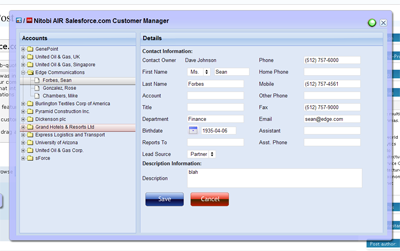
Since Andre was invited to go on the Adobe AIR bus tour we decided to build a cool sample application that would exhibit some of the cool features of AIR and our components. Since we like to focus on the “business case” for our Ajax components and our custom development, we built an AIR application that integrated with the Salesforce.com API. Being the RIA nutters that we are and knowing that most people would be building Flex based applications - which we are currently building a few of for various customers - we decided to build an HTML / Ajax based application instead.
The cool AIR features that we wanted to show off were things like
1. custom chrome to make things look hawt
2. drag and drop from the desktop for vcard integration
3. file system integration for taking things offline
Since we had a pretty tight timeline we went fairly simple and built the application in about three person weeks. The idea was centered around a mobile sales person being able to have access to their Salesforce Account and Contact data while online or offline. Of course, being an Ajax application it should also prove to be a much nicer interface than the current Web 1.0 based Salesforce user interface - man would I like to be able to redesign the Salesforce UI!
Custom Chrome
The most important part of the application was to make it look hawt. This involved a bit of design assistance from Alexei and the creation of some JavaScript and text based activity indicators since animated gifs don’t work in the current AIR beta What we did use a lot though was the CSS3 border-image style. It doesn’t seem to work quite right but if you just go with it you can make something that looks half decent.
So on the outer window we applied a style like this:
As well as looking great the chrome needs to be functional. It needs to have minimize, maximize, restore and close buttons. It needs to be resizable and draggable. Maximize, minimize, restore and close are easy - for example:
window.htmlControl.stage.window.restore();
All of those methods (restore, close, minimize, maximize) are created on the nitobi.air.Window JavaScript class. To enable draggability we attach an HTML event handler to the our main window DIV element like this:
The handleMove method is shown below where we just do a quick check first to see if the element that the user is trying to drag has the chrome class on it - this lets us make the window draggable from various points like the header and around the edges. Once they get the chrome we just call startMove() like this:
nitobi.air.Window.prototype.handleMove = function(evt)
{
if (nitobi.html.Css.hasClass(evt.srcElement, “chrome”))
window.nativeWindow.startMove();
}
Desktop Integration
The other cool thing about using AIR is that rather than having some ridiculous multi file upload utility written in Java or Flash, with AIR we can just take files from the desktop and drag them onto the application. What this means is that we can take things like VCards or CSV files full of contact information and have them automagically entered into Salesforce. If offline they get saved as updategrams and get uploaded once the computer is back online. The events for the drag and drop are Flex events on the AIR htmlControl but they connect to JavaScript methods as handlers.
When the drag operation enters the AIR window we call the acceptDragDrop method with the htmlControl as the only argument. This will enable dropping onto our HTML application.
Now that we have enabled dropping on our HTML app we can actually process the information when it is dropped by accessing the transferred data like this:
nitobi.air.Window.prototype.doDrop = function( e )
{
var files = e.transferable.dataForFormat(
air.TransferableFormats.FILE_LIST_FORMAT,
air.TransferableTransferMode.CLONE_PREFERRED );
for( var f = 0; f < files.length; f++ ) {
onDragDrop.notify(files[f]);
}
}
In this case we specify that the drop should be a list of files and we are able to iterate over that list to add each of the VCards to Salesforce.
Offline Operation
Finally, we did some filesystem integration for working offline and that was pretty cool. Rather than using the SQL-Lite database that comes with AIR, we wanted a solution that would be more conducive to a web way of working - ie something that will essentially queue HTTP POSTs and subsequently POST them when a network connection is present. Because frankly, unless you have A LOT of data on the client and interfacing to a SQL-Lite database is generally going to be overkill and make a lot more work for the developer since they will have to write not one backend in their server language of choice but also a client side backend in JavaScript. Anyhow, in the Nitobi CompleteUI framework, all changes on the client are stored as XML “updategrams”. So it was a pretty easy task to put a layer between the client side JavaScript DataTable and the XMLHttpRequest that sends data to the server when it is “saved”. Instead of the data being sent to the server with an XHR, if the client is offline the updategram is just persisted to disk. Even when online, the data is continually saved to the disk for offline use at any time. All this took very little extra coding since we just serialized the server messages rather than actually transforming them into SQL statements that would store the data in SQL-Lite.
For all of this to work we needed to be notified when the computer is connected to the network. This is done in the nitobi.air.Window class by using the AIR service monitor. This has the additional requirement of having the servicemonitor.swf library in the web page by using a script tag with the src as servicemonitor.swf. To create the service monitor we do something like this:
var req = new air.URLRequest(’http://www.adobe.com’);
this.monitor = new window.runtime.air.net.URLMonitor(req);
this.monitor.addEventListener(
air.StatusEvent.STATUS, handleStatusChange
);
this.monitor.start();
Where the handleStatusChange method will notify any objects that are connected to the the onOnline and onOffline events of the nitobi.air.Window class.
nitobi.air.Window.prototype.handleStatusChange = function(evt) {
// Fire the event for online / offline notification
if (evt.code == “Service.unavailable”)
onOffline.notify();
else
onOnline.notify();
}
For writing the data to disk we use the AIR filesystem integration and wrap it all in two IO methods for reading and writing. The air.File.applicationStorageDirectory is (on Windows) in c:\documents and settings\username\application data\Application-Name folder.
nitobi.data.IO.readXml = function(filename) {
var file = air.File.applicationStorageDirectory.resolve(filename);
var stream = new air.FileStream();
stream.open(file, air.FileMode.READ);
var str = stream.readMultiByte(file.size, air.File.systemCharset);
stream.close();
return nitobi.xml.createXmlDoc(str);
}
nitobi.data.IO.writeXml = function(xmlDoc, filename) {
if (typeof xmlDoc != ’string’) xmlDoc = nitobi.xml.serialize(xmlDoc);
var file = air.File.applicationStorageDirectory.resolve(filename);
var stream = new air.FileStream();
stream.open(file, air.FileMode.WRITE);
var str = stream.writeMultiByte(xmlDoc, air.File.systemCharset);
stream.close();
}
I think that those were definitely the coolest parts of the application and made for a a pretty sweet little app for managing Salesforce Contacts and Accounts. There is still a little more work that I would like to do in the coming weeks like allowing adding and saving of both Contacts and Accounts without VCards as well as some other searching features. Alas, this will have to do for now Also, when Adobe gets XSLT support in there it will be even more awesome!
You can check out the half baked source code here and get the AIR application for installation here. I am working on a version of the AIR app that will allow the user to enter their Salesforce.com credentials and actually see their data - and there will be a HUGE disclaimer that you use at your own risk
Update: I just found out that the Mac version of AIR does not have XPathResult (!!!) so selectNodes doesn’t work … sorry Mac users but it should be fixed soon.
This is some code that I wrote about a year ago at the Flex Component Developers Summit (and more recently presented at XTech) to show how declarative Ajax and Flex can work together to create dynamic, rich and compelling Internet applications.
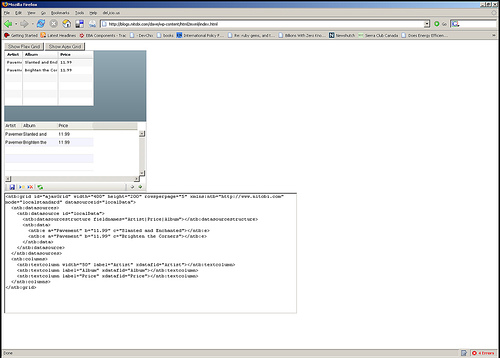
The idea is simple. Take a single declaration - in this case XHTML - of some user-interface component and then use it to build a UI using either Ajax or Flex. All this from just one declaration.
What happens is that we take a single declarative data grid and converts it using XSLT on the client (so it only works Firefox, IE and soon Safari) into a declarative Nitobi Ajax Grid and to a Flex declarative MXML DataGrid. I use the FABridge to get the string of MXML generated from the XSL transformation into a stub Flex application where a Flex DataGrid is instantiated (deserialized) from the MXML declaration. It can an be seen live here (note: create the Flex grid first then the Ajax one - something funny that I can’t be bothered to fix ) and the code can be downloaded from here.
So by using a declarative approach and a little XSLT on the client we were able to quickly choose between using a Flex DataGrid or a Nitobi Ajax Grid to display our tabular data in!
Really the most interesting part is the MXML deserialization stuff. The only contents of the Flex application are two functions for performing the deserialization. I have listed the main part of the code that takes an XML document of an MXML DataGrid declaration and actually instantiates a DataGrid according to that declaration. It’s pretty quick and dirty but at least gets the right thing out! Essentially it just looks at each XML element and creates an Object out of it and sets all the properties on it from the XML element attributes and then recurses through the child elements doing the same. There are some special attributes though like datasources that need a little more care.
public function initGrid(html) {
// setup a tagname to datatype hash - maybe this already exists somewhere
controls['DataGrid'] = 'mx.controls.DataGrid';
controls['ArrayCollection'] = 'mx.collections.ArrayCollection';
controls['Object'] = 'Object';
controls['columns'] = 'Array';
controls['DataGridColumn'] = 'mx.controls.dataGridClasses.DataGridColumn';
// load the HTML into XML DOM
var mxml:XML = new XML('<root>'+html+'</root>');
parseXml(AjaxBox, mxml);
}
public function parseXml(parent, mxml) {
var item:String;
// get all the elements in our XML doc - this should of course walk the xml tree recursively
var itemList:XMLList = mxml.elements('*');
for (item in itemList) {
// get the tag name of the XML node
var tagName:String = itemList[item].localName();
// get the class by using getDefinitionByName() method
var ClassReference:Class = Class(getDefinitionByName(controls[tagName]));
// create an instance of the class
var myObject:Object = new ClassReference();
// get all the attributes and set the properties
var attrList:XMLList = XML(itemList[item]).attributes();
for (var attr:String in attrList) {
myObject[attrList[attr].localName()] = attrList[attr].toString();
}
// now parse the children of this node
parseXml(myObject, itemList[item]);
if (parent.hasOwnProperty(tagName)) {
parent[tagName] = myObject;
} else if (parent.hasOwnProperty("length")) {
if (parent.hasOwnProperty("source")) {
parent.source.push(myObject);
} else {
parent.push(myObject);
}
} else if (parent.hasOwnProperty("dataProvider") && tagName == "ArrayCollection") {
// This means we need to create a datasource for the Grid
parent.dataProvider = myObject;
} else {
parent.addChild(DisplayObject(myObject));
}
}
}
Who wants a job? We have some very exciting Flex and Ajax development opportunities coming up with some high profile companies and we need some kick ass people to help us out.








 Entries (RSS)
and
Entries (RSS)
and