

Flex Ajax Dashboard 
October 17th, 2006
We have just made a quick Flex/Ajax dashboard to show how Flex and Ajax can work together to make a very compelling user-interface for something like a corporate information dashboard. You can check it out the demo here and an article about the demo here.
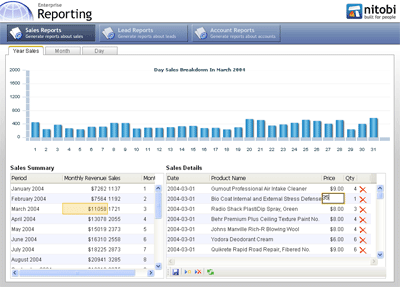
Using the FABridge along with the Nitobi Ajax Grid and Adobe Flex Charting, we have created a scenario where one can view monthly sales data and then see the sales details for the month in both a tabular format in a grid and visually represented in a Flex chart.
Under the hood we have used PHP and MySQL to provide the data to both the data grids and the chart. When a user clicks on a record in the sales data grouped by month, the details grid makes a request to the server for all the sales data for that month - this ends up being between 200 to 1000 records or so. To ensure that the details grid is still fast, we only render the part of the dataset that the user is looking at rather than rendering all 1000 records say, which can take a long time when you use the DOM innerHTML property. The other thing that happens when a month is selected in the master grid is that the Flex chart is also updated with information about the sales for that month, except that the sales data is then grouped by day. Grouping of the sales data could either be done on the client or the server, however, since we have already retreived all the sales data for the month and displayed it in the detail grid we simply take that same data and group it very quickly using an XSL transformation (yes currently only IE and Moz but the latest Safari build also has it - finally!). The grouped data we output from the XSL transformation is actually formatted as JSON which is then evaluated into a JavaScript object and passed to the Flex chart for rendering. The grouping XSLT is pretty simple and uses the Muenchian method:
<xsl:stylesheet version="1.0"

    xmlns:xsl="http://www.w3.org/1999/XSL/Transform" xmlns:ntb="http://www.nitobi.com">

  <xsl:output method="text" encoding="utf-8"/>

  <xsl:key name="sales-by-day" match="ntb:e" use="@h" />

  <xsl:template match="/">

    [<xsl:apply-templates select="//ntb:data" />{}]

  </xsl:template>

  <xsl:template match=”ntb:data”>

    <xsl:for-each select=”ntb:e[count(. | key('sales-by-day', @h)[1]) = 1]”>

      {’totalSales’: <xsl:value-of select=”sum(key(’sales-by-day’, @h)/@i)”/>,

        ’day’: <xsl:value-of select=”@h” />,

        ’month’: <xsl:value-of select=”@f” />,

        ’year’: <xsl:value-of select=”@g” />},

    </xsl:for-each>

  </xsl:template>

</xsl:stylesheet>
We have also hooked up a few other events so that the chart will be updated when changes to the data in the detail grid are made.
All in all, by using the FABridge to move data to and from a Flex chart we can create very compelling and ultimately very useful dashboard type of application by merrying the Flex and Ajax technologies.
 Del.icio.us
This entry was posted on Tuesday, October 17th, 2006 at 5:18 pm and is filed under AJAX, Components, Declarative Programming, Flex, Nitobi, RIA, Web2.0. You can follow any responses to this entry through the RSS 2.0 feed. You can leave a response, or trackback from your own site.
 Entries (RSS)
and
Entries (RSS)
and
October 17th, 2006 at 5:37 pm
Good work nitobi. It looks very sexy.
October 17th, 2006 at 6:56 pm
Why not just build everything in Flex? It would make it more browser compatible for sure. I’m just not “getting it” on the advantages of mixing the two technologies for this demo, especially since it only places further barriers. Could you please explain?
October 17th, 2006 at 7:23 pm
Hi ali, thanks for the question. First of all we wanted to show an example of using the FABridge!
Second of all, I think that there are good reasons one may not want to go for the all Flex solution (or even an all Ajax solution). The biggest reason for going with a hybrid approach would be the fact that it only requires an incremental change to an organizations IT infrastructure. Going with an Ajax+Flex solution can be a good step towards evaluating the benefits of either of the those technologies / approaches rather than making a large investment in moving away from a web standards based application to a proprietary all-or-nothing framework.
For the moment, I think there are many compelling reasons to take a serious look at Flex, however, there is still room for technologies in the Ajax stack to play an important role in enterprise software.
-dave
October 17th, 2006 at 8:33 pm
good point Dave…not too mention you may have boat load of HTML/Ajax pages already in your app that you can’t just throw out at a moments notice.
See my blog post here for more on that: http://blogs.nitobi.com/andre/?p=255
At any rate if you are pro Flash/Flex you should be happy to see adoption in any shape or form!
October 17th, 2006 at 8:36 pm
Great work Dave-looks fkn sweet.
Relevant thoughts too, I don’t think we as developers would be wise to write off any technology. Flex has a great future. Adobe isn’t going anywhere though I do fear they’ll fuck up flash (PDF isn’t exactly the best user experience imo). JavaScript has a great future with no roadblocks in sight (thanks to mozilla, w3c and ecma standards).
Being competent in both technologies and having the ability to integrate them is a pragmatic and a very realistic “enterprise” scenario.
Besides, you can’t understand the best tools for the job unless you know a few that essentially fill the same needs.
Cheers,
Brian
October 18th, 2006 at 3:35 am
[...] Dave Johnson put together a Flex / Ajax dashboard demo using the Nitobi Ajax Grid and the Flex 2 Charting component with the FA Bridge. It’s a pretty neat use case for visualizing data and having the tabular view (which is editable) in one screen. And developers don’t have to know much about Flex, just Ajax skills.read more | digg story Share and Enjoy:These icons link to social bookmarking sites where readers can share and discover new web pages. [...]
October 18th, 2006 at 12:40 pm
Ali,
I agree, seems to me one of the reasons companies choose AJAX is to stay away from the flash platform… Once they start combining Flash / Flex / Ajax, seems easier to just going full cream Flex IMHO.
From the point of the companies that are not against flash, but do want to keep their existing framework, it makes sense to combine. It’s just strange to me. Every AJAX vs Flex conversation I have seen seems to revolve around the want to stay away from Flash because it’s “Evil”. It’s great Nitobi and companies like this are helping get past that perception. Flex 2 and AS3 have matured to the point of being a real enteprise quality tool, not just a “marketing / fancy website tool” (not my perception, but a general perception none the less.) Kudos Nitobi!
May 22nd, 2007 at 6:30 pm
[...] The team at Nitobi has just released a Flex Ajax dashboard showing off what is possible when you combine Ajax and Flex 2 using the FA Bridge. Dave Johnson posted the demo over on his blog. [...]
June 1st, 2007 at 6:18 pm
Hi Dave,
I included your Flex / AJAX experimental site in an internal presentation for our intranet and corp comms teams, and yesterday I discovered that the site is missing its data. Flex draws the correct interface, but the Flex bar chart and AJAX Sales Summary & Details are missing. I tried using both Firefox and IE, and the results were the same.
Marc
June 3rd, 2007 at 2:51 am
Hey Mark, that is very strange - I am looking into it now so it should be fixed by monday morning.
Thanks for the tip!
Dave
October 14th, 2007 at 3:45 pm
Hello, great article - I am wondering if you can provide more details on how you managed the interaction between the data tier and the charts?
thanks
June 9th, 2008 at 12:19 am
hello, you are really great Dave.but i think once you have to take a look on this visifire.It can help you to gain some more of your AJAX Chart’s