Declarative AJAX Components and XML Namespaces | October 16th, 2006
Being on the OpenAjax committee has been pretty interesting so far despite the fact that I have only managed to be in on one call - luckily all the minutes are on the wiki and I have been following that pretty intently.
The declarative markup comittee is looking at how to standardize the definition and instantiation of declarative AJAX components or widgets. A good example of a complex component is the Nitobi Ajax Grid component while the Dojo framework has several smaller widgets like the very cool fisheye menu. To create an Ajax widget in a web page declaratively one might have some markup like this:
<ntb:grid ... />
Similarly, one could use something like this:
<div oatype="ntb:grid" ... />
This is very similar to the idea of microformats - and even makes them more expressive. In either case the OpenAjax bootstrapper would start using something like the onload event on the window object and it would search through the DOM and find all elements with a custom namespace or an oatype attribute. Once the bootstrapper finds a component declaration it refers to a registry to find the toolkit that is responsible for parsing and loading that specific component from the declaration. Personally, I like the former with the custom tag that is properly namespaced.
Unfortunately, IMHO, people generally opt for the later declaration that uses the build in HTML elements and simply adds custom attributes. While both are nearly identical, the use of namespace prefixes on the tags is possibly more “standard” and ensures that one doesn’t get a Grid component mixed up with a regular DIV element. For the most part, I think the gravitation towards the later declaration is due to the general contempt people hold for Internet Explorer - and indeed most of the people on the declarative markup committee feel this way. Having been building declarative components for Internet Explorer for over six years now we are pretty well versed in the problems with Internet Explorer, and I can assure you that the support for XML namespaces and custom tags in Internet Explorer is perfectly fine. I would argue, as you will see in a moment, that the support is even better in Internet Explorer than in Mozilla. Some Ajax frameworks, such as Dojo, support XML namespaces in Mozilla but not in IE due to perceived deficiencies.
From our experience, Firefox and not Internet Explorer has been the browser that breaks when custom namespaced tags are used. The biggest hurdle is that, as noted in the Dojo manual page that, one “must” (emphasis on the part of the author of the Dojo manual) define the xmlns:mynamespace on the page. Usually that is done on the HTML tag. Anyone that has worked with XML will surely know that if you want to have some elements in a different namespace then declaring that namespace is a fact of life. On the other hand, Firefox works in a quirky way if you define custom XML namespaced tags - forgetting the fact that it doesn’t even care if you define the namespace or not, which seems very bizarre to anyone familiar with XML. For the straight dope on custom tags in IE everyone should check out the relevant MSDN article (it is amazing all the good stuff on MSDN that many people ignore). The jist of the article is that you just need to specify your XML namespace on the HTML element like this:
<html xmlns:mynamespace>
How completely unexpected! However, it can also be specified on any other element that is a parent of an element that uses the namespace. The article describes the fact that support for custom tags was introduced for enabling behaviours - ie defining custom HTML elements that behave in some custom way - which were a great idea. Admitedly, the one drawback of the IE model is that it does not support the document.getElementsByTagNameNS() method, which can select tags with a namespace in Firefox. Instead one has to use the regular getElementsByTagName method and look at the namespace value. This is easily wrapped of course.
Having said all this, one should also remember that XHTML is not really there yet.
At any rate, we still want to use XML namespaced tags and there are a few problems we have found with Firefox regarding support for custom XML namespaced elements. The two main problems we have observed are:
- Styles are not applied correctly
- DOM methods do not work correctly
- Self closing tags do not work
To illustrate this, I have made a simple example with some sample markup that might be used in some sort of windowing or panelling situation. I defined some buttons, panels and a title with some interspersed native HTML elements.
<div id="div1">

  <ntb:button id="button1">button 1</ntb:button>

  <ntb:button id="button2">button 2</ntb:button>

  <ntb:panel id="panel1">

    <ntb:title id="title1">

      <div id="div2">panel title 1</div>

    </ntb:title>

    <ntb:contents id="contents1">

      <div id="div3">Contents div3</div>

      <div id="div4">Contents div4</div>

    </ntb:contents>

  </ntb:panel>

</div>
One common thing to do is define some custom styles for these elements such as this:
ntb\:panel {border:1px solid red;display:block;}
ntb\:contents {color:red;display:block;}
ntb\:title {border:1px solid black;background-color:#3366FF;display:block;}
ntb\:button {border:1px solid black;background-color:#CCCCCC;}
The results are fairly good in IE:
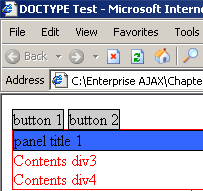
and pretty poor in Mozilla:
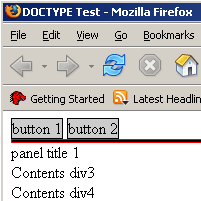
Granted that is quite contrived and the likelyhood of specifying styles for the custom elements is pretty low.
This brings us to the second point which is a bit more important. The native DOM methods in Mozilla don’t actually recognize the custom elements; or rather, to be more precise, DOM methods don’t reflect the true DOM hierarchy as it appears in your HTML. As an example, we will try and access the parent node of each of the nodes in our sample custom namespaced HTML. The results were as follows:
IE parentNode()
| Target Node ID | Expected Parent ID | Actual Parent ID |
| title1 | title1 | title1 |
| contents1 | contents1 | contents1 |
| … | … | … |
| ok you get the idea | ||
Mozilla parentNode()
| Target Node ID | Expected Parent ID | Actual Parent ID |
| div2 | title1 | div1 |
| div3 | contents1 | div1 |
| div4 | contents1 | div1 |
| button1 | div1 | div1 |
| button2 | div1 | div1 |
| panel1 | div1 | div1 |
| title1 | panel1 | panel1 |
| contents1 | panel1 | div1 |
Internet Explorer gets the parentNode as one would expect but Mozilla seems to have some difficulty. There are similar difficulties with many other of the DOM methods in Mozilla.
The big problem we have found is that Mozilla does not support self closing tags. One would expect that the following would be equivalent:
<ntb:grid />

<ntb:grid></ntb:grid>
Not so in Mozilla. The later syntax is ok, whereas the self closing tag does not get parsed correctly when you look at the innerHTML of an element and it is even worse once you have self closing tags in conjunction with DOM methods.
Mozilla has to get its act together with custom namespaced tags for declarative AJAX components to ever get anywhere. If anyone wants to compare war stories then please leave some comments.
Technorati tags:ajax, microformat, declarative, components, xml
October 16th, 2006 at 1:40 am
Dave, I see two problems in what you’re doing.
First of all, the CSS syntax you use is what you would use for a non-namespace-aware UA. For a namespace-aware UA (such as Gecko), the correct syntax is described in http://www.w3.org/TR/css3-namespace/
Second, based on your description of the parsing behavior (and given the lack of a link to an actual web page containing “self-closing tags”), I can only assume that you’re sending your page with the text/html MIME type. Then you do in fact run into the issues described in http://www.hixie.ch/advocacy/xhtml and in particular you encounter the fact that the syntax doesn’t follow XHTML 1.0 Appendix C (which describes the requirements for sending XHTML as text/html and having it sort of work).
I appreciate that XML namespaces are a (over-)complicated business, but I think you are basically criticising Firefox for implementing the W3C specifications instead of “doing what IE does, even when IE is acting in a non-namespace-aware manner”.
October 16th, 2006 at 10:28 am
[...] read more | digg story Share and Enjoy:These icons link to social bookmarking sites where readers can share and discover new web pages. [...]
October 16th, 2006 at 4:30 pm
Thanks for the CSS link Boris!
I am not so much criticising Firefox but giving the other side of the declarartive markup argument where IE - in all its non-standard glory - is usually derided for not working “properly”. But, from a vendor point of view, at least it works.
-dave
October 16th, 2006 at 4:51 pm
Dave, my point was that it only “works” from the point of view of vendors who are coding to its bugs.
October 17th, 2006 at 1:38 am
Yeah i agree
October 17th, 2006 at 3:30 am
Dave you’re always causing shit eh;-)
Hey there appears to be some content missing in FF after the lines:
“The big problem we have found is that Mozilla does not support self closing tags. One would expect that the following would be equivalent:”
Just an FYI.
October 17th, 2006 at 3:34 am
haha, forgot to escape those tags. oops.
-dave
October 19th, 2006 at 4:10 pm
[...] Declaritive Ajax components and XML namespaces, referencing a great Dave Johnson post. [...]
October 20th, 2006 at 8:05 am
Good article Dave.
I don’t see a need for an “OpenAjax type” attribute, when the ‘role’ attribute from the W3C is ideal for what you are talking about: see Using role to extend XHTML.
Note also that @role is already supported in Firefox as a hook for accessibility: see Accessible DHTML. Of course, even if the browser doesn’t do anything with the attribute itself, there is nothing to prevent libraries like Dojo from using it as their hook.
Regards,
Mark
Mark Birbeck
http://www.formsPlayer.com/
http://skimstone.x-port.net/
October 20th, 2006 at 9:59 am
I’m curious, how do the other browsers out there (Safari, Opera, Dave’s Cool Browser 3.0, etc.) deal with these issues?
October 30th, 2006 at 7:08 am
Hey Dave,
Great post…
Have you or anyone else noticed that IE7 fails to redraw custom namespaces correctly, when swapping CSS-link? That is, without reloading the page (Firefox accomplishes this galantly).
I suspect that this problem is similar to hasLayout problem from IE6.
October 30th, 2006 at 2:10 pm
thanks for the useful comments everyone!
Mark, thanks for the link to @role - very interesting point about accessibility as well.
Daniel, there are other browsers aside from FF and IE??? I personally have checked it out but now that I have a nice mac on my desktop i will be looking into Safari some more.
Hakan, I have not observed any problems drawing custom namespaces in IE7 but that is likely only because I have not been playing with it that much
December 13th, 2006 at 9:16 pm
I actually have ran into the FireFox parsing issue that Dave described above and can’t really get it to work as expected. Even if you fully describe an extended DTD (according to W3C spec http://www.w3.org/TR/1999/xhtml-modularization-19990406/developing.html), it will not do the parsing as expected.
For example: something like
Will get parsed as:
It is really annoying and frustrating since we are always praising FireFox for following W3C standards but in fact it fails to comply just like IE in certain ways. At least IE does not comply in certain cases to make our live easiers, not worst!
December 14th, 2006 at 5:15 pm
sorry faris but it looks like you will need to encode your html there.
I agree with your frustration! I have also found in proper XHTML that Firefox cannot get across the elements with different namesaces (using something like parentNode).