Skip to Navigation | Skip to Content


Archive for the 'air' Category

AIR Support | September 4th, 2008

When Andre went on the final leg of the Adobe AIR tour back in the spring I needed to build a nice Ajax + AIR demo for him. Ultimately I had to drop the project and Andre went without. The main reason that I decided not to build the application was due to frustrations with building HTML / Ajax apps in AIR - though I had previously built several successful HTML / Ajax AIR apps in the beta versions of the AIR runtime.

This was the first real application that I had tried to build since the Beta 1 and of course there were some API changes - as can be expected between beta versions and a release - but more importantly the security restrictions in Ajax AIR applications make it almost unusable for certain use cases. At least for my HTML apps.

There are two main problems that I found exceedingly annoying and that ultimately led to the shelving of the project.

The first problem was that you cannot use innerHTML to insert HTML that contains event handler code such as <div onclick=”foo()”>Bar</div> when you are in the Application Sandbox. This is of course to prevent people from inserting malicious code on HTML events - which is equivalent to doing an eval if the user somehow triggers that event or the event is triggered manually through JavaScript.

That meant that I had to put most of my code in the Network Sandbox to get around the security restrictions. Fair enough I thought until Murphy reared his ugly head.

It just so happens that you cannot pass complex objects across the Sandbox bridge since they become of type “Object” on the other side. So for example I wanted to pass an XML document from the Network Sandbox where my application UI is residing into the Application Sandbox so that I can do some cross domain requests with it and / or save it to disk for use later when offline - essentially to do anything interesting it needs to be in the Application Sandbox. So to do this I had to write my own code to serialize and deserialize any custom objects that I wanted to pass around, essentially converting my XMLDocuments and so on to strings on one side and then loading them into XML documents again on the other. Pain. In. The. Arse.

A second, and maybe more important result of not being able to pass complex objects across the bridge is that it pretty much means that if you want your UI to be in the Network Sandbox you cannot do file drag and drop unless you have a special place that is in the Application Sandbox where the user can drop onto. This may not seem like such a big deal, however, it poses other problems with the UI layout since the best way to layout the UI in an HTML AIR app is to have the custom chrome in the Application sandbox using the CSS border-image (which is awesome) and then have the rest of the UI in a 100% width and 100% height IFrame with some margin to take into account the custom chrome edges. In that case there is not really any opportunity to have a special drop area in the Application Sandbox to accept dragged information from the desktop.

So to make a long story short, building AIR apps that use dynamic UI generation and some of the APIs that make AIR awesome, like drag and drop, means that HTML / Ajax AIR apps are simply not feasible due to the security restrictions.

Posted in AJAX, air | 2 Comments » | Add to Delicious | Digg It

Nitobi to Build XMPP Client in Flex and AIR | March 15th, 2008

This is a really exciting new project (working with Verb Exchange) where we are building an AIR XMPP client for a VOIP system that lets people use their existing phones to make cheap calls and SMS.

Andre has more details and the press release is here.

It should be a pretty cool project!

Posted in AJAX, Flex, Nitobi, air, voip, xmpp | No Comments » | Add to Delicious | Digg It

Nitobi’s OnAIR European Vacation | February 21st, 2008

Adobe is at it again with the OnAIR bus tour European leg.

There will be two legs this time one in the west and one in the east.

Of course the most exciting part is that Andre will be joining the party again for both legs and talking about all the Ajax goodness that AIR has to offer. So if you are a Nitobi customer in one of the tour cities be sure to contact us and meet up with Andre!

Posted in AJAX, Nitobi, adobe, adobeair, air | 2 Comments » | Add to Delicious | Digg It

Nitobi Hack Day Take Two | January 24th, 2008

The second Nitobi Hack Day will be happening on Feb 9, 2008 from 10am to 6pm. You can come and start hacking at 9 things will officially start at 10am SHARP! Of course you can always come by later and if you don’t know anyone just ask for someone that works at Nitobi to show you the ropes. You can signup over at Upcoming.

The event is meant to bring hackers from around Vancouver to the Nitobi office and dedicate a day to building something amazing! That something can be hardware, software or whatever. The hacking is generally focused on Ajax (of course), social networking (Facebook apps anyone?), wireless (Joe and I got this covered), AIR / Flex, and web development in general - of course the hacking can still be robotics, Wii hacks or whatever you think is cool.

Nitobi will provide the foosball, beer, prizes (like books, shirts, software and an IPod Nano) and you provide the hax0r skillz.

Be there!

Posted in AJAX, Flex, Nitobi, air, hackday, wireless | 2 Comments » | Add to Delicious | Digg It

Ajax Alive and Kicking | December 14th, 2007

I think that people still finding new and interesting features of old browsers is a good sign that Ajax still has some gas left. Even more recently there are developments around charting, comet, sound and widgets. For those reasons I am not convinced that new “RIA” frameworks like Flex, Silverlight and JavaFX are the nirvana that will save us poor web application developers from the hell that is cross-browser JavaScript and DOM development. Even the very idea that Ajax is a cross-browser hell is really a misnomer in this day and age when there are so many different mature Ajax frameworks that take care of a lot of the cross-browser issues Ajax developers have to deal with on a daily basis - Ajax frameworks are to Ajax developers as the Flash player is to Flex developers. Most of the rest of this is to build on what Kevin Hoyt recently posted.

Where Have We Been

Over the past few years both Ajax and Flex have come a long way. Previous versions of Flex (and Flash before that) were nowhere near where Flex 2 / 3 Beta are at and one can achieve amazing things with Flex these days. The same can be said for Ajax. I think that both Flex and Ajax have been moving forward in step. In fact, Ajax has been around for a lot longer than Flex and was already creating real RIAs back in the late 90’s when Flash 3 was still only being used to make website intro’s. Certain frameworks, like Ext, make it simple to create applications with a desktop like feel using splitters, panels and common desktop UI widgets.

What is an RIA

I use the term RIA here with some reservation just because of the differing perceptions of what it really means - sort of like early perceptions of DHTML only being useful for annoying flashing text and simple animations. In terms of Ajax, one needs only look to today’s best of breed Ajax applications such as the Google online application suite including their great spreadsheet and mapping applications, which either don’t have equivalents in other RIA technologies or are simply better than their competitors; most people would choose Google Maps over the Flex based Yahoo! maps any day. Really, other than Buzzword, there are few popular Flex based RIAs (and even fewer that are actually available to the public) and frankly is there anything that much more amazing about Buzzword compared to a Google Doc? Google Doc even “feels” faster and more responsive to boot.

If RIA is about eliminating the page refresh or drag and drop then Ajax definitely has the right tools to create an RIA application. If RIA is about creating a “desktop like” experience then Ajax is definitely an RIA. If RIA is about improving the user experience and usability of network connect applications then Ajax is undoubtedly an RIA. One look at Google Mail and anyone can appreciate that it for the most part loads faster, searches faster, and generally performs far better than a desktop mail program like Outlook. Even in areas that Ajax may struggle, such as video or graphics, Ajax can take advantage of a wide variety of other technologies such as Flash, SVG or Canvas.

Flex Shortcomings

As with Ajax there are a lot of shortcomings to Flex applications. Dealing with the browser back button, search indexing, rendering HTML content are just a few of the problems that face Flex developers - some of them equally problematic for Ajax applications others not.

On the other hand, one of the biggest strengths of Ajax, which is often quoted as a weakness, is that it depends on the fragmentation of browsers and standards. As we know, overspecializing breeds in weakness. While Ajax may change rather slowly due to the glacial pace of browser advances and constant bickering over standards (something that is changing more rapidly now as the browser market becomes more competitive), at least the people doing the standards are less impacted from having budgets, managers and boards to report to - i.e. closed products like Flex are produced by companies that need to make money. Furthermore, any gaps in the technologies provided by the browser vendors are often filled in by the tireless work of Ajax framework developers.

And you know what the best part of being standards based is? You get included in all the coolest new technologies. Can the same be said of the de-facto standards? Well, Opera is doing ok :)

Development Process

Flex has a hard time fitting into conventional - and I dare say preferred - web development processes, which will keep it on the fringe for some time to come. The process that Flash and now Flex developers go through when building an application is that they have Flex builder to design their application and maybe write some ActionScript to access some web service endpoints on a server somewhere. Then the developer needs to build their web service endpoints using a different tool (likely Eclipse or Visual Studio). Everything is separated between the client and server only connected by the web service endpoints yet the client side development is still not strictly for a designer but a designer and an engineer need to work on the Flex application. One interesting thing about this approach to development is that it fits in well with the enterprise SOA sort of idea; the Flex app is only a consumer of enterprise services and does nothing on the server. This is one reason that Flex is becoming popular in applications for SAP and Salesforce I think. However, hat is not to say that Ajax has no place in enterprise applications. The one thing that I do really like about Flex development is the declarative approach which few Ajax frameworks have done, I digress.

On the other hand, Ajax developers are used to using one tool for doing their server and client development whether it be Dreamweaver, Eclipse, or Visual Studio. Arguably the most popular Ajax frameworks, notably ASP.NET Ajax and Google Web Toolkit, actually combine both server and client development in one environment. In those environments Ajax developers are able to write server side code (binding to databases, interfacing with external web services, writing server side events, and so on) as well as client side code (CSS, JavaScript and HTML) all in one place. Even better, the server side code often encapsulates all the HTML, JavaScript and CSS required for an Ajax component like a tree or grid making Ajax development a painless and productive RIA endeavour.

Ajax developers also have so many choices between different Ajax frameworks that provide different widgets and various fundamental approaches to Ajax itself. Some are integrated with the server while others are completely client side. Whereas if a developer chooses Flex, they have really only got one option for their framework, their widgets, their tech support and their sanity.

Testing

Unit testing is all well and good but where is the functional test framework for Flex that is Selenium to Ajax? I concede that functional testing is more important for Ajax just because you may be trying to hit four or five different web browsers with your application but it is important for Flex development even beyond just checking for browser nuances.

Mashups

Finally, one of the biggest drawbacks of Flex, and strengths of Ajax as evidenced by the Web 2.0 craze, is the fact that Flex simply does not play nice in the world of the web. Sure you can access data across domains from Flex if the remote server has read permissions set in the crossdomain.xml file, however, in general Flex is not amenable to building mashup applications. There is no easy way to specify some Flex widget and have it dynamically included in another Flex application (probably due to what I say in the conclusion). On the other hand Ajax RIAs are free to use any of the many technologies at their disposal and mashup content from anywhere on the net - including Flex content. Ajax applications were popularized due to the early mashup - in particular maps based ones with Google Maps. Flex is a heavy (handed?), non-standard, monolithic approach to building RIAs that are conducive to keeping the application separate from others.

Conclusion

Ajax is made for the browser and the browser will continue to be the universal approach to accessing content over a network for some time to come. Not the least reason of which is the rule of least power. The web became popular for a reason and that reason is the ease with which content can be created. This is as true for HTML as it is for Ajax and is the main reason that Ajax is alive, kicking and will be around for a while despite new RIA technologies.

Posted in AJAX, Flash, Flex, adobe, adobeair, air | 3 Comments » | Add to Delicious | Digg It

Alwees Froosh | October 28th, 2007

That is the name of the application that Jake, Chris and I made for the inaugural Nitobi Hack Day last Saturday.

Yes, we may have had the biggest team and yes some teams didn’t even stick around until the sweet, sweet beer but we came within a whisker of winning it all! Of course, how you split up a single iPod Nano amongst three people is anyone’s guess.

The idea behind the application was that we wanted a desktop app that would be running all the time and would bring in information from many different sources about music artists / bands that you like. In particular, I never know when new albums come out from bands that I like. The trick is that we use, in this case, your top tracks XML listing from Last.fm to determine what you like - ie what you listen to most is what you like. Then we use that info to look up different information about the bands. At the time of building the application we decided on two things to bring in; new releases and events. The original reason that we went with the AIR application was because I wanted to use my iTunes XML file. We found a problem with that early on - my iTunes XML files is >7MB and AIR has a tough time opening it. That is when we decided to go with Last.fm.

I will release the app shortly once I get some time to fix it up.

We were able to deal with the new AIR security model pretty easily and of course chromeless windows and all the great CSS3 support was much appreciated!

Posted in AJAX, JavaScript, Nitobi, Web2.0, adobe, adobeair, air, hackday | 5 Comments » | Add to Delicious | Digg It

Hack Day Epilogue | October 21st, 2007

Nitobi Hack Day today was a great success! We had over 35 people in total throughout the day and ended up with about 8 or 10 presentations at the end of the day. Joe Bowser of Nitobi ended up being voted the coolest hack and won himself an shiny new iPod Nano. There was streaming video for most of the day and there will be videos put up on YouTube soon. Tweets can be seen from Andre, Brian, Roland and myself.

At the end of the day the keg of beer was tapped and there was a flury of activity as people tried to put the finishing touches on their applications.

Thanks to everyone who came out and made this event a very fun time! We will definitely be doing it again soon!

I will report on my Adobe AIR hack tomorrow once I get some much needed rest :)

Posted in Nitobi, RIA, adobeair, air, hackday, vancouver | 2 Comments » | Add to Delicious | Digg It

Ajax Applications in Adobe AIR - eSeminar | September 26th, 2007

I just completed an eSeminar about Adobe AIR and building AIR applications with Ajax and HTML. It was a good turnout (~250 peeps) and I hope that I gave all the attendees a good idea of some of the features of AIR and how to achieve some cool results.

People can download the slide deck here or check out the Adobe OnDemand site to see/hear it in all its glory.

I also wanted to post answers to some of the questions that I did not get to answer during the seminar.

Q: Can you explain in a nutshell offline data store with sql lite?
Through JavaScript or ActionScript one can write to or read from a SQLITE database that can be created on the users computer.

Q: Is it free like adobe reader?
Yes

Q: I mean can you mix ajax and flex controls
Yes

Q: Must the end user install the AIR Runtime on their machine to run air apps or can they be run on any machine line a flash projector file?
The AIR Runtime can be included in your application and installed with your application. It can also be installed from a Flash file.

Q: A question, mind sound a bit weird but, can you mix up html and flex controls?
Yes

Q: AIR can connect to external hardware (card reader etc)?
Not sure about that one!

Q: Can you access the webcam from an AIR app?
Yes

Q: The BETA label after Apollo made my manager a bit skeptical on using it through out the whole company, any insight in that ?
I think there is something to that - the difference between Beta 1 and Beta 2 is fairly large. However, I think that from Beta 2 onwards it will be much more stable.

Q: I also did not hear if you heard if u can use ruby on rails with air apps
You can use any server backend with AIR apps

Q: Will AIR be integrated w/products after CS3?
Not sure

Q: Can we make a executable in the future .. which would include the runtime with it
Your AIR application can include the runtime already

Q: What about MySQL?
You can use MySQL on the server but not on the client

Q: You doing any sessions at max?
Andre Charland and Alexei White from Nitobi will be presenting an Inspire session at MAX

Q: When is the final release of AIR 1.0?
Early 2008

Q: AIR release will be synchronize to the WebKit release?
AIR will be very close to Webkit - even providing bug fixes etc to the project

Q: Is iTunes created with AIR?
No

Q: Do you know when the expected release for AIR (for public use) will be?
The current Beta 1 version is for public use and the anticipated 1.0 release is early 2008

Q: How does this work with ColdFusion? As expected?
Yes as expected - any server technology will work

Q: MS Access mainform / subform - is there a plug-in that does something similiar?
Not sure at the moment

Q: Will there be a separate AIR development environment?
No. You can use Dreamweave, Aptana, or Eclipse at the moment I believe

Q: Where to start? Extensions for dreamweaver or handcoding
Do some hand coding and get familiar with the application.xml file and

Q: Is there an AIR plugin for Dreamweaver 8??
I don’t think so but don’t quote me :)

Q: Can I develop with Flex and use AIR?
Absolutely

Q: Maybe you said, but what rendering engine does AIR use? do we have to account for CSS issues liek we do for IE?
It is Webkit

Q: What must you go through to visually place objects in the appplication where you want them to appear?
Flex, Dreamweaver, Aptana. Just use your preferred HTML IDE

Q: Why would the application not update on its own?
There is update functionality I think - the AIR installer for your application generally deals with upgrades nicely

Q: Will Adobe Air be open source if not what will it retail for?
It is not open source but it is free. Well it is partially open source I guess since it uses WebKit

Q: Is Adobe Air the same thing as Adobe Apollo?
Yes

Q: Linux??
Not yet - after V1.0 comes out

Q: Does it go beyond the root of the XML file? for example ../..?
Good question - haven’t tried it!

Q: Is all of this code applicable to all Operating systems or do does it have to be coded differently for each OS
AIR is OS agnostic. You can run AIR apps on any platform although currently there are a few bugs that have been logged and will be fixed

Q: I thought I saw the use of .attachEvent previously; now it looks like a Flash .addEventListener call… what’s the difference?
attachEvent was the Nitobi Ajax Toolkit event attachment so that the code could run in a browser (IE et al) or AIR

Q: Does the system chrome command apply to osx as it does to windows?
Yes

Q: Can you change the appearance of the Windows XP window with AIR?
Not that I know of

Q: External files are included in the air file or they are on a server?
They can be either

Q: What about movies? Quicktime etc…
I think the same as Flash or Flex

Q: I assume that this will run on Mac the same why it runs on Vista?
Yes it works the same on both Windows and OS X

Q: Can you configure your AIR app with all the HTML and JS files residing on a web server?
Yes

Q: Would you say that AIR replaces the way Director used to be used for desktop apps?
To a certain degree yes. But it is definitely focused more on bringing the web experience to the desktop

Q: What does ADL stand for?
ADL is the name of the EXE used for debugging your AIR apps

Q: Will Air be able to play FLV movies?
Not sure

Q: Does AIR allow for a main form /subform similiar to an Access database? (Not something you have to answer now - just whenever there’s something similiar mentioned)
Yes you just have to build it ;)

Q: So what kind of CSS compliance is AIR in compairson with conventional online browsers?
AIR uses CSS 3.0 like the latest WebKit versions - whereas current versions of most browsers support CSS 2.0. I will probably get lambasted for making such a broad generalization!

Q: Can we use air to rotate 3D models?
Why not!

Q: How would this compare to Google Gears? Especially the offline capability.
I think that AIR provides a lot more than just offline capabilities like Google Gears does. It provides cross platform file IO, drag and drop, windowing and more

Thanks for all the questions and feel free to post more below!

Posted in AJAX, Nitobi, Web, adobe, air, html, seminar | 5 Comments » | Add to Delicious | Digg It

Adobe AIR and XSLT… Again | August 12th, 2007

I just thought that I should voice my disappointment once more regarding the fact that Adobe as yet has not confirmed that XSLT is going to be included in the final release of AIR. This is particularly strange given that it is included in the version of WebKit that is being used by AIR.

As usual I have been thinking of a cool application that would be well suited to a simple cross platform desktop widget, only problem being that it requires XSLT for high speed grouping and filtering of data. Normally, data for an AIR application might be accessed through some “web service” but in this case it is accessed natively as XML from the file system. If AIR does not have XSLT support it makes it much more difficult to make compelling and richly interactive applications for the desktop.

Posted in Uncategorized, XSLT, air | 2 Comments » | Add to Delicious | Digg It

Salesforce.com AIR Application | July 18th, 2007

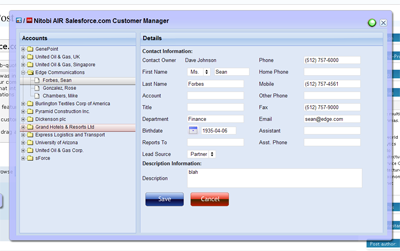
Since Andre was invited to go on the Adobe AIR bus tour we decided to build a cool sample application that would exhibit some of the cool features of AIR and our components. Since we like to focus on the “business case” for our Ajax components and our custom development, we built an AIR application that integrated with the Salesforce.com API. Being the RIA nutters that we are and knowing that most people would be building Flex based applications - which we are currently building a few of for various customers - we decided to build an HTML / Ajax based application instead.

The cool AIR features that we wanted to show off were things like

      1. custom chrome to make things look hawt
      2. drag and drop from the desktop for vcard integration
      3. file system integration for taking things offline

Since we had a pretty tight timeline we went fairly simple and built the application in about three person weeks. The idea was centered around a mobile sales person being able to have access to their Salesforce Account and Contact data while online or offline. Of course, being an Ajax application it should also prove to be a much nicer interface than the current Web 1.0 based Salesforce user interface - man would I like to be able to redesign the Salesforce UI!

Custom Chrome

The most important part of the application was to make it look hawt. This involved a bit of design assistance from Alexei and the creation of some JavaScript and text based activity indicators since animated gifs don’t work in the current AIR beta :( What we did use a lot though was the CSS3 border-image style. It doesn’t seem to work quite right but if you just go with it you can make something that looks half decent.

So on the outer window we applied a style like this:
[code]
-webkit-border-image:url(../images/app-border.png) 18 18 18 18 stretch stretch; border: 18px;
[/code]

Where the app-border.png looks like this:

As well as looking great the chrome needs to be functional. It needs to have minimize, maximize, restore and close buttons. It needs to be resizable and draggable. Maximize, minimize, restore and close are easy - for example:

[code]
window.htmlControl.stage.window.restore();
[/code]

All of those methods (restore, close, minimize, maximize) are created on the nitobi.air.Window JavaScript class. To enable draggability we attach an HTML event handler to the our main window DIV element like this:

[code]
nitobi.html.attachEvent($("main_window"), "mousedown", handleMove, this);
[/code]

The handleMove method is shown below where we just do a quick check first to see if the element that the user is trying to drag has the chrome class on it - this lets us make the window draggable from various points like the header and around the edges. Once they get the chrome we just call startMove() like this:

[code]
nitobi.air.Window.prototype.handleMove = function(evt)
{
if (nitobi.html.Css.hasClass(evt.srcElement, "chrome"))
window.nativeWindow.startMove();
}
[/code]

Desktop Integration

The other cool thing about using AIR is that rather than having some ridiculous multi file upload utility written in Java or Flash, with AIR we can just take files from the desktop and drag them onto the application. What this means is that we can take things like VCards or CSV files full of contact information and have them automagically entered into Salesforce. If offline they get saved as updategrams and get uploaded once the computer is back online. The events for the drag and drop are Flex events on the AIR htmlControl but they connect to JavaScript methods as handlers.

[code]
window.htmlControl.addEventListener(
runtime.flash.events.NativeDragEvent.NATIVE_DRAG_ENTER,
nitobi.lang.close(this, doEnter));
window.htmlControl.addEventListener(
runtime.flash.events.NativeDragEvent.NATIVE_DRAG_DROP,
nitobi.lang.close(this, doDrop));
[/code]

When the drag operation enters the AIR window we call the acceptDragDrop method with the htmlControl as the only argument. This will enable dropping onto our HTML application.

[code]
nitobi.air.Window.prototype.doEnter = function( e )
{
if(e.transferable.hasFormat(air.TransferableFormats.FILE_LIST_FORMAT ) ) {
runtime.flash.desktop.DragManager.acceptDragDrop(window.htmlControl);
onDragEnter.notify();
}
}
[/code]

Now that we have enabled dropping on our HTML app we can actually process the information when it is dropped by accessing the transferred data like this:

[code]
nitobi.air.Window.prototype.doDrop = function( e )
{
var files = e.transferable.dataForFormat(
air.TransferableFormats.FILE_LIST_FORMAT,
air.TransferableTransferMode.CLONE_PREFERRED );
for( var f = 0; f < files.length; f++ ) {
onDragDrop.notify(files[f]);
}
}
[/code]

In this case we specify that the drop should be a list of files and we are able to iterate over that list to add each of the VCards to Salesforce.

Offline Operation

Finally, we did some filesystem integration for working offline and that was pretty cool. Rather than using the SQL-Lite database that comes with AIR, we wanted a solution that would be more conducive to a web way of working - ie something that will essentially queue HTTP POSTs and subsequently POST them when a network connection is present. Because frankly, unless you have A LOT of data on the client and interfacing to a SQL-Lite database is generally going to be overkill and make a lot more work for the developer since they will have to write not one backend in their server language of choice but also a client side backend in JavaScript. Anyhow, in the Nitobi CompleteUI framework, all changes on the client are stored as XML "updategrams". So it was a pretty easy task to put a layer between the client side JavaScript DataTable and the XMLHttpRequest that sends data to the server when it is "saved". Instead of the data being sent to the server with an XHR, if the client is offline the updategram is just persisted to disk. Even when online, the data is continually saved to the disk for offline use at any time. All this took very little extra coding since we just serialized the server messages rather than actually transforming them into SQL statements that would store the data in SQL-Lite.

For all of this to work we needed to be notified when the computer is connected to the network. This is done in the nitobi.air.Window class by using the AIR service monitor. This has the additional requirement of having the servicemonitor.swf library in the web page by using a script tag with the src as servicemonitor.swf. To create the service monitor we do something like this:

[code]
var req = new air.URLRequest('http://www.adobe.com');
this.monitor = new window.runtime.air.net.URLMonitor(req);
this.monitor.addEventListener(
air.StatusEvent.STATUS, handleStatusChange
);
this.monitor.start();
[/code]

Where the handleStatusChange method will notify any objects that are connected to the the onOnline and onOffline events of the nitobi.air.Window class.

[code]
nitobi.air.Window.prototype.handleStatusChange = function(evt) {
// Fire the event for online / offline notification
if (evt.code == "Service.unavailable")
onOffline.notify();
else
onOnline.notify();
}
[/code]

For writing the data to disk we use the AIR filesystem integration and wrap it all in two IO methods for reading and writing. The air.File.applicationStorageDirectory is (on Windows) in c:\documents and settings\username\application data\Application-Name folder.

[code]
nitobi.data.IO.readXml = function(filename) {
var file = air.File.applicationStorageDirectory.resolve(filename);
var stream = new air.FileStream();
stream.open(file, air.FileMode.READ);
var str = stream.readMultiByte(file.size, air.File.systemCharset);
stream.close();
return nitobi.xml.createXmlDoc(str);
}

nitobi.data.IO.writeXml = function(xmlDoc, filename) {
if (typeof xmlDoc != 'string') xmlDoc = nitobi.xml.serialize(xmlDoc);
var file = air.File.applicationStorageDirectory.resolve(filename);
var stream = new air.FileStream();
stream.open(file, air.FileMode.WRITE);
var str = stream.writeMultiByte(xmlDoc, air.File.systemCharset);
stream.close();
}
[/code]

I think that those were definitely the coolest parts of the application and made for a a pretty sweet little app for managing Salesforce Contacts and Accounts. There is still a little more work that I would like to do in the coming weeks like allowing adding and saving of both Contacts and Accounts without VCards as well as some other searching features. Alas, this will have to do for now :) Also, when Adobe gets XSLT support in there it will be even more awesome!

You can check out the half baked source code here and get the AIR application for installation here. I am working on a version of the AIR app that will allow the user to enter their Salesforce.com credentials and actually see their data - and there will be a HUGE disclaimer that you use at your own risk :D

Update: I just found out that the Mac version of AIR does not have XPathResult (!!!) so selectNodes doesn't work ... sorry Mac users but it should be fixed soon.

Posted in AJAX, Nitobi, Web2.0, air, completeui, onairbustour, salesforce | 7 Comments » | Add to Delicious | Digg It


Search Posts

You are currently browsing the archives for the air category.

Archives

Categories