Skip to Navigation | Skip to Content


Archive for the 'JavaScript' Category

Surfin’ Safari | October 9th, 2008

For the past little while I have been busy fixing up Complete UI to work in Safari. The big problem for us in getting Complete UI working in the WebKit powered browser was that there was no client side XSLT JavaScript API until Safari 3.

So there were a few things I had to update to get things all working properly - and this more or less applies to Chrome now as well but I need to check on a few things.

XMLDocumet:selectNodes

The first problem I came across was using the XMLDocument:selectNodes method. To get selectNodes working I had to implement my own NamespaceResolver which is usually handled for you by the browser.

I had to change the call to the XMLDocument:evaluate method a bit to look like this:


var oResult = this.evaluate(
  sExpr,
  (oContextNode?oContextNode:this),
  new MyNSResolver(),
  XPathResult.ORDERED_NODE_SNAPSHOT_TYPE,
  null);

Where the MyNSResolver class essentially implements the lookupNamespaceURI method through a switch statement returning the appropriate URI for the specified namespace prefix. Pretty easy but kinda annoying to figure out!


function MyNSResolver() {};
MyNSResolver.prototype.lookupNamespaceURI = function(prefix) {
  switch (prefix) {
    case "xsl":
      return "http://www.w3.org/1999/XSL/Transform";
      break;
    case "ntb":
      return "http://www.nitobi.com";
      break;
    default:
      return null;
  }
}

XSLT Transformations

Then there was the actual act of performing an XSLT transformation. Doing the transformations was fine but getting the output node or string from the transformations - depending on if the <xsl:output /> was text, html or xml - was rather different than both Firefox and Internet Explorer. Go figure.

For transforming to an XMLDocument here is what I found to be the output of an XML transformation for the various output methods.

Text:

<!DOCTYPE html PUBLIC "-//W3C//DTD XHTML 1.0 Strict//EN" "http://www.w3.org/TR/xhtml1/DTD/xhtml1-strict.dtd">
<html xmlns="http://www.w3.org/1999/xhtml">
  <head>
    <title></title>
  </head>
  <body>
    <pre>innerText</pre>
  </body>
</html>

XML:

<output>innerText</output>

HTML:

<html>
  <body>
    <output>innerText</output>
  </body>
</html>

XSLT Parameters

There is also one difference in how the Safari XSLT processor deals with parameters. Rather than casting true / false to 1 / 0 the Safari XSLT processor does not recognize true or false values and requires the inputs to be 1 / 0. I have started setting all my XSLT params like this:


oXsltProc.addParameter("paramName", val+0, "");

Events and Focus

There were some other small issues that I came across regarding implementing rich keyboard navigation and events in general.

For example, in our Grid component I had to change the HTML element that we used to “focus” the Grid so that we could capture key presses from a <DIV> to an <INPUT>. Apparently you can’t call Element:focus on a <DIV> element from JavaScript but you can on an <INPUT> (even with a tabIndex set but I try to avoid those for accessibility reasons anyhow).

However, that was not my only problem with keyboard navigation. The other problem was that the focusable element (the newly created <INPUT> in this case) was still not getting focus due to a small code snippet like this:


oMyInput.focus();
cancelEvent(evt);

That second line where I cancel the event (wrapped nicely in a cross browser library call) somehow prevents the <INPUT> from getting the focus. Never figured out a workaround aside from a browser check before calling cancelEvent.

CSS

Finally, in some of our components we also generate CSS using XSTL and dynamically insert it into the page. For example, the developer defined column widths in a Grid produce dynamically generated CSS. However, WebKit does not seem to support the bulk creation of stylesheets neither using the document.createStylesheet method of Internet Explorer nor the hacky way of doing in Firefox by creating a <STYLE&gt element and setting the innerText. Instead Safari requires that you use the uber slow DOM API for adding rules to stylesheets :(

Miscellany

You will often see the “xml namespace prefix mapped to wrong URI” error when working with XSLT in Safari.

Be careful that you are using double quotes in your XSLT for attributes etc and only use single quotes in attribute values.

Of course you also have to be very careful about the nodes that you are transforming / selecting as you are also likely to get the “WRONG_DOCUMENT_ERR” fairly frequently.

Oh yah and depending on the application expect a lot of random “Stack overflow” errors!

Posted in AJAX, CSS, JavaScript, XML, completeui, quirks, safari | No Comments » | Add to Delicious | Digg It

Complete UI Q4 | September 26th, 2008

Some big changes are coming in the Q4 release of Complete UI. Big!

Of course there is a slew of JavaScript bug fixes for all the components with Grid receiving the most attention for IE 8, Safari 3, Firefox 3 and Chrome.

There are a bunch of changes to the Java side of Complete UI with more great JSP and JSF code to make it even easier to use Complete UI in your Java project.

Finally, we have also made huge changes to the ASP.NET Grid and Combo code - and are working on the rest of the components as I am writing this! I think that anyone using ASP.NET will be very happy with the new direction of the ASP.NET code :)

We are shooting for an on time Oct 1 release but there is so much we are trying to fit in it might be a bit late - but it will be well worth waiting for!

Posted in AJAX, JavaScript, Nitobi, completeui | No Comments » | Add to Delicious | Digg It

CommunityOne Presentation | May 8th, 2008

In addition to my slides, Andre recorded my CommunityOne presentation and put it on Blip. Check it out!

Posted in AJAX, JavaScript, Patterns, communityone, dom | 1 Comment » | Add to Delicious | Digg It

CommunityOne Presentation | April 26th, 2008

So I have been accepted to give a presentation at CommunityOne, which occurs the day before JavaOne on May 5. I am going to talk about JavaScript + DOM patterns. I was going to focus on the JavaScript and DOM details around some common Ajax patterns such as those covered conceptually by Michael and Bill. Any ideas would be more than welcome!

Andre and I are also going to take part in the RedMonk CommunityOne festivities as much as possible as well which should certainly be a blast.

This is a bit of a digression but what a sweet picture. Ryan looks badass and Cote is all choked up!

Posted in AJAX, JavaScript, Nitobi, Redmonk, Uncategorized, communityone, javaone | 1 Comment » | Add to Delicious | Digg It

Ajax Functional Testing Fun | March 12th, 2008

It seems that no matter how much you look for information about Eclipse and how to setup different types of projects, your version Eclipse is innevitably not the same version of the person who makes the tutorial and nor are you as much of an Eclipse geek as the writer of the tutorial. The same things will probably be thought about what follows :)

First of all I am doing this in Eclipse 3.3 WTP.

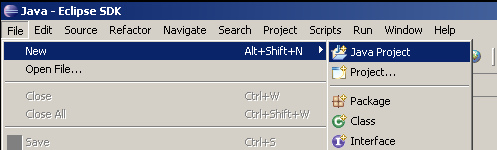
I started by creating a new Java project.

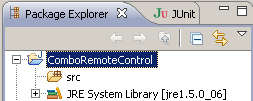
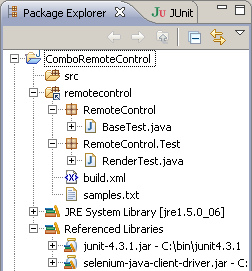
Which should have resulted in a basic project that looks something like this.

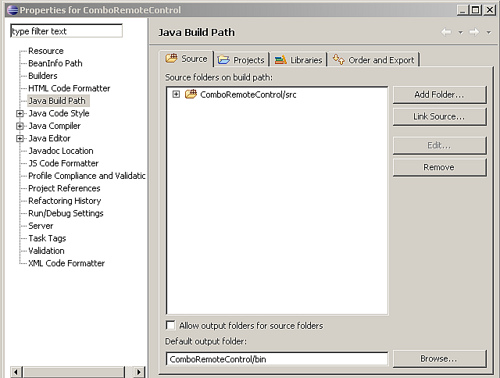
Then right click on the project root and choose “Properties” from the context menu (Alt+Enter). Go to the “Java Build Path” section of the properties. There you can include source files from elsewhere on your computer - so for example if you keep your test code elsewhere on your system you can include the source folder which will include your Java files in the Java project so that they can be built and run as a Java program while still keeping the files in your source control folder as well. This way you also avoid checking in Java projects all over the place that are useless for everyone else.

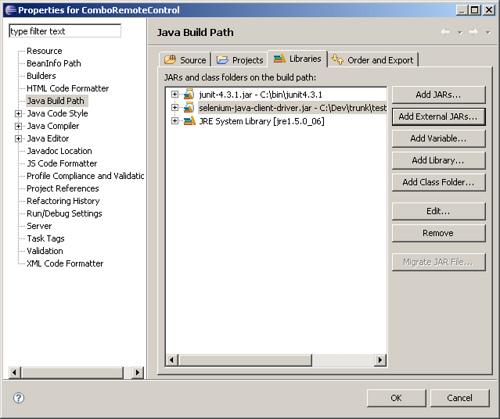
Now we add some external Jars. Find the Selenium Java client Jar and the JUnit Jar on your system and add them.

Now your project should be ready to go and you can create Selenium tests using the Java API and run them from Eclipse using JUnit. How sweet it is!

Posted in AJAX, JavaScript, Testing, selenium | 7 Comments » | Add to Delicious | Digg It

Internet Explorer StyleSheet Quirks | February 19th, 2008

I have spent the better part of the past week fighting with the Internet Explorer 31 stylesheets limit.


http://flickr.com/photos/cassidy/2461135/

It came up when, thanks to the great performance of our Grid component, a customer wanted to have about 35 grids on a single page for a very complex ordering system. Now as is usually the case, by the time that people come to us to help them they usually have a pretty firm business case for their application and don’t want to change the overall information architecture and the like - so we had to figure out how to get 35 grids running in Internet Explorer.

The problem arises from the fact that for a live scrolling grid where blocks of data are dynamically inserted into the page as the user scrolls, each grid needs its own stylesheet since the column widths and a few other parameters are defined on a grid/column basis and need to be changed globally in a lot of cases; for example, when a column is resized we need to be able to just change one CSS rule and have the widths of all the relevant HTML nodes get updated.

The worst part is that there is even a difference between IE 6 and IE 7 - w00t. In IE 7 it has no problem with just creating one stylesheet and continually appending or overwriting that stylesheet. So that was a pretty easy fix to have a global stylesheet instead of one for each grid. Then comes IE 6… in IE 6 it seems that you can’t even write to the same stylesheet object more than 31 times (or some number around 31 I am not really sure).

So what was the solution for IE 6? We essentially had to make a registry of all the components on the page that keeps track of which components were done initializing and then when all the components are ready create one huge stylesheet and write the contents only that one time. Failing to use this approach meant that IE 6 would just crash.

The other approach that we of course considered was using addRule on the stylesheet object to inject each of the CSS rules into an existing stylesheet rather than writing the stylesheet. I quickly learned that addRule is ridiculously slow in IE. Something like on the order of 30ms to add a rule. So ~35 grids * 50 columns per grid * 30ms per addRule = way too long. Retarded.

We now almost have everything working with > 31 grids. Joy.

Posted in AJAX, CSS, InternetExplorer, JavaScript, quirks | 4 Comments » | Add to Delicious | Digg It

Complete UI Q1 | January 22nd, 2008

The builds are running and - as the press release suggests - it will be available today!

We have improved performance significantly in this build and added a few new features like drag-fill of selections.

I will be posting a screencast later today as well.

w00t!

Posted in AJAX, JavaScript, Nitobi, cui | No Comments » | Add to Delicious | Digg It

The Mystery of Removing XML DOM Nodes | January 16th, 2008

I was reviewing some code today and came across something that seemed very strange. There is a method we use for removing all the child nodes of a parent node in an XML document and it looked like this:


nitobi.xml.removeChildren = function(parentNode)
{
    var children = nitobi.xml.getChildNodes(parentNode); // gets children that are not empty text nodes
    for (var i = 0, len = children.length; i < len; i++)
    {
        parentNode.removeChild(children[i]);
    }
}

Someone (probably me) was trying to save processing and store the child node collection length rather than re-calculate it every time through the loop. Seems good but one will notice that we are removing the child at the i'th index and so half way though deleting the child nodes we are going to try and delete the len/2+1 node but there will only be len/2 nodes in the collection (or something along those lines).

So I "fixed" it and made it look like this:

nitobi.xml.removeChildren = function(parentNode)
{
    var children = nitobi.xml.getChildNodes(parentNode);
    for (var i = 0, len = children.length; i < len; i++)
    {
        parentNode.removeChild(children[0]);
    }
}

Now it would always remove the first element in the collection and iterate over the original collection length - done and done. Oh wait but no. So I go to test this in Firefox and low and behold it crashes like AAPL after MacWorld.

Then I finally get my act together and test both approaches in Internet Explorer and the latter approach - the expected solution - is the one that works. So Firefox is doing some strange things with the length of the child node collection.

Posted in AJAX, JavaScript, XML, quirks | 3 Comments » | Add to Delicious | Digg It

Alwees Froosh | October 28th, 2007

That is the name of the application that Jake, Chris and I made for the inaugural Nitobi Hack Day last Saturday.

Yes, we may have had the biggest team and yes some teams didn’t even stick around until the sweet, sweet beer but we came within a whisker of winning it all! Of course, how you split up a single iPod Nano amongst three people is anyone’s guess.

The idea behind the application was that we wanted a desktop app that would be running all the time and would bring in information from many different sources about music artists / bands that you like. In particular, I never know when new albums come out from bands that I like. The trick is that we use, in this case, your top tracks XML listing from Last.fm to determine what you like - ie what you listen to most is what you like. Then we use that info to look up different information about the bands. At the time of building the application we decided on two things to bring in; new releases and events. The original reason that we went with the AIR application was because I wanted to use my iTunes XML file. We found a problem with that early on - my iTunes XML files is >7MB and AIR has a tough time opening it. That is when we decided to go with Last.fm.

I will release the app shortly once I get some time to fix it up.

We were able to deal with the new AIR security model pretty easily and of course chromeless windows and all the great CSS3 support was much appreciated!

Posted in AJAX, JavaScript, Nitobi, Web2.0, adobe, adobeair, air, hackday | 5 Comments » | Add to Delicious | Digg It

Declarative Ajax with CSS | September 20th, 2007

Those that have developed or used Ajax components to build an application will be familiar with the idea of using some sort of declarative structure to define or configure a component. This is commonly achieved through either HTML or JSON.

For example, a simple dynamic table or grid JavaScript object may take a parameter that sets the height of each row in the table. Through JavaScript it might look like this:

var myTable = new Table({”id”:”myTable”, “rowHeight”:”20px”,”data”:["dog","cat","bird"]});

This could in theory instantiate a dynamic table with rows of height 20px and contents as defined by the data array.

Everything is right in the world.

Class it up

However, there are some out there - I won’t name any names - that might prefer to set something a table row height through CSS instead. So rather than setting the rowHeight in the configuration directly they may instead just specify a rowClass that is the class that will be applied to each TR element in the table. Defining the table would then look something like this:

var myTable = new Table({”id”:”myTable”, “rowClass”:”tableRow”,”data”:["dog","cat","bird"]});

and the corresponding CSS would look like this:

.tableRow {height:20px;}

Now the only problem here is that there are situations where we may want to know what the height of the rows in the table are through the objects API. For example:

alert(myGrid.getRowHeight());

So the question is, how can we support using CSS as the declaration for a component (too bad you can’t just put any name/value pairs in CSS in Firefox :(

Bridging the API Divide

Luckily for us we have the DOM. In the Nitobi Toolkit it is pretty easy to find a class in a stylesheet and read properties from it. In our Grid control we do something like this for rowHeight such that it can be defined through an HMTL declaration or CSS and still be accessible through the API. We end up with some code like this:

var ntbRow = nitobi.html.getClass(”ntbrow”);
if (ntbRow != null && ntbRow.height != null)
  this.rowHeight = parseInt(ntbRow.height);

The getClass function essentially scours all the included stylesheets for rules that contain the class in question.

This solution makes the components more skinnable and easier to work with in general while at the same time preserving the JavaScript API.

Posted in AJAX, CSS, JavaScript | 3 Comments » | Add to Delicious | Digg It


Search Posts

You are currently browsing the archives for the JavaScript category.

Archives

Categories