

Nitobi Grid and Google Maps Mash’d-up 
August 2nd, 2006
I have been meaning to do some mashup action for a long time now and finally found some time. Andre tried to steal my screenshot cause I originally made it for his talk at GeoWeb. I have just made a screencast of it to give people an idea of how it all works.
The idea was to use our Ajax Grid control to provide a nice interface into which addresses could be entered and then plotted on a Google Map.
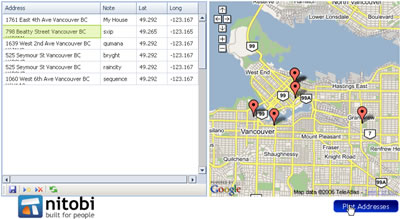
So what this enables people to do is copy addresses from MS Word, Excel or even OpenOffice products - no proprietary tricks here. Of course the Grid currently only works in FF and IE (sorry safari users). Then when I click on the “plot addresses” button (which could also happen every time I edit a record in the Grid for example) a request is made to the Google server for each record in the Grid and it does the geocoding - ie converting an address to lat/long - which can then be plotted on the map. It is a pretty sweet thing to be able to take a bunch of addresses and get them plotted on am online map!
Here is the screencast (sorry about the crappy audio :)) and I will try and get the sample up in the next few days so that people can actually try it out!
Technorati Tags: google, ajax, map, web2.0
 Del.icio.us
This entry was posted on Wednesday, August 2nd, 2006 at 11:33 pm and is filed under AJAX, Components, Google, Map, Web2.0. You can follow any responses to this entry through the RSS 2.0 feed. You can leave a response, or trackback from your own site.
 Entries (RSS)
and
Entries (RSS)
and
August 3rd, 2006 at 4:17 pm
dave I didn’t steal it! I own it yo!
August 23rd, 2006 at 10:04 am
any news on a sample ? this is EXACTLY the mash up I’ve been waiting (and googling) for!!
August 24th, 2006 at 9:45 pm
sample should be available real soon now - just waiting for the next point release of the grid. ping me back in a couple weeks in case i forget
October 17th, 2006 at 8:30 pm
[...] Dave and I talked about Ajax, I showed a bunch of cool demos including dave’s infamous Google maps/Ajax Grid/Excel Mashup. And then dave went off discussing some Advanced topics in JavaScript such as aspect oriented programming and inheritance. If you want Dave’s slide deck (you’re either David Gratton or Brian Leroux) email me;-) [...]
October 24th, 2006 at 6:25 pm
Sample…P L E A S E!!!???? This is exactly what I need for some route-specific info.
March 27th, 2007 at 9:24 am
Hi looks too good, Can you provide sample or source code how you implemented it. I will greatful to you
July 18th, 2007 at 10:05 pm
This is great! but I have a question. What I have are a huge amounts of Lat and long coordinates that I want to plot, may be up to 30 at a time! Is there any way do this without getting into google mashup/api or entering lat & long by hand. I created a mapplet but I think google has a long way to go. I don’t understand why I can’t just save the mapplet as my map and put a link to it.. without having to login and going to my maps to turn the mapplet on!! Any help would be good. I’d like to have one link that takes me to a map with multiple lat long plots that I have created before and I could distribute to anyone. My maps sucks!!
July 19th, 2007 at 1:41 pm
hey darkstar, I was hoping to get to a point where you could enter lat/long coords and create a perma-link to that map… but so many things to do
September 24th, 2007 at 12:34 pm
If you ever make available the source, this would be awesome. Have alot of plots I want to make for each state.
September 26th, 2007 at 5:57 pm
This has been on the backburner for a while but I hope to get to it soon! The latest grid is looking great and this app will be cool