Skip to Navigation | Skip to Content


Conference Season | May 4th, 2011

The Nitobi office right now is starting to empty out, and it’s not just because of the weather. It’s conference season and the other guys are at JSConf. However, I’m going to be going to some conferences this year. I’m going to be going down to the SF area Google IO this year. Feel free to ask me about PhoneGap and PhoneGap Android when I’m down there.

Also, I’m speaking at OSCON this year and if you follow this blog’s details about working on WebKit, it’s going to be more of the same, except with better slides, more detail and MUCH, MUCH more hunting for weird comments in WebKit.

I’ll probably be attending other conferences related to PhoneGap and Android Development at some point this year, but those are the ones that are confirmed. If I find out about any more, I’ll definitely be postng them here.

Posted in Uncategorized | No Comments » | Add to Delicious | Digg It

Shame doesn’t work in Open Source | April 18th, 2011

There was a fair amount of news about Android 3.0 coming out. There was tons of hype regarding the new Honeycomb release, and how it would be designed for tablets, how there is 3D Acceleration, and how the User Interface would be changed. Well, even though it’s rumoured that at Google IO, we’re all going to get tablets, we decided to go and get the Motorola Xoom so that we can have solid answers to our clients about Honeycomb tablets.

Unfortunately, we have answers, and they’re not very good with respect to Google.

First of all, the Honeycomb Emulator is so horrifically slow, we had to buy a device. The device we bought was the Motorola Xoom Wi-Fi Only model. After booting up the model, we put PhoneGap on it and ran tests. Most of the tests worked fine, however we did notice that the Native Storage (SQLite) does not work anymore and throws a security error. This is a serious problem for many PhoneGap applications that use this, and I plan on investigating the storage situation, and seeing what storage is used on the device.

Secondly, when we ran our mobile-spec test suite and ran it with no try/catch, this actually causes the browser to close. The browser shouldn’t close when a Javascript Error is thrown. The fact that you can force someone out of the browser by throwing an exception should be an indicator that this should not have been released,

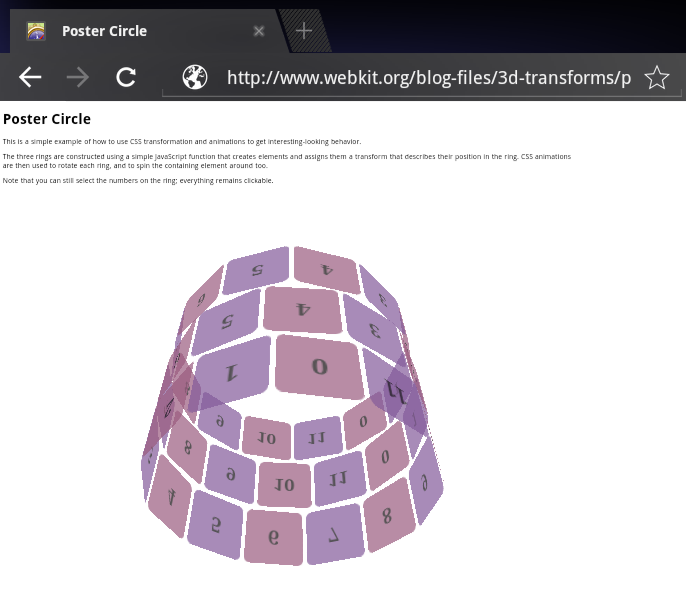
Finally, this device is rumored to have 3D Acceleration, including in the browser with 3D Transforms. First, we tested the browser with the standard WebKit test here. When you test it in the actual Android Browser activity, you get the following:

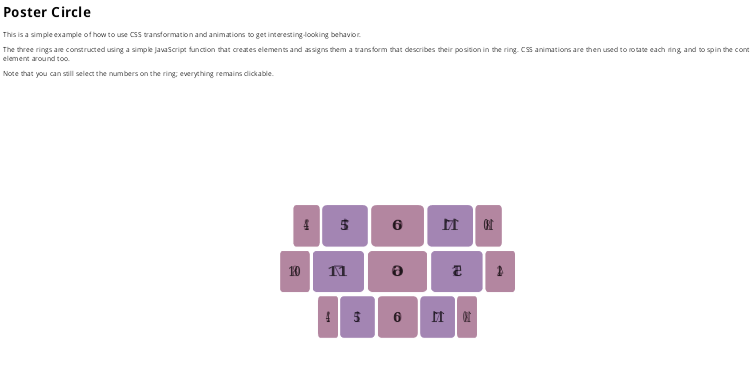
Then, when you take the poster-circle.html file (which is nice and self-contained) and stick it in PhoneGap (which at this point is just an Android Webview), you get the following here:

Now, since we don’t have the source code, we have no idea why Android Webview has broken 3D CSS Transforms, but Android’s browser does. It’s clear that Android WebKit didn’t go through any sort of rigorous QA process, and was once again cobbled together. The thing that I don’t like about this situation is that I can’t see what they did to fix it on their browser. Many people would love to see 3D CSS Transforms on Android, Tablet OR Phone, but we don’t have either right now.

The thing that I don’t understand is this. If Google as a company isn’t proud enough to release this source code, then why were the proud enough to release a half-baked product? As many people know, I have been developing Android applications both with WebKit and with straight-up Java ever since I heard that the T-Mobile G1 was going to be released. I put up with flaky APIs, with WebKit bridges that would crash, and with the mess that the Android 2.0 release was. The fact that Google hasn’t learned from their mistakes with Android 2.0 was disappointing. It wasn’t too bad in 2009 when they did this, because not too many people were using Android yet, but now that we’re in 2011, and Android is on a ton of devices, and Android is in the tablet space, I’d expect there to be a little bit of consistency between the Android Browser and the WebView with respect to what is supported in WebKit.

That being said, I’d forgive flakiness in a x.0 version of Android if it came with the source code. Mainly because the community could fix the bugs and help create something kick-ass like the awesomness that Android 2.1+ was (Android 2.1 was the first solid Android version, everything else before it people liked because we were rooting for the underdog). However, today, as it stands, there’s two different versions of WebKit on the SAME DEVICE that operate differently. I think that this is a serious regression, and it’s unfortunate.

Update: I’m an idiot! The reason you don’t get 3D CSS Transforms is the fact that you have to enable 3D Acceleration for the app in the Android Manifest. A quick Google Search turned this up, and now I have it working. I still think the bug with the storage, and the fact that when you hit the back button you end up back at the First Use screen are still big reasons that Honeycomb is not ready for primetime, but WebKit has many problems, but 3D CSS Transforms aren’t one of them.

Posted in Android, phonegap | 11 Comments » | Add to Delicious | Digg It

Rabbits, Robots, Holes and Things like that | March 17th, 2011

I finally got some free time to do something that has been nagging me for quite some time, which is attempt to actually debug WebKit. Note that I said WebKit, and not PhoneGap. The main motivation for this was the fact that everyone at Nitobi depends on WebKit to work, and sadly on certain Android devices, certain things like the Android WebKit bridge don’t quite work as expected. Now, I understand that this bug doesn’t affect the top-of-the line phones like the Nexus One, the Nexus S, the Motorola Droid/Milestone, but could show up on budget devices, such as the Motorola Spice, the HTC MyTouch4G (that cheap thing with the Keyboard from T-Mobile that looks like an HTC Magic), or pretty much every Android device that has a screen smaller than 480×800, since they seem to have the weaker processors and a smaller memory footprint.

So, while we have worked around it, it’d be good to actually fix this problem for everyone, not just for us, so I decided to take a look into this issue. Now, since this is a WebKit failure, I decided that I’m going to have to hook up an Emulator to this process. This is easier said than done, since WebKit is written in C, the build is done on an Ubuntu machine, and this is leading into gdb territory. Furthermore, WebKit is a shared library, NOT an exectuable, and PhoneGap Android is written in Java! How do we go about doing this.

I decided to ask Google, and I found this entry on the Android Platform group that details the process. Unfortunately, email isn’t the clearest way of communicating things, so I’m going to start at the beginning. The first thing you need to do is fetch the Android source, to do this, follow the steps here.

Once you have the source code, the next step in the process is setting the debug flags. To do this, first it’s a good idea to run lunch and pick which platform you want to debug this on. Once you do this, you need to copy from build buildspec.mk.default to the root directory of your android repo. Then rename it to buildspec.mk, and add two lines to it:

DEBUG_MODULE_libwebcore:=true
DEBUG_MODULE_libxml2:=true
TARGET_CUSTOM_DEBUG_CFLAGS:=-O0 -mlong-calls
ADDITIONAL_BUILD_PROPERTIES += debug.db.uid=100000

Then, since we’re doing a debug build, you need to go to external/webkit and edit Android.mk. Uncomment this line:

LOCAL_PRELINK_MODULE := false

This will allow you to have HUGE webkit files that won’t break your build. Webkit will be extra large due to the fact that you now have debugging symbols included in the libraries. Once this is done, then make the app, and go home. A debug build of WebKit in the AOSP seems to take at least three times as long as a regular Android build. Once it has built, assuming that you picked the Engineering Image for the Android Emulator, you need to specify the the ANDROID_PRODUCT_OUT, then you will be able to start the emulator and get the device going. Once you start the emulator, you need to setup port forwarding:

adb forward tcp:5039 tcp:5039

The next step is pretty important, since this is frustrating. To debug WebKit, start a WebKit process, then attach the Java Debugger to that process. I chose to do this in Eclipse, where it’s just like debugging a regular Android app. Once the Java Debugger is attached, then attach gdb to it. It’s important to run Android’s GDB, and you have a copy of this located in the AOSP tree. Due to the fact that I hate using Eclipse for anything other than Java development, I decided to go and use a tool that I haven’t used since my university days, namely DDD, which is a brutally old front-end to GDB, but it works well enough, and gives you access to the GDB command line.

Anyway, to connect GDB up you need to do the following on the device:

gdbserver 10.0.2.2:5039 --attach pid

And in GDB/DDD/whatever, you need to run these commands:

set solib-absolute-prefix /home/(yourdir)/aosp-official/out/target/product/generic/symbols
set solib-search-path /home/(yourdir)/aosp-official/out/target/product/generic/symbols/system/lib
file /home/(yourdir)/aosp-official/out/target/product/generic/symbols/system/app_process

Once you have both debuggers, you need to run cont! Then the app will work until you crash it, where it will show you where it crashed. This is as far as I got with this process. I think it’s pretty ridiculous that you need to run two different debuggers with this, but it makes sense, since there’s WebKit and there’s the Dalvik/Android stuff above WebKit. It’s funny listening to people talk about Native vs Web on Android, since in Android’s case, the Web Apps are FAR more low-level than things running in Dalvik Virtual Machine. This also may explain the extremely broken nature of WebKit on Android, and why there’s so much divergence of WebKit across these platforms.

I’m going to keep working on this. If you know anyone who’s actually patched WebKit on Android, or works on this at HTC, Motorola, Google, Samsung or another company, please let me know what your workflow looks like, since it’d be good to get ramped up on this to fix some of the extreme brokenness and quirks that are causing Android’s browser to quickly become one of the worst browsers for the web. Given how pro-Android I’ve been in the past, that should be a sign that things are really broken.
Posted in Uncategorized | 2 Comments » | Add to Delicious | Digg It

Android: Your JS Engine is not always V8 | January 14th, 2011

Recently, I watched some Mobile Web training, and I noticed that people overlook many things about Android. Namely these facts:

  • WebKit is different on every phone
  • The Browser and the WebKit engine are different things.
  • WebKit can have a different engine

So, as usual I will talk about how the source to Android is OPEN, and how with the source code, I can look at the build scripts and find out what Android ACTUALLY supports instead of doing feature detection or the other things people in turtlenecks use to decide what Android can and can’t do very well. Below is the applicable Makefile for WebKit:


# Two ways to control which JS engine is used:
# 1. use JS_ENGINE environment variable, value can be either 'jsc' or 'v8'
# This is the preferred way.
# 2. if JS_ENGINE is not set, or is not 'jsc' or 'v8', this makefile picks
# up a default engine to build.
# To help setup buildbot, a new environment variable, USE_ALT_JS_ENGINE,
# can be set to true, so that two builds can be different but without
# specifying which JS engine to use.

# To enable JIT in Android's JSC, please set ENABLE_JSC_JIT environment
# variable to true.

# Read JS_ENGINE environment variable
JAVASCRIPT_ENGINE = $(JS_ENGINE)

# The default / alternative engine depends on the device class.
# On devices with a lot of memory (e.g. Passion/Sholes), the
# default is V8. On everything else, the only choice is JSC.
# TODO: use ARCH_ARM_HAVE_ARMV7 once that variable is added to
# the build system.
ifeq ($(ARCH_ARM_HAVE_VFP),true)
DEFAULT_ENGINE = v8
ALT_ENGINE = jsc
else
DEFAULT_ENGINE = jsc
ALT_ENGINE = jsc
endif

ifneq ($(JAVASCRIPT_ENGINE),jsc)
ifneq ($(JAVASCRIPT_ENGINE),v8)
# No JS engine is specified, pickup the one we want as default.
ifeq ($(USE_ALT_JS_ENGINE),true)
JAVASCRIPT_ENGINE = $(ALT_ENGINE)
else
JAVASCRIPT_ENGINE = $(DEFAULT_ENGINE)
endif
endif
endif

So, if you’re running a low-end Android device, like a Motorola Quench, your Javascript Engine will be different from the Nexus S, HTC EVO with CM7, the Motorola Droid, the Nexus One, etc. Since nobody has seen the official Android 2.3 on anything other than the Nexus S, I can only really do experiments with Cyanogen on an HTC Dream, which isn’t really accurate.

Recently, there was an issue with the emulator image on Android 2.3 that directly affected PhoneGap. Because I have no idea what Javascript Engine is on the emulators, I suspect that this image may creep up again on low-end phones and cause even more fragmentation than before. This is a REALLY bad thing, since it makes web development on Android even more frustrating, and will chase developers away from that platform. Like everything else in Android, things are always changing, so if any phone manufacturers are reading this and can test PhoneGap on their low-end line and get back to me, that would be greatly appreciated.

Posted in Uncategorized | 1 Comment » | Add to Delicious | Digg It

Android Testing: The Emulator is your friend | October 26th, 2010

A while ago, I broke my Nexus One, and because I switched from Rogers to Telus back in February, I was unable to use my other Nexus One and I had to go back to using the Motorola Milestone as my phone. Now, I’m trying to look at the bright side of this is that I was forced to live like most users of Android, which is that I’m stuck using Android 2.1 (and while I’ll happily root a Nexus One and void it’s warranty, I’m a bit more sketched out by the Milestone’s Signed Bootloader, and would like a backup phone before going through the rooting process.)

This isn’t a huge deal with PhoneGap, except that I found a bug that was only in Android Webkit. The issue is that Motorola’s Webkit behaves differently than the stock Emulator Webkit, and that each phone Motorola implements has a unique firmware. That’s where the Motorola Developer Add-Ons came to the rescue. I was able to get Emulator Images that were roughly similar to my phone’s build, and was able to confirm the bug. Motorola really stands out with this tool, and it seems that after doing some initial checking, it seems that Samsung only has an emulator for the Galaxy Tab, and not for their other Android devices, HTC doesn’t even have an emulator and just offers source so you can patch the Android Open Source Project and generate your own images. Sony Ericsson has an Emulator for their Android 1.6 devices so if you need to test on the Xperia line, you can test on that as well.

The downside is that the Emulator is painfully slow in comparison to the device. Furthermore, most Emulator Images are still very unfinished, and others have annoying side features. They may be a custom boot animation, or random resolutions that aren’t supported. The Android Emulator is definitely the weakest link, and it would be great if we could rely on Android Webkit to be the same across all devices, and behaviours (like proxies) to work across all devices as intended. Unfortunately, life is not that simple.

Posted in Uncategorized | 5 Comments » | Add to Delicious | Digg It

Not all cameras are equal | June 9th, 2010

Recently, the way we were creating a camera and using it broke. I’m not sure why it broke, but I decided to say screw it and to use the Camera Intent in Android, because that’s what you’re supposed to do on Android anyway. This is what most Twitter Applications use, and since Twitter Apps are probably the most used application on Android, I figure if it’s good enough for them, it’s good enough for me…

Oh how wrong I was!!!

I added the new intent code, and I tested it on four phones. I tested it on the HTC EVO 4G that I received from Google IO, the Nexus One, the Motorola Milestone with the official Telus Firmware (with camera), the HTC Dream with stock Android 1.6 and the Rogers HTC Magic with Android 1.5 and the 9/11 update. Basically, everything worked but the Rogers HTC Magic. The thing is that once you use intents, you are relying on the OEMs to write a good enough Android Camera Application for you to get a picture from. This may be good for a Google blessed image, or a stable HTC phone like the EVO, but it’s clear that on certain phones from certain providers, that there may be some issues.

I’m certain that there’s phones in the wild that have broken cameras, and it’d be good to find out which phones have broken cameras. If people could test on these phones (with Canadian carriers next to them), that would be greatly appreciated:

  • HTC Hero (Telus)
  • LG EVE (Rogers)
  • Motorola DEXT (Bell)
  • Motorola Quench (Rogers)
  • Motorola Backflip (Telus)
  • Samsung Galaxy (Bell/Rogers)
  • Acer Liquid E (Rogers)
  • Xperia X10 (Rogers)

Those are the phones that I know are in the wild in Canada. I’m sure there’s more than this in other countries, namely in the United States, but this is a good cross-section of devices from a handful of manufacturers who may have their own customized camera applications. I’ve exempted test devices from this post, because I don’t think it’s fair to take a broken firmware and say “Hey, the Camera Doesn’t work!”. However, the HTC Magic should work, and it’s disappointing that it doesn’t, since this breaks not only PhoneGap’s camera capability, but anything that uses that intent. Hopefully in the future, Android cameras will be more reliable.

Posted in Android, phonegap | 3 Comments » | Add to Delicious | Digg It

Using PhoneGap across ALL ANDROID DEVICES | May 31st, 2010

This is my biggest pet-peeve to date. We get a lot of people trying to use PhoneGap across all devices. However, despite the work that people have done on droidgap, most people still use Eclipse as the primary way they develop with Android, because that’s what people read in the Wiki.

The problem is that when you start developing for Eclipse, you notice that PhoneGap is set to the latest version of Android. However, for some reason people want to change their target because they’re running an earlier version of Android. Since they use Eclipse to deploy their app, they are misled to believe that if you write an APK, you must target only one version.

If we’re deploying multiple APKs, PhoneGap has FAILED to do the job it was meant to do. If you have to change the target, there is something wrong!

Now, why do I say that, because I discovered this when using Eclipse:

  • Automatic Selection of your running target is EVIL!
  • Manual Selection allows you to choose your APK

The reason Automatic Selection is evil is because it will launch an Emulator and go for the highest level device it can go. Not what you’re running, but whatever the highest device is. This is the correct behaviour, but this does NOT help people who are looking to test it on their device. This causes people to instinctively mess with PhoneGap and do bad things like change the target. Here’s why you should NEVER have to change the target:


This is the line from the AndroidManifest.xml. This sets the Minimum SDK Version to 2, which is Android 1.5. A while ago, we fixed the Android 1.5 issues by changing the conditional compatibility code to look for the SDK string. We could probably do this better, and we’ll look into it in the coming weeks. However, as it stands right now, this is how we do it, and it works.

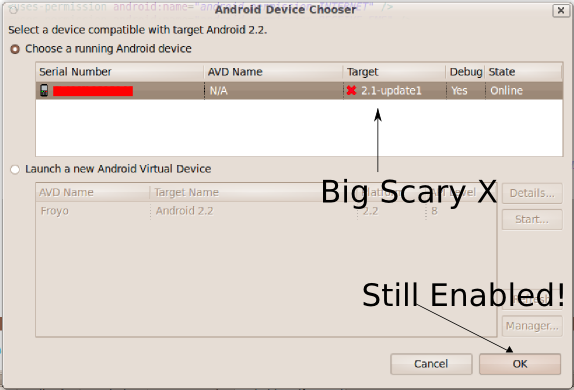
The other thing that annoys me about eclipse that I’m sure causes people to change it is this:

This is the stupidest UX ever. It should be a warning, not big red X, and this causes a LOT of headache and unnecessary gnashing of teeth. If you click OK, it will actually run on the device. As you see here, this is pointing to my Nexus One, which is still running Android 2.1-update1. I’m currently building PhoneGap for Froyo, BUT it still runs, and it works fine. This is actually how you can have one APK that runs on all devices.

I can see how someone wouldn’t want to support all Android devices, BUT given the fact that according to Google, Android 1.5 and 1.6 phones far outnumber the Android 2.x devices, it makes sense to make one APK to rule them all. The idea is to write once and deploy anywhere, and not write once and deploy to every single version of the platform. If this doesn’t work for you, you’ve found a bug, and we would appreciate it if it was filed. It’s important for PhoneGap to both run on Android 1.5 AND be able to take advantage of all the latest browser features, and the current approach we are using with the EDGE version allows us to do exactly that.

Fragmentation? The only fragmentation on Android that we care about is the fragmentation between WebKit versions, but that’s another issue entirely.

Posted in Android, phonegap | 1 Comment » | Add to Delicious | Digg It

Canvas + Accelerometer on Android | April 27th, 2010

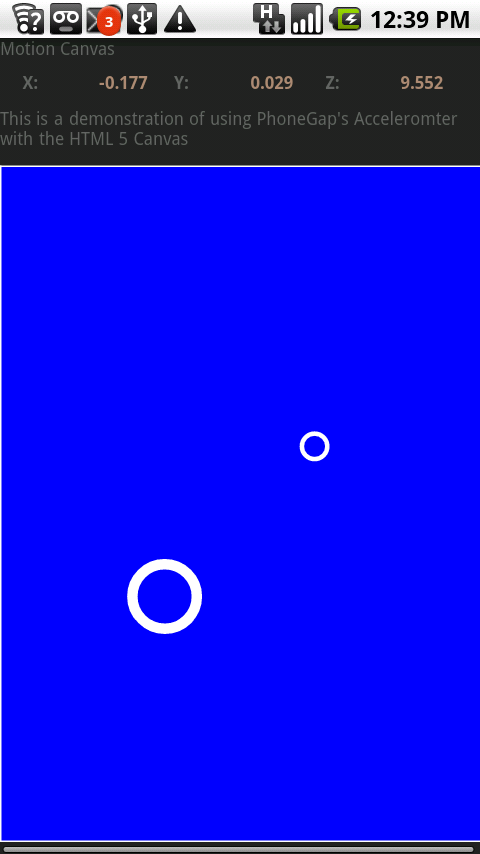
Over the past month, I was working from home, and when I wasn’t busy wiping spit-up from my kid’s face, I was working on various stuff, including a new Android PhoneGap demo to replace the one that I took off the Android market. The problem with these demos is that they do not stand the test of time. However, this one should. After playing with C5Bench a couple months ago, I decided to do a quick hack of the Canvas. After many bug fixes to PhoneGap Android later, I finally managed to put together this simple example:

Now, of course, this is an early version, and the code has been thrown together very quickly, and there are bugs, which is why I haven’t posted it in the market, but you can download and try out the application here, or scan in the QR code below.

This code is based on a few examples that I found on the web of good Canvas Tutorials, namely the Breakout Clone tutorial by Bill Mill. It’s a pretty solid tutorial and shows how to effects like bounce fairly effectively. Of course, I didn’t add bounce, because I wanted more of a sliding bubble effect. I also decided to NOT use the jQuery framework to keep the javascript code as small as possible. (In fact, I didn’t even use XUI, since I didn’t see the need).

That being said, I’m definitely going to have to work on my own JS library at some point that maintains complex objects, since redrawing functions can quickly become large and cumbersome, even when using a JS library, which is better suited to the DOM and not pixel-manipulation.

So, basically you move around two objects which are directly related to each other on a screen with the accelerometer, and the method that we use is below:


var watchAccel = function()
{
var canvas = document.getElementById("canvas");
canvas.width = document.body.clientWidth;
canvas.height = document.body.clientHeight - 100;
ctx = canvas.getContext("2d");
var succ = function(a){
updateValues(a);
updateDraw(a);
};
var fail = function(){};
var opt = {};
opt.frequency = 100;
timer = navigator.accelerometer.watchAcceleration(succ, fail, opt);
}

Now, what’s interesting is how the frequency is handled. Currently, we use the setInterval to do this, exactly like the iPhone. However, this actually kinda sucks, and we may in the future move more of this into the Java land, similar to how we manage the Geolocation code that we use. However, this is good enough to create the sliding bubble effect of the application. I hope to have the final version of the app up and working before Google IO, however I’ll probably post it up to GitHub this week, feel free to try and and let me know if there’s serious issues.

Posted in Android, phonegap | 1 Comment » | Add to Delicious | Digg It

Android without Eclipse | March 26th, 2010

Now, for people who are Java developers, I can understand the attachment to Eclipse, but for the rest of us, Eclipse is a giant piece of bloatwear that gets in the way of the code and what we want to do with that code. However, it’s a fact of life for Android developers, or is it?

Building and running Android Applications:

Now, the first command that we deal with is the android command, which can generate a project. In typical java fashion, it takes a crap ton of flags, but you can create a project by typing this:


android create project -t 7 -k package name - a name -n name

This will create an android project. Now, on Android, the DroidGap script actually uses the Android script to create a project. So, once you have your project, what do you do with it? Well, the first thing to do is to build it, which you can do with ant. When you type ant on an Android project, you’ll get a list of commands like this:

help:
     [echo] Android Ant Build. Available targets:
     [echo]    help:      Displays this help.
     [echo]    clean:     Removes output files created by other targets.
     [echo]    compile:   Compiles project's .java files into .class files.
     [echo]    debug:     Builds the application and signs it with a debug key.
     [echo]    release:   Builds the application. The generated apk file must be
     [echo]               signed before it is published.
     [echo]    install:   Installs/reinstalls the debug package onto a running
     [echo]               emulator or device.
     [echo]               If the application was previously installed, the
     [echo]               signatures must match.
     [echo]    uninstall: Uninstalls the application from a running emulator or
     [echo]               device.

I think this is pretty self-explanatory, BUT there needs to be something said for the difference between debug versions and release versions of the same piece of software. Most of the time, you’ll want to sign the apks with a debug key, so that these are specific to your workstation. However, when releasing a project, you will want to sign it with a key in the keystore. (It’s important to take care of your keystore and not to do what I did and forget about it. This is why I haven’t gotten a free Nexus One from Google for the PhoneGap Demo Application.)

Of course, this only works either for one phone, or one emulator. What if you have multiple emulators? No problem, use adb. The Android Debug Bridge is one of the most handy tools in the Android Developers toolkit, and is extremely handy for debugging. To see what devices you have, run adb devices like this:


bowserj@shapley:~/Orbot$ adb devices
List of devices attached
0123456789012 device

To install an APK onto a device, type the following:

apk -s 0123456789012 install phonegap.apk

Debugging Javascript and Java on the Android WITHOUT ECLIPSE

Now, here’s where things get interesting. When you need to debug javascript in the latest version of PhoneGap, you can use logcat to do so, all you need to do is run adb logcat, like this:


adb logcat

Of course, to actually use a Java Debugger, such as jdb, you need to attach it to a process on the device. ADB has you covered as well, all you need to do is this:

adb jdwp

Then once you have the PID that you want, do this:

adb forward tcp:8000 jdwp: jdb -attach localhost:8000

Then you’re in! Make sure that you don’t have another process (i.e. Eclipse) running that connects to this, and you should be able to debug your Java code just like how you would debug Java code normally. I admit that I’m not a jdb/gdb ninja and things like DDD have made me dumb. Therefore, I’d appreciate any book recommendations on how to use JDB/GDB for debugging.

Posted in Android, phonegap | 3 Comments » | Add to Delicious | Digg It

Ada Lovelace Day Post | March 24th, 2010

Last year at this time, I did a post about Ada Lovelace Day, and once again I’m back at it, doing another post, this one is going to be pretty short. This year, I wasn’t sure why I was going to write a blog post about, so I figure that this time, I’ll just write about my 2nd Year Computer Architecture Professor, Desa.

Desanka Polajnar was probably the first CS professor that actually made people worry about failing a Computer Science course when I was up at UNBC ten years ago. People for some reason couldn’t quite understand how boolean logic worked, and why K-Maps were a good idea. In fact, many people didn’t even realize why it was relevant to learn Assembly Programming at all, and many people consider knowing the internals of a processor a waste of time. I remember hating the first CPSC 230 class, because it was hard, and because it seemed to have absolutely no bearing, or connection to what I’d be doing now. I also remember thinking that MIPS and ARM assembly was useless because you know, everything runs on an x86.

Also, it was in her class that I got introduced to Hardware, which has turned into a pretty awesome hobby. It’s strange, since to this day, I haven’t met too many people that even know what a PDP-8 even is, let alone actually implement it with microcontrollers and TTL logic. Thanks to Desa, I can say that I actually have done that, and I think that’s pretty awesome. I definitely appreciate the time I spent in her classes, even if I didn’t seem like it back in the 90s, when I was actually in them.

Thanks

Posted in Uncategorized | No Comments » | Add to Delicious | Digg It


Search Posts

You are currently browsing the archives for the Uncategorized category.

Archives

Categories

LinkedIn Profile

  • My Profile


My ideal work culture:
[See my summary] [What's yours?]