JSON Benchmarking: Beating a Dead Horse | December 21st, 2005
There has been a great discusson over at Quirksmode [1] about the best response format for your data and how to get it into your web application / page. I wish that I had the time to respond to each of the comments individually! It seems that PPK missed out on the option of using XSLT to transform your XML data to an HTML snippit. In the ensuing discussion there were only a few people mentioning XSLT and many of them just to say that it is moot! I have gone over the benefits of XSLT before but I don’t mind going through it once more  Just so everyone knows, I am looking at the problem _primarily_ from the large client side dataset perspective but will highlight areas where JSON or HTML snippits are also useful. Furthermore, I will show recent results from JSON vs XSLT vs XML DOM in Firefox 1.5 on Windows 2000 and provide the benchmarking code so that everyone can try it themselves (this should be up shortly - just trying to make it readable).
As usual we need to take the “choose the right tool for the job” stance and try to be objective. There are many dimensions that tools may be evaluated on. To determine these dimensions let’s try and think about what our goals are. At the end of the day I want to see scaleable, useable, re-useable and high performance applications developed in as little time and for as little money as possible.
End-User Application Performance
In creating useable and high performance web applications (using AJAX of course) end-users will need to download a little bit of data up front to get the process going (and they will generally have to live with that) before using the application. While using the application there should be as little latency as possible when they edit or create data or interact with the page. To that end, users will likely need to be able to sort or filter large amounts of data in table and tree formats, they will need to be able to create, update and delete data that gets saved to the server and all this has to happen seemlessly. This, particularly the client side sorting and filtering of data, necessitates fast data manipulation on the client. So the first question is then what data format provides the best client side performance for the end-user.
HTML snippits are nice since they can be retieved from the server and inserted into your application instantly - very fast. But you have to ask if this achieves the performance results when you want to sort or filter that same data. You would either have to crawl through the HTML snippit and build some data structure or re-request the data from the server - if you have understanding users who don’t mind the wait or have the server resources and bandwidth of Google then maybe it will work for you. Furthermore, if you need fine grained access to various parts of the application based on the data then HTML snippits are not so great.
JSON can also be good. But as I will show shortly, and have before, it can be slow since the eval() function is slow and looping through your data creating bits of HTML for output is also slow. Sorting and filtering arrays of data in JavaScript can be done fairly easily and quickly (though you still have to loop through your data to create your output HTML) and I will show some benchmarks for this later too.
XML DOM is not great. You almost might as well be using JSON if you ask me. But it can have it’s place which will come up later.
XML + XSLT (XAXT) on the other hand is really quite fast in modern browsers and is a great choice for dealing with loads of data when you need things like conditional formatting and sorting abilities right on the client whithout any additional calls to the server.
System Complexity and Developement
On the other hand, we also have to consider how much more difficult it is to create an application that uses the various data formats as well as how extensible the system is for future development.
HTML snippits don’t really help anyone. They cannot really be used outside of the specific application that they are made for but when coupled with XSLT on the server can be useful.
JSON can be used between many different programming languages (not necessarily natively) and there are plenty of serializers available. Developers can work with JSON fairly easily in this way but it cannot be used with Web Services or SOA.
XML is the preferred data format for Web Services, many programming languages, and many developers. Java and C# have native support to serialize and de-serialize from XML. Importantly on the server, XML data can be typed, which is necessary for languages like Java and C#. Inside the enterprise, XML is the lingua franca and so interoperability and data re-use is maximized, particularly as Service Oriented Architecture begins to get more uptake. XSLT on the server is very fast and has the advantage that it can be used, like XML, in almost any porgamming language including JavaScript. Using XSLT with XML can have problems in some browsers but moving the transformations to ther server is one option, however, this entails more work for the developer.
Other factors
- The data format should also be considered due to bandwidth concerns that affects user-interface latency. Although many people say that XML is too bloated it can easily be encoded in many cases and becomes far more compact than JSON or HTML snippits.
- As I mentioned XML can be typed using Schemas, which can come in handy.
- Human readability of XML also has some advantages.
- JSON can be accessed across domains by dynamically creating script tags - this is handy for mash-ups.
- Standards - XML.
- Since XML is more widely used it is easier to find developers that know it in case you have some staff turnover.
- Finally, ECMAScript for XML (E4X) is a _very_ good reason to use XML [2]!
Business Cases
There are various business cases for AJAX and I see three areas that differentiate where one data format should be chosen over the other and these are: mash-ups or the public web (JSON can be good), B2B (XML), and internal corporate (XML or JSON). Let’s look at some of the particular cases:
- if you are building a service only to be consumed by your application in one instance then go ahead and use JSON or HTML (public web)
- if you need to update various different parts of an application / page based on the data then JSON is good or use XML DOM
- if you are building a service only to be consumed by JavaScript / AJAX applications then go ahead and use JSON or a server-side XML proxy (mash-up)
- if you are building a service to be consumed by various clients then you might want to use something that is standard like XML
- if you are building high performance AJAX applications then use XML and XSLT on the client to reduce server load and latency
- if your servers can handle it and you don’t need interaction with the data on the client (like sorting, filtering etc) then use the XSLT on the server and send HTML snippits to the browser
- if you are re-purposing your corporate data to be used in a highly interactive and low latency web based application then you had better use XML as your data message format and XSLT to process the data on the client without having to make calls back to the server - this way if the client does not support XSLT (and you don’t want to use the _very slow_ [3] Google XSLT engine) then you can always make requests back to the server to transform your data.
- if you want to have an easy time finding developers for your team then use XML
- if you want to be able to easily serialize and deserialize typed data on the server then use XML
- if you are developing a product to be used by “regular joe” type developers then XML can even be a stretch
I could go on and on …
Performance Benchmarks
For me, client side performance is one of the biggest reasons that one should stick with XML + XSLT (XAXT) rather than use JSON. I have done some more benchmarking on the recent release of Firefox 1.5 and it looks like the XSLT engine in FF has improved a bit (or JavaScript became worse).
The tests assume that I am retrieving some data from the server which is returned either as JSON or XML. In XML I can use the responseXML property of the XMLHTTPRequest object to get an XML object which can subsequently be transformed using a cached stylesheet to generate some HTML - I only time the actual transformation since the XSLT object is a singleton (ie loaded once globally at application start) and the responseXML property should have little effect different from the responseText property. Alternatively the JSON string can be accessed using the responseText property of the XMLHTTPRequest object. For JSON I measure the amount of time it takes to call the eval() function on the JSON string as well as the time it takes to build the output HTML snippit. So in both cases we start with the raw output (in either text or XML DOM) from the XMLHTTP and I measure the parts needed to get from there to a formatted HTML snippit.
Here is the code for the testJson function:
function testJson(records)

{

        //build a test string of JSON text with given number of records
var json = buildJson(records);
var t = [];
for (var i=0; i<tests ; i++)
{
var startTime = new Date().getTime();
//eval the JSON string to instantiate it
var obj = eval(json);
//build the output HTML based on the JSON object
buildJsonHtml(obj);
t.push(new Date().getTime() - startTime);
}
done('JSON EVAL',records,t);
}
As for the XSLT test here it is below:
function testXml(records)

{

        //build a test string of xml with given number of records

        var sxml = buildXml(records);

        //load the xml into an XML DOM object as we would get from XMLHTTPObj.responseXML
var xdoc = loadLocalXml(sxml, "4.0");
//load the global XSLT
var xslt = loadXsl(sxsl, "4.0", 0);
var t = [];
for (var i=0; i<tests ; i++)
{
var startTime = new Date().getTime();
//browser independent transformXml function
transformXml(xdoc, xslt, 0);
t.push(new Date().getTime() - startTime);
}
done('XSLT',records,t);
}
Now on to the results … the one difference from my previous tests is that I have also tried the XML DOM method as PPK suggested - the results were not that great.
For IE 6 nothing has changed of course, except that we can see using XML DOM is not that quick, however, I have not tried to optimise this code yet.
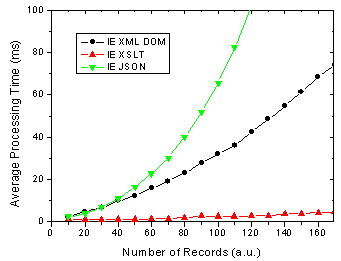
Figure 1. IE 6 results for JSON, XML DOM and XML + XSLT.
On the other hand, There are some changes for FF 1.5 in that the XSLT method is almost as fast as the JSON method. In previous versions of FF XSLT was considerably faster [4].
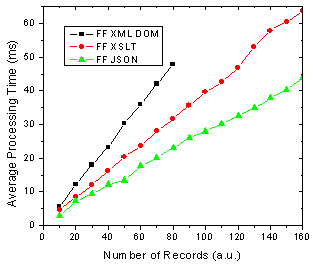
Figure 2. FF 1.5 results for JSON, XML DOM and XML + XSLT.
What does all this mean you ask? Well as before I am assuming that the end-users of my application are going to use FF 1.5 and IE 6 in aboutl equal numbers, 50-50. So this might be a public AJAX application on the web say whereas the division could be very different in a corporate setting. Below shows the results of this assumption and it shows that almost no matter how many data records you are rendering, XSLT is going to be faster given 50-50 usage of each browser.
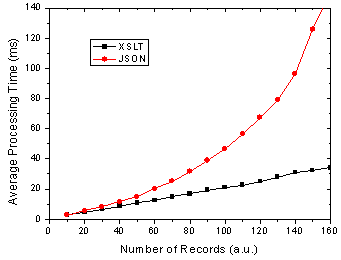
Figure 3. Total processing time in FF and IE given 50-50 usage split.
I will have the page up tomorrow I hope so that everyone can try it themselves - just need to get it all prettied up a bit so that it is understandable 
References
[1] The AJAX Response: XML, HTML or JSON - Peter-Paul Koch, Dec 17, 2005
[2] Objectifying XML - E4X for Mozilla 1.1 - Kurt Cagle, June 13, 2005
[3] JavaScript Benchmarking - Part 3.1 - Dave Johnson, Sept 15, 2005
[4] JavaScript Benchmarking IV: JSON Revisited - Dave Johnson, Sept 29, 2005
December 30th, 2005 at 9:35 pm
You actually think that there is no overhead when the browser parses the xml into an xmldom object and saves it to responseXml as opposed to just saving the json string in responseText?
Also, it’s much easier to save state on the client side when your working with a js object. That in and of itself constitutes using json in most cases.
December 31st, 2005 at 2:38 pm
Hi Matt,
As I said above “(the) responseXML property should have little effect different from the responseText property”.
What I really think is that getting the responseText property should be much slower than responseXml since the XMLHttpRequest objects native format is XML and not text - therefore to get the responseXml should be simply a regular variable copy whereas responseText should require some processing on the XML to build a string from it.
Anyhow, I actually checked this and as I suspected neither one is signifcant when compared to calling eval(JSONString) or using XSLT. In fact, responseXml is about an order of magnitude faster than responseText.
Yeah I agree that saving state can be much easier in JSON - although I think that using XPath makes saving state in XML fairly easy which also lets you send the state back to the server to be saved.
January 4th, 2005 at 1:24 pm
Here, you are transferring pure data from server to client then displaying it. Of course, XML is better in this case. Note however that the processing time is irrelevant in this application : 100ms is just unnoticeable by the human visitor.
The question of using JSON over XML appears when you do something else with what you receive from the server than transforming it for display.
When you call a javascript function, you don’t build a DOM tree, insert your function parameters as DOM elements, pass it to the function, then extract them back as JS variables before doing with them whatever process the function is supposed to do. You pass the parameters as regular JS objects.
When the communication between server and client is of the same order, for example when what will be displayed is the result of a calculation on the tranferred data and not the transferred data themselves, JSON is more efficient and natural in most of the cases.
For example, I had to transfert the list of ressources cotations from a web game from my server to my client app. I wanted other peoples to be able to use it for their own app too. I choosed SOAP, as it can be instantly used in about any language, on any plateform, and very easily.
For another app, I had to get static (backup) data from the server and display it according to the visitor preferences. Amount of stored data was huge on the server. I choosed to store them as compressed XML files on the server, transforming them with XSLT on the client, or on the server if client was not capable of doing it.
Finally, in another app, I had to retrieve data from a database on the server, organized in a non-linear way (graphs and cross-referenced linked lists), and perform on the client complex calculations (search for optimal result sets) before displaying statistical results. I choosed JSON to transport the data while keeping its structure. XML would have caused a HUGE overhead when rebuilding the graph and cross-references.
As a last note, saying XSLT is very fast on the server is really not accurate. XSLT is slow. Any text parser is very slow for that matter, compared to a non-human readable format, and the more verbose the format, the slower the parser. It is much faster than Javascript, yes, but certainly not fast. Just reading a DOM tree takes huge amount of memory and a lot of processing power to parse the text. Now, it may not be a concern at all for your specific application and your server machine. But the more load you have on the server, the less transformation you have to perform on the sent/receive data server-side. Additional milliseconds on the client is not a problem then, while a single more millisecond on the server times 1000 requests leads to a one second delay.
January 4th, 2005 at 4:42 pm
Hi kirinyaga,
Thanks for the great examples of where JSON or XML would be appropriate! I am not sure about the last example, however, since I know in my experience XSLT can be much faster than JavaScript for doing, things such as sorting table data and the like … admitedly it is a more simple operation than what you are talking about
The data that I was comparing was very simple and was only a “proof of concept”. In reality if you are generating data to display in the browser then both the XSLT and JSON methods would take longer as you have more complex conditional formatting, sorting and filtering operations to do.
I definitely agree that XSLT can be slower than compiled code on the server but it you are doing lots of if statements, loops etc it _can_ be favourable from a performance as well as code re-use standpoint.
January 21st, 2005 at 12:19 pm
There’s one interesting alternative that might make JSON faster, though I still need to benchmark it. People assume that you have to eval() JSON, which of course would make it slow. However, if you use the On Demand JavaScript pattern, which means you add a SCRIPT tag to your DOM, pointed to your remote JavaScript file or service (such as the RSS to JSON convertor here: http://ejohn.org/projects/rss2json/), then you don’t have to eval the code; the script is treated as script and not a string. Not sure if this is faster, but it seems like it must, since when you load script normally it doesn’t seem like it’s being evaled().
January 25th, 2005 at 8:07 am
I’m working on an app that downloads many 000’s of records. I’m making ajax calls to the server which is then returning JSON streams, so I am accessing the JSON string using the reponseText approach and then doing an eval() to get at a javascript object.
As this discussion shows the eval() step seems to grind things down (especially in IE6). I am interested, therefore in trying the ‘on demand javascript’ approach mentioned by Brad, but I can’t quite see how this works. I can understand attaching a script element to the DOM, but where does the JSON responseTEXT go? Or is this the javascript src?
Any further help, Brad or Dave, so I can try this out would be greatly appreciated.
(incidently have you folks tried this approach and does it get around the sluggish eval()?!).
Many thanks, Will
January 25th, 2005 at 1:29 pm
Hi Will, I have done a preliminary check on IE 6 of using script injection to load JSON and it seems to work really well - ie fast.
Essentially all you have to do is create the script tag and set the src attribute as your server resource (http://server/customers?start=100&end=500) to get some customer records then. The one wrinkle being that you have to use ‘var myObj = someJsonText’ in the actual script that is generated - the actual variable name could be passed as a parameter to the script like http://server/customers?start=100&end=500&var=myObj.
January 25th, 2006 at 4:25 pm
Dave, thanks. Using this approach and not using eval() at all I’ve been able to show a halving in page loading time for 10,000 records into a grid (ActiveWidgets grid library) 40 seconds down to 20 which is getting more acceptable. Initially I have written the server to output records as straight javascript arrays (i.e. myVar = [a,b,c, etc..]) and in the client page I just placed a line.
I have then moved onto to using the DOM method of inserting the script tag, and also used URL parameters as Dave suggests: this works OK in Firefox, but not in IE. Does IE have different behaviour in terms of the DOM script tag approach?
Thanks again ,Will
January 26th, 2006 at 9:12 pm
Great post, I’m finding JSON to be extremely slow in IE for approx. 150 records. But, DOM traversal is also slow, so XSLT looks like the way to go. Did you post your test page somewhere yet? I didn’t see a link for it. I’d love to see how you coded the different approaches.
January 30th, 2006 at 6:29 pm
Hey Ryan,
Yeah at 150 records you just have to use XSLT IMO - although JSONP (see my latest post) also has something to offer. In general it just seems silly to create these custom JavaScript templating frameworks (eg JST) to work with JSON when you can do the exact same with already available things like XML and XSLT which work on both the client and server.
I have not posted the test page yet … been far too busy but I am making the benchmarking code a bit more readable and re-usable at which point I will re-do all the tests including a few new and interesting cases and will post the code then. I have some time in the coming month so stay tuned. I will be sure to email you the code as well
January 31st, 2006 at 9:47 pm
Great, looking forward to seeing it. I ended up with a straight javascript array for now. You can see what I’m building at http://www.fourio.com/web20map, ironic considering your post today about the flood of startups. Now you can visualize the flood .
.
As this map grows though, I’m going to play with some other approaches, including the GXml/GXslt libraries from the Google API. IE will not like me very much if I continue down the current path.
February 20th, 2006 at 3:15 am
Do you have the js files you used to benchmark this available somewhere? I find it highly suspicious that XML+XSLT should be faster than JSON+ESTE(1) (or some other highly optimized template engine.
(1) http://erik.eae.net/archives/2005/05/27/01.03.26/
February 20th, 2006 at 7:45 pm
Heya Erik - I am trying to find some time to put the code out there … I have just been making it a bit more readable in hopes of releasing it for everyone to use.
“highly suspicious”??? Well fair enough since I have not released the entire code but you can try the bits that I have shown above and you will likely see similar results.
The main thing I have noticed is that JavaScript in IE is pretty darn slow - so if you are targeting the general public or many corporations then this can be a real bottleneck. Having said that, all this is pretty moot when it comes to looking at the amount of time it takes to actually set the innerHTML of a DOM node.
March 9th, 2006 at 1:17 pm
Dave, Why not run your JSON tests using JSON.parse() instead of eval()?
March 9th, 2006 at 2:18 pm
Hi Tom, I looked into the JSON.parse() previously and it was _really_ slow. The latest version of that library, however, seems to just apply some RegEx or something and I have not really tested it out. Any ideas about it’s performance?
April 9th, 2006 at 3:20 pm
[...] I had a few comments on one of my previous posts from Brad Neuberg and Will (no link for him). Brad suggested using script injection rather than XHR + eval() to instantiate JavaScript objects as a way of getting around the poor performance that Will was having with his application (he was creating thousands of objects using eval(jsonString) and it was apparently grinding to a halt). [...]
July 27th, 2007 at 2:17 pm
Can you run an update to the same test using E4X in Firefox? Would be very interested to see those results plotted. cheers-
September 25th, 2007 at 2:24 pm
Good diagrams..
October 6th, 2007 at 8:51 am
Great, looking forward to seeing it. I ended up with a straight javascript array for now
February 6th, 2008 at 11:29 am
Many thanks for interesting performance charts. Good piece of work!
April 25th, 2008 at 1:17 pm
[...] D’autres que moi ont fait des tests. Un premier test trouve XML+dom deux fois plus rapide que JSON+eval. Dave Johnson des graphiques intéressants en fonction du nombre d’éléments dans le jeu de données. Du plus rapide au plus lent sous Microsoft Internet Explorer 6 il trouve XML+xslt, XML+dom et enfin JSON+eval. Sous Firefox 1.5 c’est JSON+eval qui est plus rapide mais la différence est moitié moins importante. En considérant un marché français de 25% de Firefox, JSON+eval est en moyenne nettement plus lent. [...]