- Nitobi
- Built for People
Customer Case Studies
Nitobi Case Study: Overlay.TV
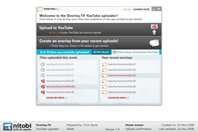
Design comp extending the clients brand and interaction design from their current application to the new application to maintain a familiar user experience across both applications.
Wireframe layout to maximize the balance of branding space and usability of the AIR desktop application used to upload videos to the web
Wireframe layout to maximize the balance of branding space and usability of the AIR desktop application used to upload videos to the web
Services Provided:
Nitobi Helps Overlay.TV Make its Mark on Online Video
Overlay.TV is making its mark on online video. The Ottawa-based company designed a unique application that makes it easy to add hyperlinks and images to video clips destined for the web. The premise is simple. By embedding interactive hyperlinks in video, content creators, owners, publishers and e-commerce sites can go a step further in monetizing videos by overlaying contextual information directly onto video and linking to external websites.
Here’s how it works. In an online video that Overlay.TV produced for popular home decor magazine, Style at Home, they “overlayed” descriptive information about the products featured in the video, and provided links directly to websites where viewers can purchase the featured items.
But video overlays aren’t just for advertising. The overlay tool is free and so can be used for any kind of do-it-yourself project. If, for example, you make a ‘learn to play guitar’ video, you might choose to add a link to an online guitar tablature resource, or to a website that sells sheet music. In another scenario, you might overlay amusing commentary over video of you and your friends snowboarding for the first time.
“Overlay.TV is really stretching what users can do with their YouTube videos,” said Andre Charland, Nitobi CEO. “They’re creating some really interesting mashups with user generated content and advertising models. That’s why we were so excited to be part of this project.”
Bringing Overlays to the Desktop
Overlay.TV brought Nitobi Inc. on board to develop easy end-to-end workflow for content creators using YouTube to upload their videos in the desktop version of the Overlay.TV application. Nitobi worked with Overlay.TV to help build a desktop application with Adobe AIR that closely resembles the existing Flash movie application system. “Our goal was for the desktop app to mimic Overlay.TV’s web functionality and user experience as closely as possible. We wanted to avoid disrupting existing users at the same time as providing a full-feature app for those new to the Overlay.TV service,” said Chris Stone, User Experience Designer at Nitobi. With a diverse audience of both corporate and personal users in mind, Nitobi designed the app in a way that would intuitively encourage users to upload their Overlay.TV movies to the web. By putting Agile development principles in play, Nitobi’s team scoped, designed and delivered the Overlay.TV desktop application to completion in less than a month of work hours.
Building the YouTube Uploader
Getting the YouTube uploader to launch within the Adobe AIR desktop application is a key function. “The goal was to be able to upload videos directly from the Overlay.TV desktop app and to introduce users to the Overlay.TV service by making the experience as intuitive and comprehensive as possible,” said Stone. “We believed it was important to mirror the necessary features YouTube offers its users in order to ease the workflow.” By building a YouTube uploader into the desktop app, users would be able to upload their movies without having to log in to the YouTube website as a separate action.
Getting the YouTube uploader working was a development challenge. Security built in to Google and YouTube, plus Adobe AIR’s security requirements made it an almost unachievable task. Lead Developer, Jesse MacFadyen, poured through the API docs and found a creative solution for successfully incorporating the uploader into the app, just as Nitobi planned. The Overlay.TV YouTube uploader now allows users to easily drag and drop videos to upload to YouTube. Once the videos are uploaded and hosted on YouTube you can use Overlay.TV’s tools to make them interactive with text, links, and other videos.
Open Sourcing the YouTube Uploader
Earlier this month, Overlay.TV announced it would open source its API to allow developers to build applications on top of its technology, like the YouTube uploader, so other developers can reuse it in their applications. “Our applications barely scratch the surface of the capability of interactive overlays on video,” said Ben Watson, VP of Marketing at Overlay.TV. “In order to solidify our position as a platform we need to work with more content providers, creators and developers who will bring new and more robust use cases to the table for our services and products.”
Nitobi embraces open source, and so immediately identified the YouTube uploader functionality as something that should be shared with the community. “I made sure that there were no dependencies on other libraries, defined an interface and event model that made sense in the context that it was needed,” said MacFadyen.
Watson says Nitobi’s expertise in AIR, desktop applications, Flash and user experience made them a perfect fit for this project. He’d happily work with Nitobi, “every chance I get.”
“We successfully extended Overlay.TV’s existing user interactions, branding and functionality to the desktop application, which is always the result you’re after when tasked with extending an existing product or service,” said Stone. “It was great to get emails back from Overlay.TV knowing they were stoked about the progress of the app and its delivery. At the end of the day, my goal is to have happy clients.”
- Counterpoint
- CTP
- hyperWALLET
- Jiibe
- Jistik
- Overlay.TV
- RNAO
- Schenker
- Scrutinizer
- Sosido
- Tabrio
- Vancouver Aquarium
- VanGuide
- Webex
- Work at Play
Watson says Nitobi’s expertise in AIR, desktop applications, Flash and user experience made them a perfect fit for this project. He’d happily work with Nitobi, “every chance I get.”