Skip to Navigation | Skip to Content


A Tale of Two Androids | March 18th, 2010

After being shown many more ways of writing applications on Android, I decided to investigate the possibility of using the V8 Javascript Engine in Android Scripting Environment. I saw what was done with the other platforms, so it should just be a simple matter of porting node. Unfortunately, I’m not there yet, so I started with what I know should exist, which is V8.

Blogs have it on good authority that Android Webkit now uses V8 as its Javascript Engine instead of JSC as it used to in previous versions of Android. Now, in the Android Open Source Project, the build system that is used there (which has even less documentation than the WebKit docs on the Android SDK), has the ability to compile every single module in Android independently. However, if you type the following:


make modules

You will notice that libv8 and v8shell are lacking. However, if you run this:


make modules JS_ENGINE="v8"

You will then notice that you will have access to these things. Given that most phone companies do their own builds of the OS, it’s not clear which phone has v8 and which phone does NOT have V8. I’m certain HTC knows this, but what about Motorola, Sony, LG, Dell, Acer or any of the other manufacturers of phone who all do their own builds and all have their own buildbots. It’d be great if you could find out which engine you were running on your phone, since WebKit can run many JavaScript engines, and soon we’ll be able to run Javascript on the phone wherever we want. Of course this is more pie in the sky than the reality, which looks like this:

adb shell
$ cd /tmp/
$ ./v8shell
V8 version 1.3.10 (candidate)
> print('Hello world');
Hello world
>

We’re working on it, and we’ll see what happens when this does exist. In the meantime, the DroidScript stuff is really interesting, and the more ways to develop on Android, the better. While some people are married to the idea of Java, I like the idea of writing whatever works for the developer. If anyone can recommend some solid books on Makefiles, that would be greatly appreciated. If I ever manage to get this to work, I’ll have an APK for download.
Posted in Android, phonegap | 8 Comments » | Add to Delicious | Digg It

Curiosity of the Day: DroidScript | March 12th, 2010

Recently, a blog post came forward from Mikael Kindbord about running Rhino on Android. I was then asked to take a look at it,and it was pretty interesting. He recently released a project called DroidScript, which is actually really interesting. It’s an interesting front-end to Rhino, and it has the Javascript using Dalvik Android classes with Javascript so that you can have intents and invoke any method in Javascript that you can in Java. It does produce some pretty verbose code, and while I’m not going to re-structure Android PhoneGap so that it uses this just yet, it’s an interesting thought experiment in how many different ways you can write code for Android.

If you’re interested in Android and Javascript, I high recommend checking it out.

Posted in Android, phonegap | 2 Comments » | Add to Delicious | Digg It

LOLWUT? Canvas Benchmarking on C5Bench and Xperia X10 | February 26th, 2010

Recently, I started looking at Canvas on Android, and I came across the C5 Canvas Benchmarking test. I tested it on both the Motorola Milestone that I recently bought, and the Sony Ericsson Xperia X10, and it was pretty surprising. Now, it should be noted that the Motorola Milestone has a TI OMAP3430 processor, and is capable of speeds up to 600 MHz. However, the Xperia X10 has a Qualcomm Snapdragon processor, and has a clockspeed of 1.02 GHz. Now, people have been speculating whether this clock speed will make a difference, and I think that when you look at the results, it clearly does.

Now, I don’t think that performance is quite there yet, but you may see more advanced uses of Canvas on mobile web applications in the future.

Posted in Android, phonegap, Uncategorized | No Comments » | Add to Delicious | Digg It

console.log on Android WebView | February 26th, 2010

I recently bought a new phone, the Motorola Milestone from Telus. The Milestone currently features Android 2.0.1, and is the first Canadian phone that actually features Android 2. So, while confirming fixes on the device, I noticed in LogCat that my WebCore wasn’t logging error messages. For those of you who don’t know, on Android 1.x, you could debug your javascript by using adb logcat and grepping for the WebCore errors. This frustrated me, since this wasn’t listed in the API changes. I then decided to sift through the WebView source code, and I found addMessageToConsole.

The method addMessageToConsole is a method that currently exists on the WebChromeClient that can be overriden with your own custom error message. Now, according to the Google Documentation, this is not a public method to be used until Android 2.1. However, I just tested it on my Motorola Milestone, and the method actually works. I’ve included this fix to PhoneGap and you should now be able to go back to debugging your Javascript directly on the device, as opposed to the other methods of using a different browser.

BTW: The code to add it is as follows:


public final class EclairClient extends WebChromeClient
{
private String TAG = "WebErrorLog";
// This is a test of console.log, because we don't have this in Android 2.01
public void addMessageToConsole(String message, int lineNumber, String sourceID)
{
Log.d(TAG, sourceID + ": Line " + Integer.toString(lineNumber) + " : " + message);
}
}

For backwards compatibility with Android 1.6, it’s a good idea to have this class extend a pre-existing WebChromeClient, and to dynamically chose the client you instantiate so you can actually get your application working.

Posted in Android, phonegap, Uncategorized | 2 Comments » | Add to Delicious | Digg It

PhoneGap Android: Creating projects and filing bugs | January 6th, 2010

So, apparently I forgot to mention the build.rb script I wrote last year. It’s checked into the phonegap-android repository, and you can pull it. To use it, you just have to do the following:

1. First, build a PhoneGap.jar (this should be built before being distributed in future releases)

ant jar


2. Run build.rb with the various attributes:


ruby build.rb TestApp com.testapp www /foo/bar

3. Profit.

You should have a test application created. The application name should have no spaces, and it’s expected that you know enough about Android development to change the res/values/strings.xml file to what you want it to be (you don’t need to know much). The www directory should have an icon.png in it for the icon that you want to use with your application. It’s an early script, and it’s an intermediary step that’s designed to make life easier for those who don’t want to bother with Eclipse.

Also, many people go here to post bugs. While I appreciate all the comments I get on Android, it works better if the bugs are also filed in the PhoneGap bug tracker. That way I can keep track of what’s broken. It’s also the place to put feature requests, since like the Android developers themselves, I will often not reply to the forums because I’ll be too busy with other tasks. I hope to have a plugins project added here soon.

Posted in Android, phonegap | 1 Comment » | Add to Delicious | Digg It

Introducing PonyGap: PhoneGap Plugins for Android | December 17th, 2009

PhoneGap Plugins Demo from Joe Bowser on Vimeo.

Recently, we have been working on each platform to get the platform-specific features to be encapsulated as plugins. Now, for the iPhone, that may take the shape of native controls, but for Android, we’re working on a project for the plugins called PonyGap. Why did I call it PonyGap? Because chances are that you would use this app in a demo, and that you would most likely stick to the basic feature set of HTML5. Of course, you MIGHT use one of these, but generally not all of them.

Currently the first plugin feature that we added was the ttsHook. This will hook into the Android Text to Speech functionality and allow PhoneGap applications to be useful to people who may not necessarily have the best vision or coordination. We’ll work on a better MobileSafari example and release it with the plugin.

This functionality was inspired by the Eyes Free work that Google did.

Update: This post is now obsolete, and there’s a new and different method of creating plugins for Android. Please visit the PhoneGap-Plugins repo for more info.

Posted in Android, phonegap | 7 Comments » | Add to Delicious | Digg It

New: KeyEvents for Menu Button | December 17th, 2009

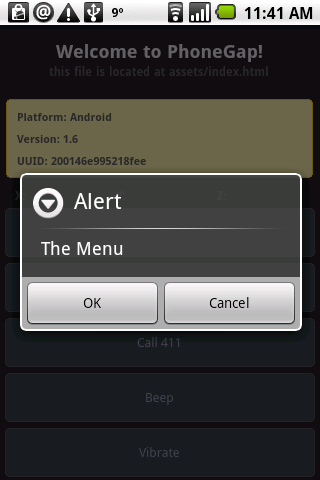
phonegap_menu

One of the big complaints that we keep hearing when you port PhoneGap apps over is that they don’t follow the Android UI specifications AT ALL. The alerts don’t have buttons, the back key doesn’t do what it’s supposed to do, etc, etc.

Well, we fixed the back button, and introduced a new event, menuKeyDown. When the menu key on any Android device is pressed, this will fire an event that will let the user know if they need to present the user with a menu of some sort. The menu could come from the bottom like the typical Android menu, or be a lightbox that takes over the window. The event exists so that the user can decide on it.

Also, the alerts have buttons now! I’m going to push these up to the EDGE version of PhoneGap momentarily.

Posted in Android, phonegap | 2 Comments » | Add to Delicious | Digg It

EDGE UPDATE: Android 1.x Database Storage | December 8th, 2009

I just finished the basic version of Android 1.6 Database Storage for PhoneGap. Unlike Android 2.0, which has a proper implementation of this, Android 1.6 does not. There are definitely numerous bugs that can happen with this implementation of Database Storage, such as mis-formatted numbers being passed into Javascript due to what SQLite sends back to the browser, however I’ve tried to mimic the HTML 5 spec the best I could with Java and JavaScript.

Now, the code being passed is VERY primitive, and it’s not well documented. Android is notorious for having this weird API in the providers that gets in the way of you and your SQLite Database. Providing a mapping from Javascript to the rawQuery seems to have made the most sense. We have yet to add a fail condition to this yet, so when it fails, it will fail silently. That’s somewhat annoying when it comes to errors in SQL syntax, and we’ll try to hammer out that bug later this week.

Posted in Android, phonegap | 7 Comments » | Add to Delicious | Digg It

Android 1.5 and Database Storage | December 7th, 2009

OK, so as many of you know, I’m in Canada. In Canada, we have some pretty nasty providers. Honestly, choosing between Bell, Telus or Rogers is like choosing which limb you want to saw off. So, because I can’t wait anymore, I’ve decided to start work on SQLite Storage on Android 1.5. This will hopefully emulate the HTML5 storage, but I haven’t really tried it out too much yet. However, I found some weirdness with the databases.

Databases in Android have to be stored in the /data/data/ /databases/ directory if they are accessed by an Android app. This is ever-so-slightly different from the /data/data/ /app_databases/ directory that Android 2.0 needs to support HTML 5 proper databases. I’m hoping that by exposing this and adding it in the conditional logic, that I can hack in the appearance of HTML 5 storage on Android 1.5 and Android 1.6. However, here’s a code fragment that comes in very handy:


Package pack = this.getClass().getPackage();
String appPackage = pack.getName();
path = "/data/data/" + appPackage + "/databases/";

This is particularly handy when dealing with Databases in General, since you may want to take your code and throw the thing in a JAR so that you can deploy numerous apps easily. Of course, making a JAR for Android Development is a simple, but completely undocumented process. I’ll post about that later.

But the fact that this feature will be necessary because of the maintenance of the 1.x Android tree is depressing. I really wish that tricks like Java Reflection, and multiple APIs for multiple versions weren’t required, but at least we managed to hack around the annoying fragmentation for the time being.

Posted in Android, phonegap | 2 Comments » | Add to Delicious | Digg It

Android 1.5 to 2.0 Support in EDGE | November 26th, 2009

After spending a day with Java reflection, I believe that we are now at the point where PhoneGap Android can now be supported on 1.5, 1.6 and 2.0 versions of Android. This wasn’t incredibly hard, except for the fact that I was unfamiliar with reflection, and the example on the Android site is less than helpful, since it deals with the Debug static methods, and not a real world object that can have things like instances. Also, reading Sun’s documentation made me realize how useless examples that use the word Class is as a classname.

The result of this is that we may have a JAR that can be used on Android 1.5, 1.6 and 2.0, which solves the divergence issue. However, this doesn’t mean that we have SQLite database storage that doesn’t exist on Android 1.5 or 1.6. It means that if you are using Android 2.0, you have access to the SQLite Database if you are running the Edge version.

After pairing down PhoneGap to a jar, it appears to be weighing in at under 200k. I’m thinking about distributing it as an installable library on Android so that if you have it installed, you can download PhoneGap compatible APKs. This would be similar to the Text-To-Speech API functionality. This may encourage Google to close the browser gap, or it may just get ignored if people just use their own stand-alone PhoneGap + app apps.

More info on this will come shortly.

Posted in Uncategorized | 1 Comment » | Add to Delicious | Digg It