I’ve moved my blog over to http://ambiguiti.es from now on. Over there I’ll be talking about web and mobile development, and maintain a more general blog relating to events, conferences, job postings, and other such news in the industry.
Posted in .net, Dell, agile, air, ajax, analytics, apple, as3, asp.net, basic, branding, business, coldfusion, components, conference, culture, documentation, enterpriseajax, events, firefox, flash, flex, graphic design, iphone, media, microsoft | No Comments » | Add to Delicious | Digg It
Someone told me about this post of Christian Cantrell’s (of Macromedia and Adobe fame) listing several incredibly handy AS3 libraries.
These free open source libs are as follows:
- as3corelib: various utilities like advanced date parsing.
- as3exchangelib: talks to Exchange servers.
- as3nativealertlib: a modal alert that appears in its own native window.
- as3notificationlib: creates notification windows, and provides a layer of abstraction on top of OS-specific notifications.
- as3preferenceslib: manages application preference persistence, including encryption when necessary.
Posted in air, as3, flash, flex | No Comments » | Add to Delicious | Digg It
 Finally, Adobe released the first beta of AIR (Adobe Integrated Runtime) for Linux. This is huge news! It makes choosing air even easier for business OR consumer apps. This release is not feature-complete, though, and this FAQ should fill you in on where it’s at: http://labs.adobe.com/wiki/index.php/AIR_for_Linux:FAQ
Generally speaking in this release you can:
- Runtime/Application Install/Update and Uninstall.
- HTML Loader with JS support to render HTML within AIR applications.
- Local Database APIs
- File system support with support for user folders like Desktop/Documents etc.
- Desktop Integration with Drag and drop, clipboard support
- Windowing support with System chrome none/standard
- Basic transparency
- Menu support with context menu, menu bar, pop up menus and menu events.
- Networking
- Network change detection (Event.NETWORK_CHANGE )
- System wide idle detection (userIdle Event)
- NativeApplication APIs
- Capabilities (OS) API
- Mouse events
- Detection of running application (InvokeEvent.INVOKE)
but you can’t
- Print
- Use hardware acceleration
- Perform badge installation
- Use the keyboard accelerators
- Or screen API’s
Posted in air, linux | No Comments » | Add to Delicious | Digg It
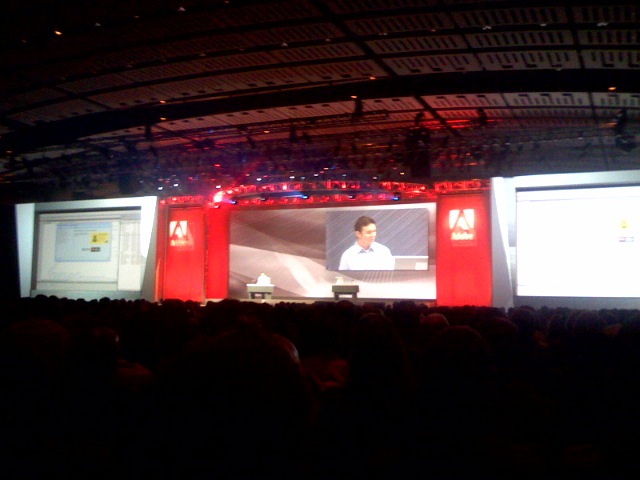 I’m here in Chicago attending MAX ‘07 with Andre. We were surprised and thrilled today to see the Nitobi Salesforce.com AIR application demo’d by Ed Rowe, VP Engineering for Adobe Integrated Runtime at the keynote on Monday morning! (see photo). We’re really thrilled about AIR, mainly as a tool for increasing the penetration and relevance of SaS applications and also distributed Enterprise Software that we build in our consulting services.
It was also great to see our book (Enterprise Ajax) available at the bookstore next to the AIR bus.
BTW if you are at MAX and want to get together to chat about Ajax, AIR, RIA, or whatever, just ping me at [email protected]. I’ll also be giving a talk with Andre on Tuesday at 1:30 on Ajax development within AIR. Be sure to check it out if you want to learn a bit about that process.
Posted in Rich Internet Apps, air, ajax, enterpriseajax, events, flex, onairbustour, web development | No Comments » | Add to Delicious | Digg It
Adobe’s MAX 2007 conference will be in Chicago from September 30 to October 3. I’m thrilled to be speaking at the event with Andre Charland on building Ajax applications in AIR. We’ll also be talking about Dreamweaver extensions, using the example of some Nitobi components.
Learn how to build rich and powerful user interfaces in Ajax for AIR applications with no JavaScript coding using Dreamweaver and off the shelf Ajax components from Nitobi. After this session, even novice developers will be able to add rich Ajax interactions such as spreadsheet-style grids, rich combo boxes, and dynamic trees. We will explain the usability advantages and potential pitfalls when migrating your web application to the AIR platform, as well as explore some innovative AIR projects, such as a SalesForce.com client, a lightweight project management tool, and a construction industry application.Â
When: Tuesday, October 2: 1:30 pm – 2:30 pm.
Posted in air, ajax, events, web development | No Comments » | Add to Delicious | Digg It
Ok I know I’ve said a lot about Adobe’s AIR framework lately.. but Im still at the AIRCamp Vancouver event and really digging what I’m hearing. Thought I’d distill down a few cool AIR features. Call this my “Why I should care” blog.
Preface:
All this can be done with HTML/JavaScript with a server-side back-end (if you want). Also from Flex/Flash:
- Windowing – True cross-window support, Z-ORDER support for windows.. AlwaysOnTop Support. Utility Windows. Transparent windoes. Chrome/Chromeless control – Works from JavaScript, not just Flex. AGAIN works cross platform, wikid.
- File IO – Read and write files from JavaScript, Flex. Don’t worry, it doesn’t subvert the security settings the user has set for an application. Includes control over different kinds of built in dialogues.. eg: Saving, browsing, etc.
- Script Bridging – Very _easy_ communication between HTML/JavaScript and Flash.. so no more external interface.. you can essentially crawl the dom directly from flash.. Big time saver.
- History management
- Drag and drop clipboard support. Dragging things between AIR applications, or from the desktop (files) to AIR apps, or from AIR to the desktop.. true desktop integration.. associate a particular file type to open IN air if you want.
- Rich clipboard support. More than you can do in the browser. Richer types of data parsing are possible.
- Service Monitoring. Know when the user is working online or offline and seamlessly switch to offline mode. Eg: if the user goes on a plane.. he can work offline.. the app can detect this and store everything in SQLLite or on the OS. When he’s connected again, you can detect this and sync-up.
- SQLLite. Built-in support for a basic SQL database as part of your application.
- Installer Update API’s. Update your apps easily.
- Badge-based Install.
Again, http://labs.adobe.com for more info.
Posted in air, onairbustour | 1 Comment » | Add to Delicious | Digg It
I’m currently at AIR Camp Vancouver, listening to Mike Chambers explain the origins of Adobe’s new cross-platform runtime, AIR. It seems like the long term vision is not just limited to PC/Mac/Linux, but also other devices.. creating opportunities for true cross-platform write-once, run-anywhere development.
I was thinking a little bit about my post yesterday, and about how Adobe should be distributing the AIR runtime. I still think they need to allow developers to bundle the runtime into a single executable (if that’s even possible), but I just realized that maybe one of the biggest barriers will be convincing people the runtime is OK. This will take time, but also lots of marketing, and thats why Adobe is somewhat-uniquely positioned (along with others in their cohort, like Microsoft, Apple maybe, and a couple others) to wage the necessary marketing war to convince people its ok to have the runtime installed and running on their computer, all “black box” like.. Adobe is a trustworthy source (I wouldnt install a similar tool from DoubleClick), and I think they can get people over the hurdle of being concerned that this is a safe runtime to have in their operating system, marshalling all these anonymous applications and making sure they don’t do anything too insane..
Again, if you haven’t heard about AIR, and especially if you haven’t tried it yet, it’s free, grab the beta here: http://labs.adobe.com/technologies/air/
Incidentally, Beta 2 of AIR is on it’s way.. and will support things like icon bounding in MacOS, and taskbar support on PC
Posted in air, onairbustour, web development | No Comments » | Add to Delicious | Digg It
So our very own Andre Charland is on tour right now with the Adobe folks on the AIR (Adobe Integrated Runtime) bus tour http://onair.adobe.com/. Besides the fact that it looks like a lot of fun, its a great opportunity for us to be demoing not only our components, but also helping spread the word about Adobe’s new development tool.

For those who don’t know, AIR is a cross-operating system runtime that allows web developers to leverage their existing web development skills (such as Flash, Flex, HTML and JavaScript) to build and deploy web applications and content to the desktop.
AIR is exciting to web developers for few reasons:
- Cross platform desktop applications. This is killer. Imagine, write an application for the desktop once, and have it run on any platform – MacOS, Linux, Windows, etc.
- Write desktop apps in JavaScript/HTML. Yes. Write pretty darn powerful web applications and have them run like native desktop apps. You can also use Flex to build these applications for a richer experience.
- Apps that act like desktop apps. Don’t worry.. this isn’t just a chrome-less browser running on your desktop. This is a pretty full featured application framework that gives you access to the file system, system tray, and the web at the same time.
- Better integration for web applications. If you have a web application and would like your users to have a desktop component to that, this is the way to do it. Pownce is showing us how.
 |
| Nitobi’s Fisheye Running in AIR on my desktop |
So what does this mean for the web development community?
- Well for one thing, it means that we’ll be seeing a lot more desktop integration for online applications in general, which means a better experience for users.
- We’re going to see a further proliferation of web API’s. Having seamless access to the web through AIR makes consuming and using web API’s much easier and makes a lot of sense, frankly.
- At the risk of sounding like a tout, I think we’ll see a growing interest in things like Flex, which are similar in the way they leverage existing skillsets to build applications. Also, AIR apps can be build with Flex in addition to JS/HTML.
What are the challenges / risks?
In general I think it will be crucial for Adobe to find effect means of distributing the AIR runtime component.. much the way they did with Flash. Blogs and advertising will get them the techy community, but to get real desktop penetration, they’ll need to ship it with a browser or piece of software that everybody owns. I had some ideas of my own… not all of them practical.
- Let developers bundle the runtime with .AIR applications! To my knowledge you cannot bundle the AIR runtime with your app. This would be a technical challenge, sure.. but not impossible to do. The goal would be to give a single executable away that users can run that will execute the AIR runtime if they don’t have it installed and then let the application run.
- Give some version of Photoshop away for free (one that does a LOT). Put AIR in the installer. Market the heck out of it. Get it bundled with everything as a killer value-add.
- Send it to customers with Adobe Updater. You’ll get millions of households that way.
- I dont think they’d get it bundled with a browser, but they might be able to get it pre-installed on Dell machines or convince Apple to put it in MacOS.. Why would they? Well, it really helps their customers after all, and Adobe might be able to sweeten the deal by shipping a free scaled-down version of Photoshop (maybe not called photoshop) – possibly under Apple branding. Small market, but an influential one.
A final thought here is the risk of someone uncovering a security hole or flaw in AIR that results in a PR firestorm for Adobe. If that happened, it would really hurt it’s chances of being adopted. This happened to ActiveX in IE. This is going to be a tricky tightrope for Adobe – offering enough power within the runtime, but pre-emptively avoiding any potential holes before they become vulnerabilities. When we visited Adobe earlier this year it really sounded like that was a major focus of theirs. We’ve noticed they’ve been very cautious in turning on functionality in Webkit, and I would guess that they’ve scaled back the capabilities of AIR for the initial release just to reduce their exposure should they have forgotten anything.
At any rate, I have doubt that this will become a major feature of the web. After playing with AIR myself, I’m quite impressed with how easy it is to build pretty powerful functionality. If you haven’t downloaded it, get on over to the Adobe website (http://labs.adobe.com/technologies/air/) and grab it. There are some great free resources here: http://www.ajaxian.com/downloads/books/AdobeAIR_for_javascript_developers.pdf if you’re looking for tutorials and the like.
�
Posted in air, ajax, business, safari, web development, web2.0 | No Comments » | Add to Delicious | Digg It