I’m thrilled to let everyone know about our new support center, featuring mainly: comprehensive, searchable documentation!
This is a tool we’ve wanted to have for a long time and I’m relieved that its finally available and online for everyone to test out and hopefully start using.
If you can’t wait until the end of this post to try it out: go to http://support.nitobi.com
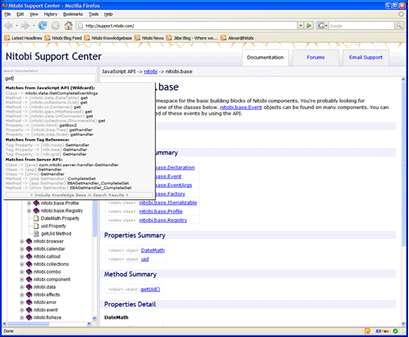
This tool has the following cool features:
- All of our documentation (ALL of it) is now in a single, easy-to-access location.
- All our documentation is now versioned by build number so it’s always up to date and always accurate for YOUR version of the product.
- Everything is instantly searchable and browsable from a single point of access.
- Perform wildcard searching of all documentation including knowledgebase. Eg:
“grid” might turn up the nitobi.grid class or the ntb:grid column or All about Nitobi Grid article.
“nitobi http” would perform a double-ended wildcard search and likely turn up nitobi.ajax.httprequest as well as other articles where ‘nitobi’ is mentioned before ‘http’ (but not necessarily exactly as typed).
- Whittle the documentation down by specific product if desired.
One thing we have lost from the docs temporarily is comments but we’ll be coming out with a comments feature in a month or so once we know the tool is succeeding and people are using it.
Posted in components, documentation, nitobi.com, resources, web development | 4 Comments » | Add to Delicious | Digg It
So I was working on a project today and I had to plug into the Google News API.. I tested it with our Company name and out came this article:
An Account Registering Frenzy – Sign up for Nothing (Jeremy Wagstaff)
The article essentially says that a big part of Web2.0 are the insane number of new services requiring registration.. we register, provide tonnes of personal data.. then forget about the service.. Now our idle account is sitting out there in a veritable boneyard of abandoned services.. So why was our name mentioned? Because the author was coming up with a list of silly-sounding Web2.0 names (of actual companies) and must have stumbled across ours at some point (I’m guessing from RobotReplay).
Is “Nitobi” really that wierd-sounding? I didn’t think so before now. Yeah ok it’s not an English word or compound-word like “Elastic Path”, or “Adobe”.. It’s not someone’s last name “Dell”, “Eaton’s”, etc. I don’t think anyone needs to defend it by pointing out the plenty of other silly names that have done just fine (hint: “Google”, “Yahoo”, “Flickr”, etc).
But why did we choose Nitobi?
First and foremost, we wanted a name that was:
- Short.
- Domain available.
- People can spell it / say it.
 Meeting those criteria was hard enough. Next we wanted something that spoke to our team. We happen to be located in beautiful Vancouver, British Columbia, home of my alma mater the University of British Columbia, where you will find the incredible Nitobe gardens– a Japanese botanical garden. We felt it was a symbol that represented a lot about who we are: a pacific rim city, and an outdoors-oriented bunch of people. We changed the ‘e’ to an ‘i’ to avoid bugging the real Nitobe gardens, and we had a name!
If anyone has any thoughts on our name or branding.. or on web2.0 names in general… would be cool to hear what they are!
BTW.. if you want a Web2.0 name generator: http://www.lightsphere.com/dev/web20.html
Posted in branding, business, nitobi.com | 4 Comments » | Add to Delicious | Digg It
We’ve updated our knowledgebase so that you can now add comments and ask questions.
Go check it out: http://www.nitobi.com/kb/?artid=345Â Â (look at the bottom!)
Posted in nitobi.com, resources | No Comments » | Add to Delicious | Digg It
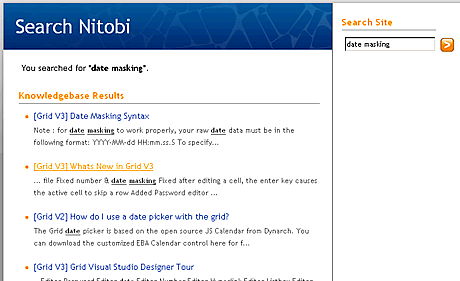
I was personally finding it difficult to search for technical information in our knowledgebase – even when I was the one who originally wrote it! Part of the reason was that I couldnt tell what product each article belonged to. Also I felt there weren’t enough returned results. To this end I have made the following changes to our search feature:
- Knowledgebase results come up first.
- More results from the knowledgebase than before
- Knowledgebase Articles now show the product they belong to (and version).
I hope this will make finding information on our site more easy. What I’d like to do now is make our API docs searchable at the same time.
Posted in nitobi.com, resources, web development | No Comments » | Add to Delicious | Digg It