Development Diary: Taming the Fisheye | December 10th, 2006
Update: I’ve posted two demos of Fisheye in action.
I thought it might be a good idea to document the development of one of our components from a user-interface perspective. We’re in the process of developing a host of new components now, which should be ready for release early this spring. One of these is a Fisheye Menu.
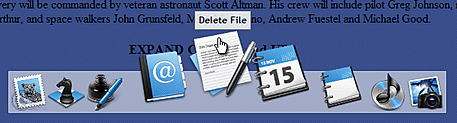
If you would like to see a video summary of the various stages of developing in Fisheye, click the play button below. You can also download a Quicktime version here [90mb].
Get the Flash Player to see this player.
A Fisheye menu is specifically designed to support browsing through long lists of menu items. The Mac OS X Dock is a popular example of a fisheye menu, but they have been studied in HCI circles for years. The University of Maryland Human Computer Interaction Lab found that users liked Fisheye’s for long lists in both goal-directed (I need to find x, where is it?) and browsing (I’m looking for something like x, but I’m not sure what..) tasks, but there was a lot more variance in users preference for Fisheye’s over hierarchical menus (for example).. I guess this means that some people LOVED them and some hated them. Part of the issue could be training, but with the increasing popularity of MacOS X, maybe users are getting used to the idea. They certainly present some advantages over regular menus:
- You can keep a lot of menu items in view, while allowing the user to focus in on just a few at a time.
- You don’t need to ‘hide’ menu items in order to faciliate browsing a very large list.
- They require less mouse dexterity on the part of the user than Hierarchical menus.
 What we actually built was a Fisheye toolbar (much like the MacOS dock), because it uses transparent PNG’s instead of text menu items. It’s a logical replacement for a regular toolbar, especially if you want to add some zing, or you in fact have lots of menu items. The development can be broken down into 4 iterations representing seperate and unique sets of UI challenges.
Iteration 1 – Proximity Detection and Scaling
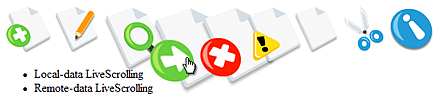
First of all, I made sure Fisheye used 32-bit transparent PNG’s instead of GIF’s or JPG’s. Why? When the icons are scaled and overlap with the content below, effects like opacity and drop-shadows help the images stand out over top the content below. Also, in IE we get a nice anti-aliased scaling effect on PNG’s. In Firefox, Opera, and Safari it looks good too, but the scaling is a bit more pixelated.
Next, I wired up a simple zooming effect to the distance from the mouse to the center of each icon. One of the issues I had right away was how to calculate the correct icon size based on this distance. It turns out its not correct to encorporate both axes in this calculation. If you do, the space occupied by the ‘zoomed’ icons varies too much, and the peripherie moves around too much too. You actually want as little variance as possible in the space occupied by the enlarged icons, despite the fact that at first it may look cool.
Iteration 2 – X-Axis “Zooming”

As the icons scale up based on the proxmity to the mouse, they occupy more space, so the surrounding icons need to move out of the way. Based on the increased space taken by the zoomed icons, we move the next icons out by that amount.
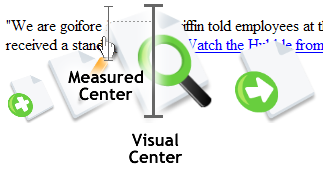 Unfortunately, an issue that cropped up was how to divy up the “extra space”. It turns out that when you have a menu aligned to the left, the icons need to be pushed out to the right.. by definition the enlarged icons themselves begin to move to the right of your focus position (where the mouse is).. So we have to constantly be adjusting for where the mouse appears to be rather than where it is measured to be. This is how you do a right, or left-aligned fisheye. It’s harder. When it’s centered you just spread the surplus around evenly. The bottom line is that the mouse must always be over the peak in the zoom.. this is probably why the ‘best’ alignment for a fisheye menu is centered in the middle (like the Mac OS Dock).
Iteration 3 – Alignments Left, Right, and Center
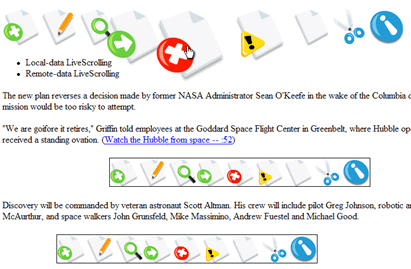
If the menu is aligned to the left, the extra space needs to be allocated to the right, and vise versa is aligned to the right. In a center alignment, the surplus space needs to be evenly distributed to the left and right. In the 3rd iteration I got this working pretty well.
Something else I got working in the 3rd iteration is having the items zoom up or down. If a Fisheye is positioned near the top of the page, the developer will probably want the items to move down instead of up. This was a simple addition.
Iteration 4 – Labels and Menu Item Activation (Bouncing)
 Toolbars need to have tooltips. Otherwise, the purpose of each menu item isn’t easily understood. Another purpose of labels in the case of Fisheye is for alerting the user as to which item is currently in ‘focus’. So, the next thing I did was write a simple label behaviour. If label text is available, it will appear above the menu item when it is the focal-point of the zoom.
Another requirement was to alert the user that they had in fact clicked on an object. In a traditional toolbar that uses images superimposed onto buttons, a button ‘depressed’ state shows the user a selection has been made (or is about to be made). In a fisheye (which doesn’t use buttons per-se) we need to do something else. In keeping with the MacOS tradition, I implemented a sinusoidal animation for a few seconds after the click. This animation can also be activated programmatically if the developer wants to alert the user to click on a particular menu item at any point in the application.
Iteration 5 – Container Object and Y-axis Zooming
The last iteration was for adding some of the finishing touches. The only things left for a basic Fisheye were an optional container object (in the screenshot it’s the semi-transparent background the icons are sitting on), and y-axis zooming on the icons themselves. If the menu is zooming ‘up’ then the icons should lift slightly off the container in addition to scaling. If the menu is zooming ‘down’, the icons should drop down slightly towards the focal-point.
Conclusion
It’s going to be neat to do more components like Fisheye, and start getting feedback from our users. Are people into less conventional UI components like Fisheye, or are they strictly eye-candy with no practical role in enterprise software?
I know there are still things that Fisheye can use in the way of functionality. It would be nice, for example, to have vertical orientations for the menus, and also to be able to attach traditional drop-down menus to each element. I would also like to see context menus and groupings.
If you’re looking to try a demo of Fisheye or download your own copy, you’ll have to wait a few weeks for the first version of the Nitobi suite – which will be available mid February.
December 10th, 2006 at 11:27 pm
great post man! I find the conclusion very interesting, since most components are based on replicating MS office style UIs. And this is continuing with a number of developers trying to come out with Ribbon style UIs, and yet Apple is more commonly refered to as the superior user interface. Do you think there’s an opportunity for web developers to break free from the shackles of the office style UI, or is it too entrenched?
December 11th, 2006 at 2:13 pm
I think we’ll continue to see a lot of office-like UI, because developers want to use patterns their familiar with. Microsoft teaches us to use toolbars and so-on. However, if we can provide people with useful UX data, I dont see any reason why they wont want to try something different if it makes sense.
Fisheye is a good example. It’s good for non-goal directed searching as well as goal-directed, but makes the most sense with long lists. In these cases it’s superior to a toolbar.
Another thing to consider I think is the role of branding. There’s probably a class of users who want to try something different with their UI in order to be interesting/unique – and I think that’s fine too. Why not make our user experience different and (dare we say it..) fun?
December 12th, 2006 at 6:37 pm
That’s a cool demo.
You bring up a good point though, how would I use that in my Enterprise application? Do I replace my toolbar with a fisheye bar? The number one thing I think that will help is the bouncing, that indication of “processing”.
Fisheye overall though, in my opinion, does highlight one thing; size of icon’s matters. In my new system I have quadrupled the size of my primary icon’s and it’s helped user acceptance immensely. For us technical guys every inch matters, making fonts as small as possible, using the highest resolution. But to a user that is just introduced to a new system (that they might not use everyday), it really helps to have icons larger.
February? Well it should be worth the wait
Andre, do you have a like for a javascript ribbon bar (besides the one on Ajaxian)? (For all Office 2007 annoyances, I think ribbon is genius)
December 12th, 2006 at 7:07 pm
The answer to your first question is yes, and you might also use it as a ‘quick pick’ for files or recent records. It seems like Fisheye’s really excel at helping users look through long lists.
You might also see what your users think about fisheye in terms of icon size. I’d be interested to know if zooming helps them locate items in the same way as a bigger button.
Fisheye is basically ready to alpha so I’ll add that to your package, Christian (if you’re interested in messing around with it)
December 12th, 2006 at 7:25 pm
Hey Xian,
I haven’t looked at the one on Ajaxian that closely, although I have seen a bunch. I think Ribbon is a good UI pattern, especially for new users to an application. I don’t think it’ll help expert users that much, but it certainly won’t hinder them and may help them discover some new features of value to them.
Is Ribbon something you’d like to be using? It seems to be it’s best suite to applications, like office, that have lots and lots of features.
Xian, once we get the first version of suite is out we’ll be trying hard to figure out where the gaps with our customers are! So keep us giving us feedback:)
Thanks!
December 13th, 2006 at 10:05 am
awfull pattern. Dont use it
December 13th, 2006 at 2:23 pm
Great analysis and writeup, Alexei. I wrote up some fisheye components for Flex a while back:
Flex fisheye
And a 2D version, for packing larger numbers of items into a small space:
Flex 2D fisheye
In addition to the points you raise, the flex examples address a few other issues:
* limited space Most implementations of the fisheye/dock effect I’ve seen zoom up the items based on distance from the mouse, and either overlap, cluttering the display, or simply take up more space to account for the larger items. This effect works in some situations, but more often than not, the fisheye needs to play within a fixed allocated space in the UI. This implementation adjusts the parameters of the zooming/falloff equation to make sure that the items always fill exactly the space provided.
* predictability Many fisheye implementations — especially those that try and deal with limited space — have little or no correlation between the location of an item in its ‘rest’ state and the location of that item when zoomed in. As a result, when the user tries to mouse over an item in the list, they inevitably find that the item ends up somewhere other than where they expect it, and have to re-hunt to find it once the fisheye is actively zooming. The mosue location to activate an item should be identical to the location the user sees it at when the fisheye is at rest.
* direction and alignment you address the question of alignment, but vertical fisheyes that can align top, middle, and bottom are valid as well.
* 2D The original intention of the fisheye research you cite is to help users quickly search through a large number of items presented in limited detail, then refine their selection with additional ‘zoomed’ detail quickly. While a 2D fisheye component presents other usability challenges (i.e., in my opinion fast searching of a sorted list in wrapped 2D layout is harder than a 1D layout), it can be used for fast visual scanning of much larger amounts of data than its 1D counterpart.
More details, and source, available here:
Fisheye Components
Ely Greenfield
Architect, Flex SDK.
December 13th, 2006 at 3:14 pm
It’s a very interesting article. Thanks for sharing!
December 13th, 2006 at 4:35 pm
Really for the most intuitive experience the bounce should be a quadratic function as that is the path that a bouncing item takes in real life?
December 13th, 2006 at 5:10 pm
Thanks Ely. I’ve seen your fisheye implementation in the past and its amazing. The 2D presentation is interesting because you have to affect items in the peripherie (non-zoomed items) as well as those in focus because of the limited space. The result is you can’t use your peripheral vision to scan items along the edges because they’ve been zoomed right out of view.
I agree with you completely about predictability. The important thing there is if people make really quick gestures to grab a menu item, they don’t want to have to wait to see where the new position is. I’m getting better at this:
http://blogs.nitobi.com/alexei/media/demos/feye1/2.html
http://blogs.nitobi.com/alexei/media/demos/feye1/1.html
December 14th, 2006 at 3:53 am
[…] Alexei White has written a post on Building a Fish Eye Menu in which he goes over iterations of his development of a fish eye component. […]
December 14th, 2006 at 8:49 am
[…] In Development Diary: Taming the Fisheye, developer Alexei presents the development process of one of their user interface components — something that looks and works like the Mac OS X Dock (A clicked icon even jumps up and down). […]
December 15th, 2006 at 4:04 am
[…] The other night my trusty feedreader alerted me to a Nitobi post demonstrating a fisheye menu (think Mac OS X dock) in javascript as a part of their upcoming library. A neat effect, to be sure…and useful as well; menu design is so often reduced to a balancing act between the number of items displayed and the actual visibility of each. I fully expect this type of widget to become much more common on the web as the major js animation toolkits begin to offer it. […]
December 15th, 2006 at 5:45 am
[…] Alexei@Nitobi » Blog Archive » Development Diary: Taming the Fisheye (tags: fisheye javascript ajax menu ui) […]
December 15th, 2006 at 6:52 am
JavaScriptã§MacOS Xã®Dockを実装 (Fisheye)
MacOS Xã‹ã‚‰å°Žå…¥ã•ã‚ŒãŸDockを実際ã«ä½¿ã£ã¦ã¿ã‚‹ã¨éžå¸¸ã«ä½¿ã„ã‚„ã™ã„。UIã¨ã—ã¦æ´—ç·´ã•ã‚ŒãŸæ„Ÿã˜ã‚’å—ã‘ã‚‹ã€ã‚‚ã¡ã‚ã‚“ãã®ä»–ã®ã‚¢ãƒ‹ãƒ¡ãƒ¼ã‚·ãƒ§ãƒ³åŠ¹æžœã‚‚ã™ã°ã‚‰ã—ã„。 MacOS Xã®Dockã‚’JavaScriptã§å®Ÿè£…ã™ã‚‹…
December 15th, 2006 at 7:54 am
[…] The Fisheye Menu Wonderful Javascript Menu (tags: javascript) […]
December 15th, 2006 at 10:04 am
This is really good!
December 16th, 2006 at 1:51 pm
[…] Il Fish-eye è utile quando gli elementi del menù sono molti, infatti aiuta focalizzando l’attenzione sull’icona selezionata. Beh qui potete vedere una demo del suo funzionamento. Da febbraio dovrebbe uscire la prima versione della Nitobi suite che sembra molto carina. […]
December 26th, 2006 at 10:41 pm
Great stuff you have here! I’ved seen it and was amazed by the beauty of this menu. Can I use this in my website as my Primary Menu? Using the code you have here? Thanks man.
January 1st, 2007 at 6:09 am
great work. what would you recomend to make a fisheye menu for website, dojo tool kit, or mootools. More over, where, can i get the script if you wanted to make similar fisheye menu for the website
January 2nd, 2007 at 12:32 pm
[…] Voici un article présentant le fonctionnement d’un FishEye en JavaScript. Il s’inspire du dock de MacOSX. […]
January 5th, 2007 at 10:18 am
[…] Nitobi (azalpenak), Demo 1 eta Demo 2. […]
January 8th, 2007 at 10:47 pm
[…] Alexei White has written a post on Building a Fish Eye Menu in which he goes over iterations of his development of a fish eye component. […]
February 11th, 2007 at 2:33 am
[…] The problem is, I always find myself looking for the icon I need. What I would like is that when I’m approaching the task bar area with the mouse, icons will start growing, with optionally displaying their description, so it is easier to choose. Something like what Alexei did, or what the dojo toolkit has. […]
April 21st, 2007 at 12:41 pm
I am Turk.I dont english well. and ı dont understand in this page but ı need to fish eye menu
April 28th, 2007 at 2:13 pm
[…] Algo realmente llamativo es el menú tipo Fish Eye del Dock, menú inferior en los sistemas Apple MacOSX. Alexei Nitobi ha publicado en su blog un interesante artÃculo con ejemplos y un vÃdeo de cómo ha conseguido éste efecto en web. […]
June 15th, 2007 at 7:35 pm
[…] Näpsäkkä Ajax-sovellus, joka matkii Mac OS X:n työpöytäefektiä: […]
July 21st, 2007 at 3:48 pm
Source code?
August 21st, 2007 at 8:59 pm
Building a Mac Dock like Menu in AIR with Ajax…
So I’ve been cruising on the Adobe AIR Bus across the country this summer and I’m the only guy with a PC, well Ben and Lee were back up for a bit but not consistently enough. So Alexei and I thought it be cool to build a Mac dock type menu…
October 29th, 2007 at 5:34 am
[…] Още по темата: http://blogs.nitobi.com/alexei/?p=37e Публикувано от nevian Публикувано в пиÑане ·Tags: меню […]
November 11th, 2007 at 9:43 am
[…] http://blogs.nitobi.com/alexei/?p=37 […]
November 20th, 2007 at 8:51 pm
[…] […]
January 14th, 2008 at 6:18 pm
[…] I don’t use Nitobi’s products, but after reading Alex’s explanation of how he built the FishEye widget, I subscribed to his blog which sometimes have interesting ideas or links. He recently posted about the Fireshot Firefox extension for taking screenshots from the browser. There are many screen capturing programs, and my favorite is MWSnap, but his extension allows you to easily edit the captured image – crop and blur areas, add annotations etc. I even used it to open an image captured outside of the browser with MWSnap, by opening the image in Firefox and re-capturing it, just for the editing. […]
January 14th, 2008 at 10:21 pm
[…] […]
February 20th, 2008 at 12:19 pm
Wow. This thing just rocks. May I use this on a project of mine? Is it open source?
March 2nd, 2008 at 11:10 pm
[…] […]
April 7th, 2008 at 12:22 pm
[…] 7)Taming the Fisheye […]
May 5th, 2008 at 11:51 am
[…] 7)Taming the Fisheye […]
May 14th, 2008 at 9:00 am
[…] Nitobi […]
May 29th, 2008 at 10:23 am
This post seems too old. I wonder if its out now.
Anyway Great work you got there. Keep it up
June 1st, 2008 at 2:22 am
[…] 7)Taming the Fisheye […]
June 24th, 2008 at 12:05 pm
Voici un article présentant le fonctionnement d’un FishEye en JavaScript. Il s’inspire du dock de MacOSX.
July 18th, 2008 at 12:23 am
Hello,
I need the complete source code for this effect.I need to implement in my applications.
Thanks in advance..