Mashup: Excel + Nitobi Grid + Google Maps | July 30th, 2006
Dave put together this cool little demo for the talk I gave at GeoWeb last Thursday.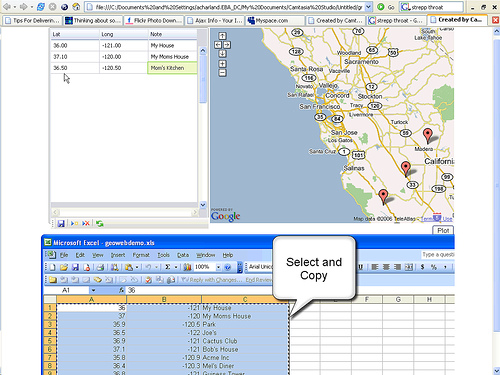
We wanted to show closer integration of the desktop and the browser environments. So we used a list of addresses (actually lat/long coordinates) in Excel, copied and pasted the list into the nitobi grid which was mashed-up with up with Google Maps. It was pretty slick, I’m not sure if I emphasized in my talk how important this type of workflow is going to be in the future. Users should have to make a cognitive switch between the desktop and web environment (IMO). If you I can see the data let me get copy it, paste it, drag it, drop it or move through it with the keyboard. Come on! I want arrow keys, tabbing, I want to send email by hitting ctrl+enter like I can on the desktop, these are not hard to implement they just take some thought and care from the application designer.
Click here for the screencast.
Dave will have a more technical follow up post to this soon. Likely he’ll include geo-coding for addresses and such too, since most people probably don’t think in lat/long coordinates or have lists of those kicking around;-) This coming from the usability evangelist that I am…
Technorati Tags: ajax, gis, map, geoweb, mashup, nitobit, nitobigird, googlemap, ux, ui, usability
August 2nd, 2006 at 11:34 pm
[…] I have been meaning to do some mashup action for a long time now and finally found some time. Andre tried to steal my screenshot cause I originally made it for his talk at GeoWeb. I have just made a screencast of it to give people an idea of how it all works. […]
September 16th, 2008 at 2:51 am
Hey man, i am trying to simply copy names address and details needed to put together a mailing list From google maps into Excel is there anyway you no of to do this i may be being very Stupid but its doning my head in!
Cheers