Skip to Navigation | Skip to Content


Archive for the 'Usability - HCI' Category

Great Tips for Better Web Form Design | December 8th, 2007

I just finished reading through Luke Wroblewski’s slides on form design. It may seem like a mundane topic, but when you considered most applications are a series of forms strung together it becomes very relevant. And more so if you’re an ecommerce site or site trying to get users to sign up via a form. Luke’s done research on label position (left aligned, right aligned, above the text box) and made recommendations on when to use each convention. He also looks at how to use required fields, how to group fields, use tabs and backs it up with really usability testing and eye tracking evidence!

Best practices, backed up with real world research. This is a must read for anyone even remotely connected to the development or design of a web form. Come let’s get users through those forms quicker! Luke has lots more great design and usability tips over on his blog Functioning Form. Luke also has a book on form design coming out next which I’m looking forward too called Web Form Design Best Practices.

Posted in AJAX, design, Software Development, Usability - HCI | No Comments » | Add to Delicious | Digg It

The Vancouver Ajax and Beer Meet | November 13th, 2007

Come chat about Ajax and drink beer. I’ll be there. Please RSVP at Upcoming.org:

Tuesday, December 11, 2007 7:00 PM

Shebeen Room
9 Gaoler’s Mews
Vancouver, British Columbia (Yahoo! Maps, Google Maps)

Description
Skip the presentation and head straight to the bar.

This is a completely informal hang out for developers interested in client side technologies but don’t want to ever hear wtf Ajax stands for ever again.

Come, have a beer and relive the days of DHTML, mock Silverlight, mess around with Adobe Air or just get shit faced. Bring your laptop if you’re up for it, we will be hacking, but you should feel no obligation to. Ad Hoc presentations are cool as long as they are not product pitches.

This event is kindly sponsored by the good people at Nitobi.

Looking forward to learning about cool stuff our local friends are up to! Thanks to Brian Leroux for spearheading this!

Technorati Tags: ajax, group, event, nitobi, vancouver, discussion, ria, development

Posted in AJAX, components, events, nitobi, Software Development, Technology, Usability - HCI, Web 2.0 | No Comments » | Add to Delicious | Digg It

Can Flash and AIR make the Browser and Operating System Irrelevant? | October 22nd, 2007

I’ve pondered for a while where all this rich web and easier desktop development stuff is headed. I have a couple ideas:

1. Flash player could make your browser irrelevant much like the web browser makes your personal computer irrelevant.
2. AIR can do the same thing for the operating system irrelevant

Let me me explain this in a little more detail. The browser makes your operating system irrelevant (or less relevant) because you can access web based applications from a standard web browser the same way whether you’re on Mac, Windows or Linux. If I use MS Office, like I used too, I’m committed to windows, switching to Mac would be a pain.  If I use Google Apps, I  currently use Gmail and some Google Docs (but not exclusively) I can switch to any operating system or computer for that matter and booya all my tools and data are already there. The only catch is that the browsers do have slight differences that create a significant amount of work for the developers. The Flash player is evolving faster and faster. the browser is stagnating not due to technical challenges but due to battles between vendors and infighting within open-source projects. No single browser has the same mass adoption as the Flash player. Flash is one run-time, not cross-browser. Just having to develop for more than one environment (IE, FireFox, Safari, Opera, Barf!) should make that self evident. Although this went mostly unknown in both the Ajax and Flash/Flex communities, there was talk after the last Ajax Experience to run WebKit inside of the Flash player (like AIR does kind of) and run all your Ajax in there. One HTML renderer across all browsers via Flash. Ironic eh.

Their proposed solution is this:

1. You make a web page using HTML, CSS and JS as you do today.
2. You test it in ONE browser. Probably WebKit.
3. You include a single JS at the top of your page, a spinoff off of SWFObject.js
4. The JS would instantiate a SWF file which would fill 100% of the height and width of your browser window.
5. The JS would then suck in the HTML of the page, and feed it to the Flash Movie.
6. Then the Flash movie would instantiate WebKit inside it and render the page.

OR

1. Same as above, but instead of a Flash movie, it would be a WebKit native plugin.
2. This would need it’s own JS that was specific to this task.

Sounds like crazy Adobe marketing speak doesn’t it?  Well this was proposed by a group including Brad Neuberg, Glen Lipka and Alex Russell.  None of whom are Adobe fanboys, and open-source advocates to the end. This is totally feasible especially with the advances they’re making in the Flash player and converting C code to Action Script. So there you go our just barely “good enough” technology, Ajax, leveraging the far superior Flash for it’s ubiquity and uniformity to run everywhere.

A similar thing may happen with AIR.  While the war between Windows, Linux and Mac wages on users and developers won’t care, they’ll just turn to AIR.  But AIR isn’t powerful enough to build “real” desktop apps you say?  So what!  Sure it’ll be a while before we have Halo 3 or PhotoShop running and performing in Flash/Flex/AIR, maybe less than a decade though according to Bruce Chizen.  We already have word processors, Wii style games and image management/editing which my grandmother and the lions share of all computer users need and/or use.  I bet Adobe will have more desktop installs of Webkit with AIR than Apple with Safari.  I think a few things have really accelerated Flash penetration in last few years namely video and advertising. I don’t know what the killer driver for AIR adoption is going to be yet.

AIR, Flash/Flex and Ajax can all have a very similar development models, which are already widely used. How many people do you know who can write a little HTML or maybe even Flash?  Probably a few to a lot depending on your scene. How many people do you know who can write Java, C++ or .Net? Probably not as many. Ajax already has one of the fastest uptakes and steepest growth curves of any development technology. When you combine this with the ability to switch at runtime from Ajax to Flex with the same markup, you can imagine hybrid Ajax/Flex developers becoming the norm. So now we’re looking at nearly ubiquitous runtimes and development models. Then you combine the ease of development of the Ajax or Flex world with the power to run existing C code that can run anywhere, well that’s hard to beat.  I guess the one downside is only that one vendor can control most of it, which we’ve experienced before.

I think with a little better tooling, some interesting cross pollination and some innovative companies we could be in a very different place in the near future.

One thing is for sure, the cost of switching applications from a consumers perspective is quickly approaching zero as you’ll be able to run any application or any operating anywhere! Which means user experience becomes king!

Technorati Tags: ajax, flash, flex, air, adobe, webkit, browser, operatingsystem, windows, linux, mac

Posted in AJAX, design, Software Development, Technology, Usability - HCI, Web 2.0 | No Comments » | Add to Delicious | Digg It

Inspire Session at MAX: Building AIR with HTML/AJAX | September 5th, 2007

I’m really stoked to be part of MAX this year. Alexei and I have been invited to talk about building AIR with Ajax.  We’ll covering everything from the basics to using Dreamweaver Extenstions and Nitobi Components.

Learn how to build rich and powerful user interfaces in Ajax for AIR applications with no JavaScript coding using Dreamweaver and off the shelf Ajax components from Nitobi. After this session, even novice developers will be able to add rich Ajax interactions such as spreadsheet-style grids, rich combo boxes, and dynamic trees. We will explain the usability advantages and potential pitfalls when migrating your web application to the AIR platform, as well as explore some innovative AIR projects, such as a SalesForce.com client, a lightweight project management tool, and a construction industry application.

When: Tuesday, October 2: 1:30 pm - 2:30 pm. 

Ted’s doing an amazing job with the conference this year!  If you’ve never been before check out this year’s event in Chicago.

Powered by ScribeFire.

Posted in AJAX, components, Software Development, Usability - HCI | No Comments » | Add to Delicious | Digg It

Offline SalesForce.com with AIR and Ajax | July 20th, 2007

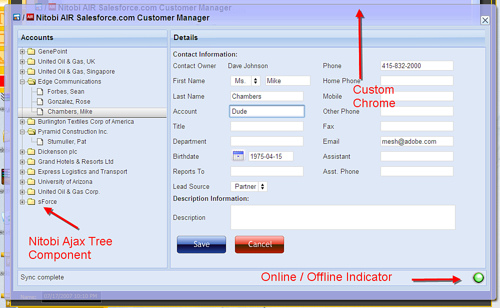
As part of the On AIR Bus Tour I’ve been showing a contact management application that uses Adobe’s AIR platform, SalesForce.com’s API and Nitobi’s Ajax Component suite. The basics premise for our demo is to help the sales person in the field take their customer contact info with them and update info even when they can’t get an internet connection. It allows users to work with their SalesForce.com data both online and offline, drag and drop Vcards from the desktop onto the app and sync changes that are made offline when a connection is detected.

Click here to watch my screencast. (No audio/editing yet, I’ve been fighting with Camtasia)

Why might SalesForce build an AIR app with Ajax?

  1. Desktop integration would improve the user experience
  2. They already have a widely used web app
  3. They have in-house HTML/JS developers
  4. They have a community that knows HTML/JS better than Flex.

Although SalesForce.com is a popular web based business tool, this scenario is quite common in enterprise apps today. HTML based UI that runs in the browser that without too much effort we can enhance with desktop capabilities. Lots of the application data is exposed through web services. I should also point out that SalesForce could definitely improve their existing web UI with some Ajax, but we won’t pick on them now;-)

The features we added to the existing app with AIR are:

  1. Offline capababilies
  2. Drag and Drop from the desktop
  3. File reading and writing
  4. Parsing Vcard client side
  5. Custom chrome

Development benefits for us:

  1. No cross domain issues so we can directly access the SalesForce data through their web API with no server proxy.
  2. No server infrastructure to set up
  3. Used existing Ajax components (with a bit of tweaking)

Dave just posted a great write up on how we built this App. Dion at Ajaxian also covered it. Check it out.Downloads:

Posted in AJAX, Business, components, nitobi, Software Development, Technology, Usability - HCI | No Comments » | Add to Delicious | Digg It

Hello world blog from iPhone! | July 8th, 2007

I’ve just logged into my wordpress blog admin and i’m posting my first post with my iphone! This might seem kind of geeky and lame, but I think it really illustrates the power of a having the fully functional safari browser on the phone. This means most web apps will as they are today on the iphone. However, it could be optimized for the resolution and touch screen.

I’m watching the iPhoneDevCamp demos, and most of them are really slick! These truly are rich internet applications. A testament to the power of Ajax!

Posted in AJAX, iphone, nitobi, Software Development, Usability - HCI | No Comments » | Add to Delicious | Digg It

What’s hot in User Experience? | June 18th, 2007

Check out this Zeitgeist on user experience, design and usability.

Rosenfeld Media UX Zeitgeist

Important books and topics on user experience design, according to the UX community.

They’re currently tracking books, topics, people (randomly). It’s maybe not 100% accurate but interesting and informative all the same. The system is pretty closed right now, but according to their FAQ they’re working on that.

Here’s an example.

Today’s Leaders

Style: Ten Lessons in Clarity and Grace (9th Edition)

Trend Upwards 1. Style: Ten Lessons in Clarity and Grace (9th Edition)
Trend Downwards 2. Flow: The Psychology of Optimal Experience
Trend Downwards 3. Don’t Make Me Think : A Common Sense Approach to Web Usability (2nd Edition)
Trend Upwards 4. The Design of Everyday Things
Trend Upwards 5. The Diamond Age: Or, a Young Lady’s Illustrated Primer (Bantam Spectra Book)

Do these titles seem important to you?

Technorati Tags: usability, ux, ui, userexperience, books, topics, zeitgeist

Posted in Business, Software Development, Usability - HCI | No Comments » | Add to Delicious | Digg It

Web Usability 2.0 Video | June 16th, 2007

Just finished watching a great discussion from some of the leading designers in web usability and interface design.  The topics include:

  • design
  • information architecture
  • usability as a component of user experience
  • usability testing
  • qualitative and quantitative measurement
  • how to roll out changes
  • when to use Ajax
  • wire framing and prototyping

It’s long though, 2h30m so make some popcorn.

The event was hosted at Google:

Usability 2.0 WebGuild Event - April 11, 2007 Luke Wroblewski, Senior Principal Designer, Yahoo! Inc. Jon Wiley, User Experience Designer, Google, Inc. Sean Kane, Director, User Interface Engineering, Netflix Reshma Kumar, VP, WebGuild

Luke’s slides are here.  There’s a few interesting slides in here that are hard to see in the flash vid.  Although none of the actual presentations or panel questions were anything special, I really liked the discussion and questions amongst the three of them.  Although they all design for the biggest properties on the web they all approach usability an ux very pragmatically and most what they discuss could be used by a team of any size.  All smart guys with lots of experience, worth listening to.

[update] Luke has done a follow up interview with Webguild.

Technorati Tags: ux, usability, webguild, ajax, design, testing, web, webdev, google, yahoo, netflix

Powered by ScribeFire.

Posted in design, Software Development, Technology, Usability - HCI | 2 Comments » | Add to Delicious | Digg It

Ask.com gets 20% more usable by going vertical | June 8th, 2007

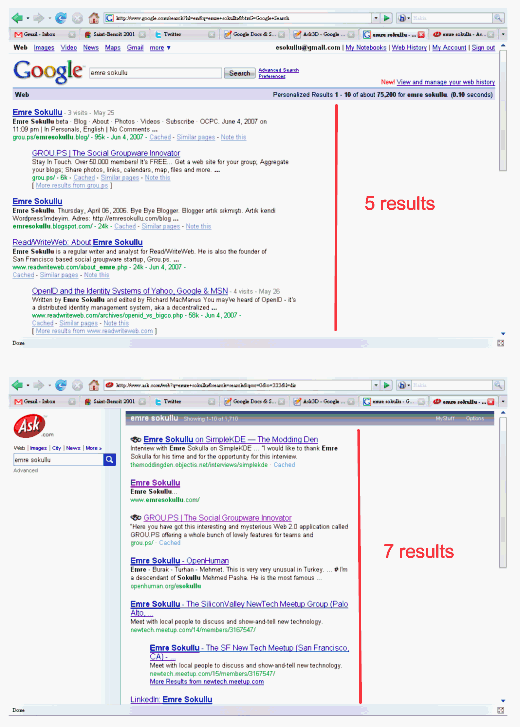
Emre over at the Read/WriteWeb claims that the “New Ask.com UI Gives 20%+ More User Satisfaction”

I like this line of thinking! The basic premise is that a better use of vertical space for the search listings allows more search results to displayed above the fold than .  This makes sense is intuitive.  I guess you’d have to also take into account how often the those lower links are actually clicked and how relevant those links are (did the user find what they were looking for??).  But putting user experience and usability into numbers is always hard.  You could tack how much scrolling goes and how often the lower listings are read.  This could be done with analytics, eyetracking or mouse tracking

I think Emry’s post does a great job of explaining the thinking that went into this UI update.  Worth noting this not Ajax, RIA or throwing technology at a problem.  It’s just good design thinking from Ask, IMO. 

Emry also ties is past eye tracking research and the well know “F” eye gaze pattern.  Worth a read.

What do you think?

Technorati Tags: usability, ask, google, ux, measure, stats, design, userexperience, internet, web

Posted in Software Development, Technology, Usability - HCI | No Comments » | Add to Delicious | Digg It

CompleteUI 2nd Quarterly Installment | June 7th, 2007

We’ve just announced our 2nd quarterly release of CompleteUI:

Nitobi Adds Components and Enhancements to “Complete UI”, its Enterprise Ajax Component Suite

The main upgrades I’d like to draw your attention to are:

  • WAY better Grid - faster and runs in standards mode (Thanks Dave, Jake and James!)
  • Java Support (Mike you rock!) - see the screencast
  • Eclipse
  • JSP TagLib
  • Struts
  • Servlets
  • POJOS
  • Spring
  • Hibernate
  • New Calendar Component (High Five Jake)
  • New Spotlight Component (High Five Alexei) - See Alexei’s blog post and screencast
  • My screencast below walks you through Grid, Calendar and Spotlight:

    Press Release Here

    Powered by ScribeFire.

    Posted in AJAX, components, nitobi, Software Development, Technology, Usability - HCI | 2 Comments » | Add to Delicious | Digg It


    Search Posts

    Twitter

    Flickr Pics

    www.flickr.com

    You are currently browsing the archives for the Usability - HCI category.

    Archives

    Categories