It’s been a long road to bring visual tooling to Ajax developer’s for us, but we did it. I’m really excited at what we’ve been able to do with Dreamweaver and our components! It’s long been a passion of mine to make Ajax development easier. You shouldn’t have to be a Javascript rockstar and phd to put a rich datagrid in your web page should you? We tried with various versions of Netbeans and Visual Web Pack but with very limited success and it was a pain.
I’ve seen some banter, like we all have, about Dreamweaver not being _real_ IDE. But I think the ability to layout rich interfaces by dragging and dropping in components should not be dismissed. It’s very helpful to be able to quickly mock up a functional page and essentially prototype your app. The ability to modify elements of an Ajax UI without writing code also enables better workflow between the developer and designer, or just makes life easier for a “devigner”.
Check our Mike’s demo embedding the Nitobi Ajax Grid in a web page and binding it to a MySQL datasource in minutes:
Nice one Mike, but we want the Arnold voice back! We’ve had some great feedback from the community and Adobe already:
“…Nitobi’s Complete UI suite makes it simple for designers, with various levels a coding background, to work with Dreamweaver and AJAX to build advanced user interface elements into a web page.” said Mark Hilton, vice president of Adobes Creative Pro Business Unit.
“Nitobi”s Complete UI is a powerful set of components that will give Dreamweaver users the ability to present data in an engaging format in a fraction of the time….Dreamweaver professionals looking to enhance their user interface functionality should turn to Nitobi with confidence.” states Michael Lekse, Vice President of Sales and Services at WebAssist.
“One of the coolest bit of news I heard at MAX was that Ajax gurus Nitobi have released Complete UI 2007, their Ajax UI component library, with full support for Dreamweaver included” said Scott Fegette Dreamweaver Technical Product Manager.
The boys at Ajaxian commented on it too. But enough about what other people think go download the components and let us know what you think! This was all rolled into our CompleteUI Q3 release we also fixed a lot of bugs and added some cool new features to Grid. Big shout out Mike, Dave, James, Andrew, Ryan and the rest of the team who made this release happen!
I’m really stoked to be part of MAX this year. Alexei and I have been invited to talk about building AIR with Ajax. We’ll covering everything from the basics to using Dreamweaver Extenstions and Nitobi Components.
Learn how to build rich and powerful user interfaces in Ajax for AIR applications with no JavaScript coding using Dreamweaver and off the shelf Ajax components from Nitobi. After this session, even novice developers will be able to add rich Ajax interactions such as spreadsheet-style grids, rich combo boxes, and dynamic trees. We will explain the usability advantages and potential pitfalls when migrating your web application to the AIR platform, as well as explore some innovative AIR projects, such as a SalesForce.com client, a lightweight project management tool, and a construction industry application.
When: Tuesday, October 2: 1:30 pm - 2:30 pm.
Ted’s doing an amazing job with the conference this year! If you’ve never been before check out this year’s event in Chicago.
So I’ve been cruising on the Adobe AIR Bus across the country this summer and I’m the only guy with a PC, well Ben and Lee were back up for a bit but not consistently enough. So Alexei and I thought it be cool to build a Mac dock type menu for AIR using the Nitobi Fisheye Ajax component.
Mac Dock:
I thought it would be a neat demo too since it’s flashy (nice graphics, animation etc…) and we have some new Dreamweaver Extensions coming out soon which makes it accessible to those aren’t yet full blown “Ajax Engineers”.
First off, so we all know what I’m talking about check this little video of it below:
Here’s how to build it (Dreamweaver + Nitobi Style):
Use the Nitobi Fisheye Component (Dreamweaver Extension) this set ups the Ajax component on the page, and configures the component by setting the properties for display, animation and images:
Sets up the Declaration:
…You get the idea, this repeats for all the menu items.
Includes the script and CSS
Onload Function function onLoad()
{
nitobi.loadComponent("myEyeObj");
Add a a function to call when the a menu item is clicked to open a new AIR window and load a given URL. function runWindow(wid) {
var bla = window.open("http://" + wid, wid, "width=800, height=600"); }
Add the capability to click and drag the app around the screen when the bar above the menu is clicked with the mouse. nitobi.html.attachEvent($("grabby"), "mousedown", function() {window.nativeWindow.startMove();});
....
Then Package as an AIR application with the System Chrome set to “None” and set it to “Transparent”.
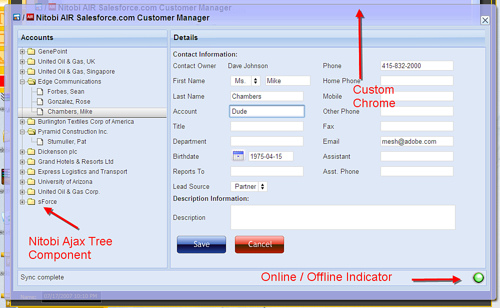
As part of the On AIR Bus Tour I’ve been showing a contact management application that uses Adobe’s AIR platform, SalesForce.com’s API and Nitobi’s Ajax Component suite. The basics premise for our demo is to help the sales person in the field take their customer contact info with them and update info even when they can’t get an internet connection. It allows users to work with their SalesForce.com data both online and offline, drag and drop Vcards from the desktop onto the app and sync changes that are made offline when a connection is detected.
Desktop integration would improve the user experience
They already have a widely used web app
They have in-house HTML/JS developers
They have a community that knows HTML/JS better than Flex.
Although SalesForce.com is a popular web based business tool, this scenario is quite common in enterprise apps today. HTML based UI that runs in the browser that without too much effort we can enhance with desktop capabilities. Lots of the application data is exposed through web services. I should also point out that SalesForce could definitely improve their existing web UI with some Ajax, but we won’t pick on them now;-)
The features we added to the existing app with AIR are:
Offline capababilies
Drag and Drop from the desktop
File reading and writing
Parsing Vcard client side
Custom chrome
Development benefits for us:
No cross domain issues so we can directly access the SalesForce data through their web API with no server proxy.
No server infrastructure to set up
Used existing Ajax components (with a bit of tweaking)
I’m going to be speaking at Massive tomorrow about blogging for business, also of note is that my good friend and adviser Duane will be speaking about Flex. I have still have a couple free tix, if you wanna come just leave a comment here. Hope to see you there.
Just found this real cool video of a new FlexComponent: video.onflex.org » Ely Greenfield Shows his FlexBook Component.
Check it out:) Looks like something Vista would be showing off, but without the Vista mess. Not 100% sure off all the practical applications but it sure is neat:)Â Nice work Ely!
Technorati Tags: flex, flexcomponent, flexbook, elygreenfield, component, video