Dreamweaver tends to be an easy target to hate on. WYSIWYG editors are not favoured by developers, the code generated by DW is at times messy, and, in the bigger picture, DW tends to be perceived as more a tool for designers than for serious developers. But it’s surprisingly hard to reconcile those criticisms with polling data. Last July, Ajaxian ran a poll for their readers to choose between Dreamweaver, Eclipse (or a derivative), and a simple text editor (e.g. Textmate) and Dreamweaver garnered a solid 21%! And even in our own customer polls we see Dreamweaver score very high.
And despite the seemingly widespread ill will among developers towards Dreamweaver (depends who you ask, I guess), there’s been an effort to have Dreamweaver support the major javascript libraries (http://xtnd.us/). Maybe Dreamweaver is a guilty pleasure amongst developers; despised in public, lovingly caressed in private. Or maybe it’s ironic, like how indie hipsters love Rihanna.
I dunno! But if nothing else, I hope people quit it with the knee-jerk reactions! I have my own particular beefs with Dreamweaver, mind you, but it’s not hard to see its value.
Posted in dreamweaver, rihanna | 3 Comments » | Add to Delicious | Digg It
We just put out the latest release of Complete UI and it includes, among other things, the new Nitobi Dreamweaver Extensions! I’ve been working on them for a little while and they’ve changed quite a bit since I last wrote about them a few months back.
Insert Bar Objects
The preview release I blogged about earlier had a really simple interface for adding components to a page. We opted to defer customization of the component until after its declaration has been inserted into the page. Well, after some deep thought, and a couple chats with the friendly folk at WebAssist, we decided to expose more options before the component is inserted. For example, in the Tree insert form, we can create the entire tree structure before the Tree is inserted:
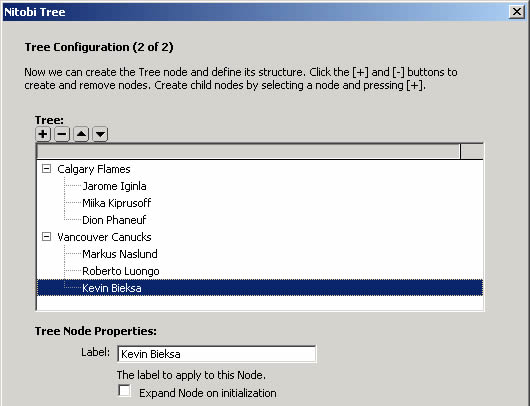
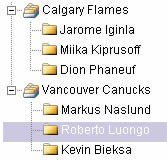
Rendered Tree:
Callout and Spotlight
I really like the additions made for Callout and Spotlight in the final release of the extensions. I sort of neglected these components in the preview release opting to simply insert a sample Callout panel and a sample Spotlight tour. The final version gives these components the sweet, gentle lovin’ they deserve.
Other cool beans
I can’t remember if the preview release had DW 8 support, but we’ve got it in the final version. We also added better support for templates and added items in the insert menu bar.
Well, I hope y’all enjoy them. We’ve got bunch of articles up in our knowledgebase and I made some video tutorials too. Check ‘em out at http://www.nitobi.com/kb/?catid=96
I’d love to hear feedback from anyone with the time to give some. Feel free to email me at [email protected]
Posted in cui, dreamweaver, nonsequitur titles | No Comments » | Add to Delicious | Digg It
Here’s a quick screencast of the extensions, as promised. I was going to do the whole thing in a bad Arnold Schwarzenegger accent, but instead you get my nervous voice and awkward inflection. Enjoy!
Posted in dreamweaver, schwarzenegger, screencast | No Comments » | Add to Delicious | Digg It
For the last little while we’ve been working on Dreamweaver extensions for our components and we’ll be releasing a beta very soon. In the meantime, I thought I’d provide a little preview of what’s to come.
Insert Bar
We’ve add objects in the Insert Bar which allows for quick insertion of components.
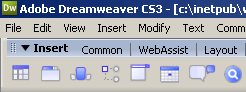
Inserting a component via the Insert Bar will automatically copy the required assets to your site and add the requisite script and stylesheet includes to your page.
Design Time Preview
When you have a Nitobi component in your page, you’ll get a nice preview in the design view.
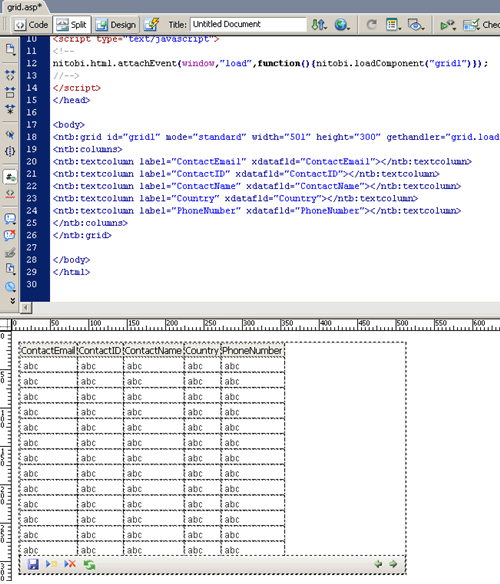
The preview Grid matches the declaration as closely as possible . For example, the columns of the declaration are shown in the preview. If you set toolbarenabled to false, the toolbar will vanish. Changing the mode from standard to livescrolling will remove the paging icons from the toolbar. Yada, yada, yada.
Property Inspector
Each component has its own custom property inspector that allows you to quickly change a number of its attributes.

Databinding Wizard
One of the areas that causes some strife with new customers is how to set up our databound components. So we’ve created a little wizard that will hopefully help out. I’ll try to post a screencast later today (my mangled prose won’t do it justice).
Posted in cui, dreamweaver | No Comments » | Add to Delicious | Digg It