Forgot to include this screencast in my last post where I go through the new features. What you can’t see in the video is all my nervous sweating, which is a good thing.
Posted in calendar, cui, features, q3, screencast | No Comments » | Add to Delicious | Digg It
Included in the 2008 Q3 release of CUI is a brand spankin’ new version of Calendar! We’ve put in loads of new features to really improve the usefulness of the component. I’ll go over some of my favourite features.
Multi Month
Using the new monthrows and monthcolumns attributes, you can render as many months you want!
Quick Nav
Another useful feature is the quick nav panel which allows you to jump to any month/year without having to go month to month. To activate the quick nav panel, you just need to click on the title of the calendar.
Natural Language Dates
For the attributes that require you to specify a date (selecteddate, mindate, maxdate, etc.), you can use some natural language dates. The following are accepted:
- today
- yesterday
- tomorrow
- last week
- next week
- last month
- next month
- last year
- next year
Databound Events
Another neat new feature is the ability to define event information for a date. You can define a url that will return event information for a date as an xml document. You can use our server side libraries to help you with this (just like with Grid). You can also define custom disabled dates in this way.
Themes
Our designer extraordinaire, Yohei Shimomae, has put together some sweet new themes for the Calendar. Loads of ‘em too!
And that’s just a small taste! There are a total of 14 new themes!
Ok, so that’s just a few of the new features. Q3 will be available to download July 17, 2008. Live samples of the new Calendar will be up then as well.
Posted in calendar, cui, q3, screencast | 2 Comments » | Add to Delicious | Digg It
A while back we partnered with Gigline Software to create JSF components based on our Complete UI suite. So to coincide with JavaOne, we have a preview build available to download (and by we, I mean Eric from Gigline. Great job!): Preview Release with live samples hosted at Gigline: http://giglinesoftware.com/NitobiJSFWeb
This preview release already has some nifty features. All the Nitobi JSF tags support value exressions on all attributes (save for the id attribute). Also, all the javascript and css files are bundled in the jar and will be loaded by the component automatically. Plus, there is a JSF tag for the Callout component allowing you to declaratively bind a Callout panel to a DOM element.
This is but a taste of things to come. Here’s what we’re trying to get into the final build, due for our forthcoming Q3 release:
- Make all data-dependent components able to populate through managed beans.
- Create a phase listener for all data-dependent components to handle parameters and simplify a bit.
- Get the rest of the components JSF compatible (including the new Tree Grid component).
- Short hand JSF tags that will allow developers to combine existing components together, without the need to muck about with javascript.
So for you JSF devs out there, give it go and let us know what you think!
Posted in cui, gigline, java, jsf, q3 | No Comments » | Add to Delicious | Digg It
Hot Date! | December 10th, 2007
I was just going over the Calendar component when I found some useful functionality that was all tucked away, obscured from prying eyes. But the time has come to unleash it upon you all!
1. Formatting
There’s a method, DatePicker#getFormattedDate that will return the selected date as a string in the ubiquitous ISO8601 format (YYYY-MM-DD HH:MM:SS).
What’s better still, you can customize the format returned by getFormattedDate by using the formatter attribute on the Calendar declaration to specify a custom formatting function.
The Function
Let’s say I want the Calendar to format dates like this: MM/DD/YYYY.
function customFormatter(date)

{

  if (nitobi.base.DateMath.invalid(date)) return "";

  return nitobi.lang.padZeros(date.getMonth() + 1) + "/" + nitobi.lang.padZeros(date.getDate()) + "/" + date.getFullYear();

};
A couple things to note here:
- First, it’s very important we ensure the date is valid.
- Second, we use a helper method nitobi.lang.padZeros to ensure single digits get padded correctly (e.g. “1″ will become “01″, but “10″ will remain “10″).
- Third, the argument is a Javascript Date object.
The Declaration
Next, we change our Calendar declaration and specify this custom function as the formatter:
<ntb:datepicker id="cal1" formatter="customFormatter"></ntb:datepicker>
Now when we call #getFormattedDate we’ll get a string of the form MM/DD/YYYY.
2. Hidden Inputs
Another useful tidbit is the Calendar renders with a hidden input field that will store the formatted date which makes using it in a form pretty simple. For a Calendar with an id of “calendar1″, the hidden input will have an id of “calendar1.value”.
Go figure!
Posted in calendar, cui, features | 1 Comment » | Add to Delicious | Digg It
We just put out the latest release of Complete UI and it includes, among other things, the new Nitobi Dreamweaver Extensions! I’ve been working on them for a little while and they’ve changed quite a bit since I last wrote about them a few months back.
Insert Bar Objects
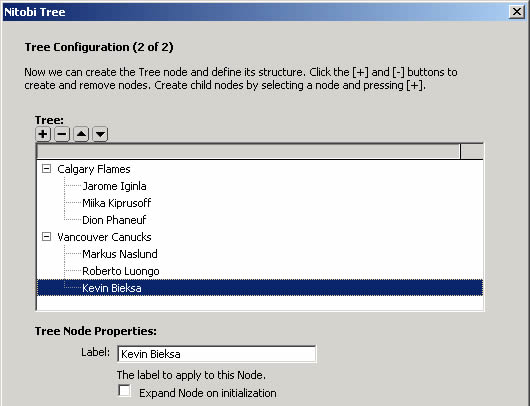
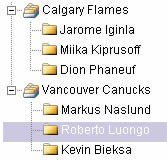
The preview release I blogged about earlier had a really simple interface for adding components to a page. We opted to defer customization of the component until after its declaration has been inserted into the page. Well, after some deep thought, and a couple chats with the friendly folk at WebAssist, we decided to expose more options before the component is inserted. For example, in the Tree insert form, we can create the entire tree structure before the Tree is inserted:
Rendered Tree:
Callout and Spotlight
I really like the additions made for Callout and Spotlight in the final release of the extensions. I sort of neglected these components in the preview release opting to simply insert a sample Callout panel and a sample Spotlight tour. The final version gives these components the sweet, gentle lovin’ they deserve.
Other cool beans
I can’t remember if the preview release had DW 8 support, but we’ve got it in the final version. We also added better support for templates and added items in the insert menu bar.
Well, I hope y’all enjoy them. We’ve got bunch of articles up in our knowledgebase and I made some video tutorials too. Check ‘em out at http://www.nitobi.com/kb/?catid=96
I’d love to hear feedback from anyone with the time to give some. Feel free to email me at [email protected]
Posted in cui, dreamweaver, nonsequitur titles | No Comments » | Add to Delicious | Digg It
For the last little while we’ve been working on Dreamweaver extensions for our components and we’ll be releasing a beta very soon. In the meantime, I thought I’d provide a little preview of what’s to come.
Insert Bar
We’ve add objects in the Insert Bar which allows for quick insertion of components.
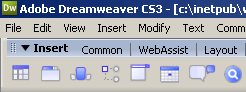
Inserting a component via the Insert Bar will automatically copy the required assets to your site and add the requisite script and stylesheet includes to your page.
Design Time Preview
When you have a Nitobi component in your page, you’ll get a nice preview in the design view.
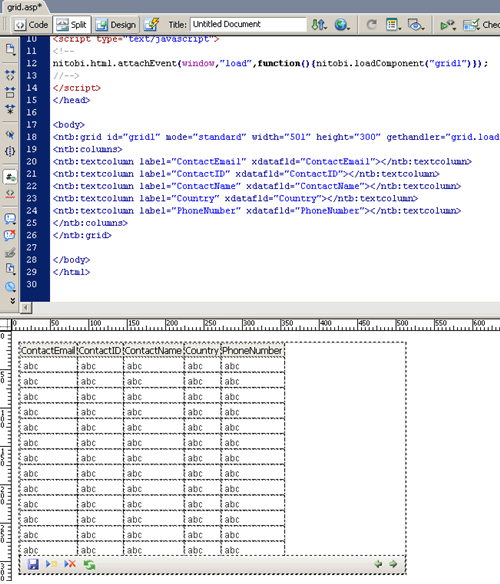
The preview Grid matches the declaration as closely as possible . For example, the columns of the declaration are shown in the preview. If you set toolbarenabled to false, the toolbar will vanish. Changing the mode from standard to livescrolling will remove the paging icons from the toolbar. Yada, yada, yada.
Property Inspector
Each component has its own custom property inspector that allows you to quickly change a number of its attributes.

Databinding Wizard
One of the areas that causes some strife with new customers is how to set up our databound components. So we’ve created a little wizard that will hopefully help out. I’ll try to post a screencast later today (my mangled prose won’t do it justice).
Posted in cui, dreamweaver | No Comments » | Add to Delicious | Digg It
Amidst all the excitement surrounding the Q2 release of Complete UI, it seems this little nugget was shunned like a ragged, Dickensian chimney-sweep: ComboBox and Grid now work in standards mode. A boon, hopefully, for our standards compliant customers.
Posted in combobox, cui | No Comments » | Add to Delicious | Digg It