Skip to Navigation | Skip to Content


Archive for the 'BlackBerry' Category

BlackBerry (Legacy) Browser and GPS | January 5th, 2011

I have been working on a BlackBerry mobile web application recently at Nitobi. It’s fairly complex in that it really pushes the abilities of the BlackBerry browser, and on top of this supports a lot of legacy BlackBerries. I’ve never been too fond of developing for this platform, just because of how hard it is to do common tasks like debugging, testing and reproducing issues. This project has taught me a lot: from being more strict with my JavaScript writing style and syntax, to finding workarounds for rendering issues, to getting better at testing on the extremely fragmented BlackBerry platform. However, one thing that stood out for me above all else was how poorly the BlackBerry JavaScript geolocation API behaved - thus, the birth of this post!

Before I begin, I want to say that my experience is based almost entirely off the older BlackBerry browser, not the new WebKit-based (Torch Mobile) browser. However, it wouldn’t surprise me if these issues existed on the Torch as it supports both the W3C Geolocation API and the BlackBerry Geolocation API simultaneously.

First, I’ve noticed that the browser will generally return 0 for both latitude and longitude when you request a location under certain circumstances:

  • If the BlackBerry is in a building or has no clear access to the sky (this is a given)
  • If you restart a device and do not access a Java-based application that queries for a GPS location, the browser will indefinitely return 0/0 as the location. What this means is that you have to open up, for example, the native Maps application, get a fix via it, before the BlackBerry JavaScript geo API will return meaningful data. Counter-intuitive, not obvious at all, not documented, but colloquial reports from other developers confirm these suspicions.

Second, some BlackBerry models do not ship with built-in GPS hardware. For an example, see this Wikipedia article and look at the 8520 (no GPS) vs. 8530 (GPS). Both 8520 and 8530 run similar BlackBerry OS versions, and thus, similar browsers. However, the BlackBerry JavaScript location API will return true when you query:

blackberry.location.GPSSupported

even for a device that has no GPS hardware! Furthermore, the location API methods will also appear to function (the location callbacks get fired, for example). To compound this problem further, the native browser application on BlackBerry allows the user to toggle JavaScript-based geolocation support on and off. What I’ve noticed on some of these models like the 8520/8530 is that this GPSSupported property returns true - even after I went in and specifically disabled JavaScript Geolocation support in the browser options.

Finally, some carriers actually disable location services on their devices (apparently Verizon does this - see last reply on first page of the linked forum post) and force you to
purchase a location-enabling add-on. No way to programmatically check for this in-browser, and also super dirty on Verizon’s part if true!

So in conclusion: although RIM’s documentation and API makes it seem like this is a reliable API to leverage in BlackBerry-targeted web apps, I find it’s hard to trust the BlackBerry JS location API in these cases, and that is a shame because this is our only avenue into GPS-aware functionality on websites targeting BlackBerries (especially older ones).

If you’ve noticed similar issues, I’d love to hear about it - drop me a line!
Posted in BlackBerry | 8 Comments » | Add to Delicious | Digg It

BlackBerry Build Script | December 1st, 2009

Hey everyone,

We’ve been making some exciting progress with PhoneGap recently.

The Ant Window in a PhoneGap BlackBerry project

First, the Mobile Spec - our own homebrew set of tests for the PhoneGap API - is taking off. People are starting to watch it, fork it, and add to it. I am really stoked to see that - keep it coming!

Second, the PhoneGap team has been working on making developing and building PhoneGap applications easier. A big step towards this was putting together some build scripts so that you - the PhoneGap developer - did not have to go through the same, tedious steps to test and develop applications in your platform’s IDE. Shazron recently rolled out an installer for those iPhone PhoneGap developers out there and I saw it in action (as detailed in this post) - it is hot shit. Super-easy! Joe has the same thing going for Android, the Android.jar he put together is a huge step towards that. So, without further ado, I present to you: an Apache Ant build script for PhoneGap BlackBerry! I’ve added it to the repository, as well as instructions in the readme on how to use it.

In my short time using it, the biggest win for me as a developer is the ability to build, sign and deploy to device with one command. It’s super-fast too - way faster than using RIM’s ‘Desktop Manager’ software to load the application onto the device.

If you’ve tried using it, post to the comments and tell me how it went! I’d be glad to help out, too, if you’re having problems.

Have fun!

Posted in BlackBerry, Mobile Applications, phonegap | 5 Comments » | Add to Delicious | Digg It

PhoneGap BlackBerry Progress | September 11th, 2009

Hey everyone,

It’s been a busy past two weeks in the PhoneGap world, especially concerning the BlackBerry branch. We (Nitobi) have put a lot of work into this branch for the past week or two because we’ve got clients who are asking for BlackBerry support for the slew of new mobile applications we’re developing. It’s exciting because these kind of requirements really push the need for expanding the source code and making it better.

I wanted to share with everyone a couple of problems that we’ve encountered recently while working on these projects, and the solutions I employed to solve these problems. For reference, you can find my GitHub repository containing the latest PhoneGap BlackBerry code here.

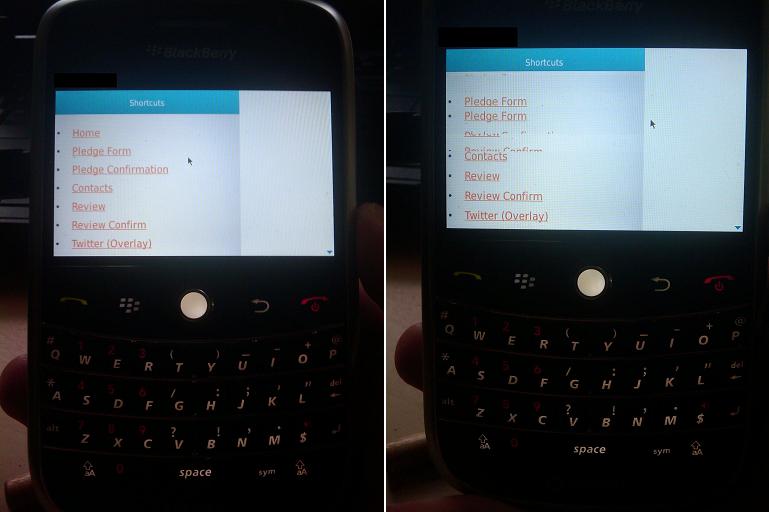
First, we had quite a serious on-device rendering issue that didn’t come up whilst testing with the BlackBerry simulator. Basically, scrolling would cause the HTML page and all related assets being rendered to ‘tear’ up as you scroll. Picture to provide a better explanation:

Initial rendering / tearing issue we experienced.

Initial rendering / tearing issue we experienced - just after load on the left, after scrolling down and then up on the right.

Warning: BlackBerry code and JDE references ahead. Proceed with caution.

Since then I have solved the problem by calling invalidate() on the application’s Screen’s Field objects, and then invoking Screen.doPaint(). One issue still stands that we currently can only do this in a Timer Task that runs every x milliseconds, so intermittent tearing is still an issue. I tried to resolve this by executing the same invalidate / doPaint code in a custom VerticalFieldManager class extension, that hooked in the redraw code on scrolling events. However, this approach just didn’t work. If anyone has any ideas on how to implement this more elegantly, don’t hesitate to contact me or post a comment - I would love to solve this properly.

Second issue I fixed just today, actually, was a pain-in-the-ass requirement for BlackBerry PhoneGap applications to use a special URI when referencing content that is stored locally on the device. For example, up to this point if your main entry page had an <img> tag that referenced a .png file in the same directory as the main entry page, you would have to set the src attribute of the <img> tag to “data:///<absolute folder path>/mypng.png”. This wasn’t a show-stopper, but it did break the mantra of “write once, deploy to all platforms” that PhoneGap strives to uphold (because, for example, PhoneGap iPhone supports relative and absolute paths within your HTML/CSS/JS).

My solution to this problem was to use a big hash table to store the absolute paths of various resources being loaded, and using the referrer IDs of these resources as the key. Then when we load in requested resources, we check if the referring ID is stored in the hash and build up the absolute path (which we need on the native BlackBerry side to grab the resource data) appropriately. I’m nervous about this approach because I can easily see this causing memory issues down the road - too big of a hash table, or keys being too large.

One mitigating option is, instead of using the entire referrer ID (which can get quite big - essentially it’s the Base64 encoding of the referring resource), hash that down to, say, an MD5 hash, and then use that as a key. That should save some space. Currently, the hashing is done on all resources being loaded, which is obviously overkill. Images don’t need to be hashed, for example.

Questions, comments, ideas, suggestions, please, post away! PhoneGap is an open-source, community-based project, so “just fork it” !

Posted in BlackBerry, Mobile Applications, phonegap | 8 Comments » | Add to Delicious | Digg It


Search Posts

You are currently browsing the archives for the BlackBerry category.

Archives

Categories