PhoneGap for Samsung Bada | April 14th, 2011
These past few weeks I’ve been working on porting the PhoneGap framework to the Samsung Bada platform.
Bada ships with a default Webkit browser. It supports the W3C geolocation out of the box. The C++ SDK allows developers to instantiate a WebView (called Web Control in Bada) inside a Form (equivalent of a view in Bada). More info on Web control can be found here.
To port PhoneGap, I got most of my inspiration from the existing iPhone implementation. I use a similar technique on Bada.
From Web to native
document.location = "gap://com.phonegap.com.Accelerometer.getCurrentAcceleration"
The url gets intercepted by the WebControl and the command is then dispatched to the appropriate module (Accelerometer module in the case above).
From native to Web
It does not seem to be possible to set the web control URL to “javascript:code” but there is a method that comes with WebControl that not only executes javascript code but also returns its result! The method is:
Osp::Base::String * EvaluateJavascriptN (const Osp::Base::String &scriptCode) const
That is really helpful for sharing data between Native/Web without overloading the URL with JSON/XML data!
The only downside is that it doesn’t seem possible to stick an alert(); as it causes the Web control to hang. I still haven’t figured out a way to do this. So right now you can’t use alerts in your phonegap callbacks. I am still investigating the issue.
PhoneGap Bada supports: Accelerometer, GeoLocation (Browser and Native), Contacts, Device, Network, Notifications, Storage (provided by WebKit), Events
PhoneGap Bada does not yet support: Camera, File
PhoneGap Bada won’t support: Media
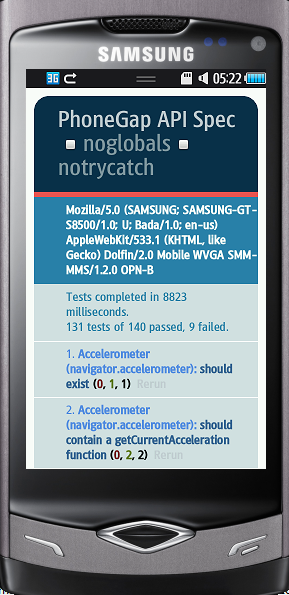
Below is a screenshot of mobile-spec running on PhoneGap Bada.
The Bada SDK is unfortunately Windows Only and there are no plans to port it to other platforms. However, you can run it just fine on a virtual machine.
Code and instructions are on github. Check it out! Let me know what you think! Feedback good or bad is always welcome!