Skip to Navigation | Skip to Content


Archive for the 'Android' Category

Introducing PonyGap: PhoneGap Plugins for Android | December 17th, 2009

PhoneGap Plugins Demo from Joe Bowser on Vimeo.

Recently, we have been working on each platform to get the platform-specific features to be encapsulated as plugins. Now, for the iPhone, that may take the shape of native controls, but for Android, we’re working on a project for the plugins called PonyGap. Why did I call it PonyGap? Because chances are that you would use this app in a demo, and that you would most likely stick to the basic feature set of HTML5. Of course, you MIGHT use one of these, but generally not all of them.

Currently the first plugin feature that we added was the ttsHook. This will hook into the Android Text to Speech functionality and allow PhoneGap applications to be useful to people who may not necessarily have the best vision or coordination. We’ll work on a better MobileSafari example and release it with the plugin.

This functionality was inspired by the Eyes Free work that Google did.

Update: This post is now obsolete, and there’s a new and different method of creating plugins for Android. Please visit the PhoneGap-Plugins repo for more info.

Posted in Android, phonegap | 7 Comments » | Add to Delicious | Digg It

New: KeyEvents for Menu Button | December 17th, 2009

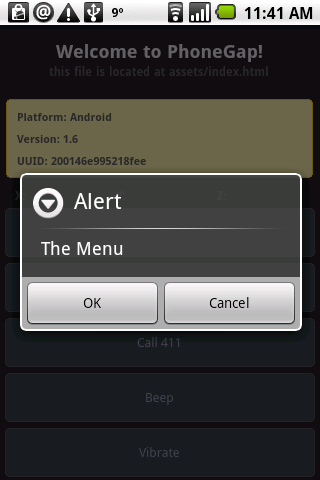
phonegap_menu

One of the big complaints that we keep hearing when you port PhoneGap apps over is that they don’t follow the Android UI specifications AT ALL. The alerts don’t have buttons, the back key doesn’t do what it’s supposed to do, etc, etc.

Well, we fixed the back button, and introduced a new event, menuKeyDown. When the menu key on any Android device is pressed, this will fire an event that will let the user know if they need to present the user with a menu of some sort. The menu could come from the bottom like the typical Android menu, or be a lightbox that takes over the window. The event exists so that the user can decide on it.

Also, the alerts have buttons now! I’m going to push these up to the EDGE version of PhoneGap momentarily.

Posted in Android, phonegap | 2 Comments » | Add to Delicious | Digg It

EDGE UPDATE: Android 1.x Database Storage | December 8th, 2009

I just finished the basic version of Android 1.6 Database Storage for PhoneGap. Unlike Android 2.0, which has a proper implementation of this, Android 1.6 does not. There are definitely numerous bugs that can happen with this implementation of Database Storage, such as mis-formatted numbers being passed into Javascript due to what SQLite sends back to the browser, however I’ve tried to mimic the HTML 5 spec the best I could with Java and JavaScript.

Now, the code being passed is VERY primitive, and it’s not well documented. Android is notorious for having this weird API in the providers that gets in the way of you and your SQLite Database. Providing a mapping from Javascript to the rawQuery seems to have made the most sense. We have yet to add a fail condition to this yet, so when it fails, it will fail silently. That’s somewhat annoying when it comes to errors in SQL syntax, and we’ll try to hammer out that bug later this week.

Posted in Android, phonegap | 7 Comments » | Add to Delicious | Digg It

Android 1.5 and Database Storage | December 7th, 2009

OK, so as many of you know, I’m in Canada. In Canada, we have some pretty nasty providers. Honestly, choosing between Bell, Telus or Rogers is like choosing which limb you want to saw off. So, because I can’t wait anymore, I’ve decided to start work on SQLite Storage on Android 1.5. This will hopefully emulate the HTML5 storage, but I haven’t really tried it out too much yet. However, I found some weirdness with the databases.

Databases in Android have to be stored in the /data/data/ /databases/ directory if they are accessed by an Android app. This is ever-so-slightly different from the /data/data/ /app_databases/ directory that Android 2.0 needs to support HTML 5 proper databases. I’m hoping that by exposing this and adding it in the conditional logic, that I can hack in the appearance of HTML 5 storage on Android 1.5 and Android 1.6. However, here’s a code fragment that comes in very handy:


Package pack = this.getClass().getPackage();
String appPackage = pack.getName();
path = "/data/data/" + appPackage + "/databases/";

This is particularly handy when dealing with Databases in General, since you may want to take your code and throw the thing in a JAR so that you can deploy numerous apps easily. Of course, making a JAR for Android Development is a simple, but completely undocumented process. I’ll post about that later.

But the fact that this feature will be necessary because of the maintenance of the 1.x Android tree is depressing. I really wish that tricks like Java Reflection, and multiple APIs for multiple versions weren’t required, but at least we managed to hack around the annoying fragmentation for the time being.

Posted in Android, phonegap | 2 Comments » | Add to Delicious | Digg It

PhoneGap.jar | November 24th, 2009

Hey

Recently, we’ve been making changes similar to the iPhone code so that we can make it even easier for people to write Android Applications. We’ve encapsulated the PhoneGap source code into a JAR file, so that your Android Application can literally be as short as this:


import android.os.Bundle;
import com.phonegap.*;
public class TestApp extends DroidGap {
@Override
public void onCreate(Bundle savedInstanceState) {
super.onCreate(savedInstanceState);
super.loadUrl("file://android_asset/www/index.html");
}
}

Of course, you’d have to have the AndroidManifest setup correctly to accomodate the activities, but this is minor in comparison to how messy everything’s been before this change. We’ll have to do more restructuring of the repository to demonstrate how to use the new library in Android Applications, and this should allow for the Java code to be abstracted away and made even easier. Of course, we’d have to do more work to figure out how this will work on Android 2.0, but it’s some exciting stuff.

Posted in Android | 4 Comments » | Add to Delicious | Digg It

Android Splintering | November 20th, 2009

*EDIT*: Apparently Rogers didn’t push an upgrade to Android 1.6, and it’s very possible that they may never push up this update. Since I still use the phone I received from Google IO, I was not aware of this.

Recently, there’s been talk about Android splintering. This isn’t a rumour, it’s a fact. Here’s a short list of the Android Devices that are either in Canada right now or are slated to arrive and what they support:

  • HTC Magic (Rogers): Android 1.5 (Upgradeable to 1.6)
  • HTC Dream (Rogers): Android 1.5 (Upgradeable to 1.6)
  • HTC Hero (Telus): Android 1.5
  • LG Eve (Rogers): Android 1.5
  • Motorola Milestone (Telus): Android 2.0 (Coming: Early 2010)

OK, this sucks! Android 1.6 introduced one MUST HAVE feature for Android, and now we’re excluding ALL the Canadian carriers? Now, it’s clear that Telus didn’t really have Android to begin with because of the fact that they were stuck with CDMA so long. However, that being said, this is not theoretical splintering, this is something that’s happened. Now, while I don’t care about the LG Eve, since it looks like a piece of crap (I can actually walk into stores and look at these devices!), I do care about the HTC Hero not being able to run PhoneGap.

Now, I could downgrade, but I lose support for the Sony Ericsson Xperia X10 and the Motorola Droid, but I can tell you right now that we’re not going to downgrade. This trend of shipping devices with a sub-standard version of Android needs to stop. I don’t expect people to ship with 2.0, because while it has nice, new features, it’s clearly got some issues that need to be resolved. However, shipping without the latest minor version (1.6), or at least pushing an OTA update is stupid. Hardware manufactuers and carriers need to keep in line with latest, which should be pushed to the Android Open Source Project repository. If that doesn’t happen early, and often, it’s going to keep frustrating developers.

Posted in Android | 4 Comments » | Add to Delicious | Digg It

Where Data Lives on Android | November 9th, 2009

Recently, I’ve been looking at the old Audio Handler code that was contributed a while back and why it can only play on the SD Card. I assumed that there was some weird permission issue that didn’t allow for data to be written in other parts of the device, but I didn’t look into it too closely until recently.

In PhoneGap, the files that are being loaded are stored in the assets directory. The decision to do this was because they could be accessed through file://android_assets, and this seemed to be rather convenient for the time, since I wanted to prove that you could in theory take the HTML and Javascript from an iPhone PhoneGap app, and put it into an Android App and have it still work. However, the issue is that this is not really a file location.

All files in the Android solution are zipped up and compiled into an apk, which is signed and installed on a phone. Dalvik comes across this package, and runs this package much like a traditional Java VM runs a JAR. The big difference is that if you’re trying to do things like access a file natively, store data into a database, or run an executable, this doesn’t work. Now, in the past, we just used the SD card for when we needed file storage, BUT last week when figuring out the WebKit SQLite Support for Android 2.0, I discovered where the data actually was being stored on the device, in the /data/data/package_name/ directories.

I then decided to look at how other people are using this storage, and I checked out the Orbot project. A while back, I had a passing interest in porting Cryptographic tools such as OTR and Tor onto Android so that I could have this on my phone. However, other people who are more dedicated to making awesome things, actually made this happen with Orbot, and shared the source. I saw that they were grabbing an executable written in C, and storing it in the data directory. This allows for ARM code to be run on the device, and allows people to get around the Android SDK, and the problems that it has.

So, I’m faced with a dilemma. Do I keep with storing the data in the assets directory, or do I copy the www directory to the /data/data/app_name/www directory and allow the files to sit in the Application FS storage? Will there be an issue on initial install? Will Android PhoneGap require a loading screen where we do this sort of heracy? Putting layout and executable code in the /data/data directory herasy? What do you think?

Posted in Android | 1 Comment » | Add to Delicious | Digg It

How To: Implement HTML5 Storage on a WebView with Android 2.0 | November 5th, 2009

So, after many days of using DDMS to poke around the Emulator subsystem I saw the way the new com.android.browser activity interacted with the data. I’ve took a TestCase code (which is like PhoneGap for Android, but stripped donw with only the WebView component), and hacked around with the old stickies example so that I can get it to work. So, here’s the steps to do it:

Step 1: Create a WebView, similar to the one in the PhoneGap source.
Step 2. Get the webSettings, and set the Database Path. The path should be the path to your databases, which will be /path/path/your_package_name/.


appView.setWebChromeClient(new WebClient(this));
WebSettings settings = appView.getSettings();
settings.setJavaScriptEnabled(true);
settings.setJavaScriptCanOpenWindowsAutomatically(true);
settings.setDatabaseEnabled(true);
settings.setDatabasePath("/data/data/org.infil00p.testcase/app_database");

Step 3: Create a WebChromeClient, and override the onExceededDatabaseQuota method. This is called when you first open the application because there’s initially no database setup. This will allow you to set the quota in Java. Since this was test code, I just threw an arbitrary value in here.


final class WebClient extends WebChromeClient {
Context mCtx;
WebClient(Context ctx)
{
mCtx = ctx;
}
public void onExceededDatabaseQuota(String url, String databaseIdentifier, long currentQuota, long estimatedSize,
long totalUsedQuota, WebStorage.QuotaUpdater quotaUpdater)
{
Log.d(LOG_TAG, "We exceeded the quota");
quotaUpdater.updateQuota(100000);
}
}

OK, we now have a database that we can store things in. When dealing with Android Databases, remember to do all your database debugging on the device or a rooted phone, since you can’t get access to the SQLite Databases from adb with the standard firmware on consumer devices, and this includes the latest images for the Android ADP1 and the Google Ion phones. I’ve just gotten this to work now, and I haven’t tested this method with the Geolocation Database, but I would assume that it would be similar, except that there would just be the Cached Location. What I found odd about this setup was the fact that I couldn’t write the database directly to the emulated SD Card on the device, which would make sense. I’m definitely going to play with this more, and refine it so that it’s less hacky and more polished. However, the stickies example works now, and we will try porting existing iPhone Applications that use this SQLite storage soon.

Posted in Android | 7 Comments » | Add to Delicious | Digg It

Rogers Revolution Released | June 2nd, 2009

Rogers just released the Android Phone in Canada. The phone is a special version that works on Rogers 850/1900 MHz frequencies, but other than that it looks like the other phones.

Early Adopters get burnt until Gloabalive comes out with their new Android Phones, which are rumoured to be on the AWS spectrum that T-Mobile uses. It’s rather frustrating, since Edge consumes more battery than any other connectivity method, and is the slowest of the three.

However, this means that the Android Market should be opening up to Canadians, and more people should be able to buy, and use open phones. It’s interesting, since Rogers is even advertising it as Open in their marketing. The question of how open Rogers is going to let the phone be will be the issue as people try to get root on their devices.

But today, Wireless in Canada still got more interesting. Too bad the phone comes with a weak plan, making Wireless Pricing in Canada still suck.

Posted in Android | No Comments » | Add to Delicious | Digg It

Google IO Blog Post and thoughts on the Open Mobile Web | May 29th, 2009

So, Google IO has come and gone, and it was a very well run, organized, and generally awesome event. I learned a lot about Google as far as their HTML 5 strategy, and it was extremely interesting how they are flirting with putting HTML and Javascript on the phone.
Loading
There’s a reason I say flirting. They aren’t betting all their chips on the web like Palm is doing with the Pre, and instead are being more pragmatic. However, this conference was interesting in the fact that PhoneGap was mentioned numerous times and the fact that Google showed people how to use what the Dan Morril called “Augmented Ajax”.

Augmented Ajax = PhoneGap

What I found interesting from a Hacker perspective was the NDK that was coming out in Donut, the new Edge build of Android. The NDK allows you to run native code and native libraries. Native libraries like libgpg, libsphinx and libpcap. Those are pretty important libraries, and can open it up to having GPG, Wireshark and actual Open Source Voice Recognition for those who don’t want to deal with Google Voice Recognition. This adds a LOT of freedom with the apps, assuming that most phones will be ARM.

Things that weren’t addressed was the state of the WebView on Android. I wanted to ask the question about WebView and why gears isn’t there, but I got the impression that the Google Devs don’t really use WebView. I suspect that once Android WebView supports HTML 5, that this will make PhoneGap on the Android Phone concentrate on sensor data, since Geolocation will be baked in by default.

The importance of making PhoneGap obsolete

The purpose of PhoneGap is for PhoneGap to not have to exist. PhoneGap is a statement as much as it is a platform. It says that we’re willing to bet on the Open Web. We believe that Web Technologies are the way of the future of development for most cases, and that things need to be open and communicate with the web. Right now, we’re getting closer with addJavascriptInterface on the WebView, BUT if we could just use HTML 5 to do what we want it to do, and if that could run just like a Native App, with an icon on the desktop, that’s the final goal. To have apps based on the web be first class citizens with apps that are on the mobile platform. Palm is doing this, but we need Google to start taking this seriously as well, since Google wants the web to win. Palm’s betting it all on the web, and that’s great. So are many other people.

And I think it’s clear by looking at what we do that we bet on the web, we want Web Technologies to win! Open Standards, Open Source and an Open Web helps us do our job better and it helps us work with our clients better and in a more transparent manner. I don’t care which platform has the best stuff, I care about which platform has the most open features that I can use anywhere. It’s why I run Linux on my personal systems, and it’s why I currently do Android stuff. It’s not perfect, but nothing is. However, it is a good, pragmatic choice for development that many people can stand behind.
Posted in Android | No Comments » | Add to Delicious | Digg It