PhoneGap Blackberry on OS X | January 30, 2010
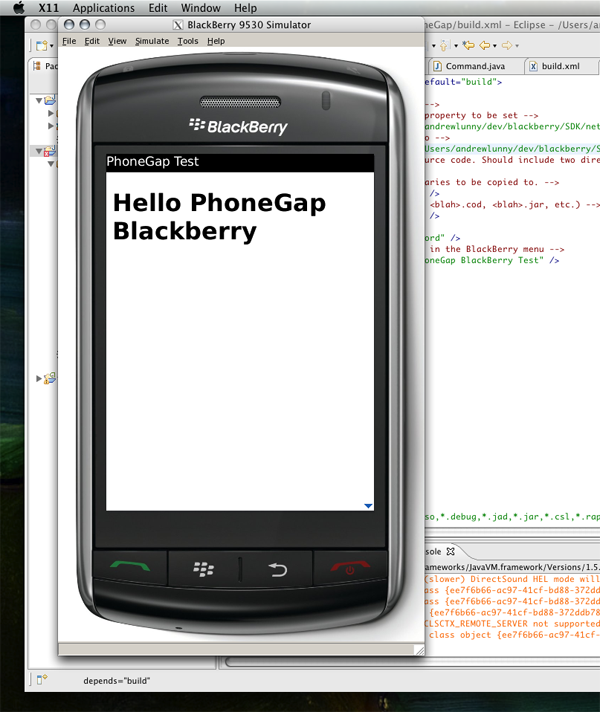
Nitobi/PhoneGap dev Fil Maj tweeted the other day about this excellent tutorial from Aziz Uysal, describing how to get the BlackBerry SDK and simulator up and running on OS X, for which it has no official support. Using some Eclipse skills and Wine magic, you can pull up the simulator and enjoy all the benefits of BlackBerry dev without booting up a VM.
If you want to run PhoneGap-BlackBerry in this environment, it’s trivially easy. Here’s how:
- Do everything it says in the tutorial, until you can run a Hello World app in the simulator
- Clone the PhoneGap-Blackberry repo
- File -> Import… -> General, Existing Projects into Workspace, then Next
- Under Select root directory, select
/whatever_your_path_is/phonegap-blackberry/framework/and then select PhoneGap in the Projects field below - Add an
index.htmlfile to thesrc/wwwdirectory. - Open
build.xmlfor editing. Change thejde.homeandsimulator.homeproperties to match your simulator location (if you follow Aziz’s tutorial, you can copy these properties from thebuild.xmlof that project). Edit theload-simulatortag (<target name="load-simulator">) to match the otherbuild.xmlfile also - Drag
build.xmlinto the app view (as detailed in Aziz’s tutorial). Then double-click on load-simulator - Hit Menu (next to the green button), then Downloads, then PhoneGap
- Hrrm… ??????????
- Profit!
Thanks to Aziz for writing such a great tutorial – now we just need someone to get XCode running on Windows 7!
Edit: This tutorial was previous referenced on the PhoneGap mailing list by John Britton – I wasn’t aware until he brought it up in a later message. Thanks for bringing this to our attention John.